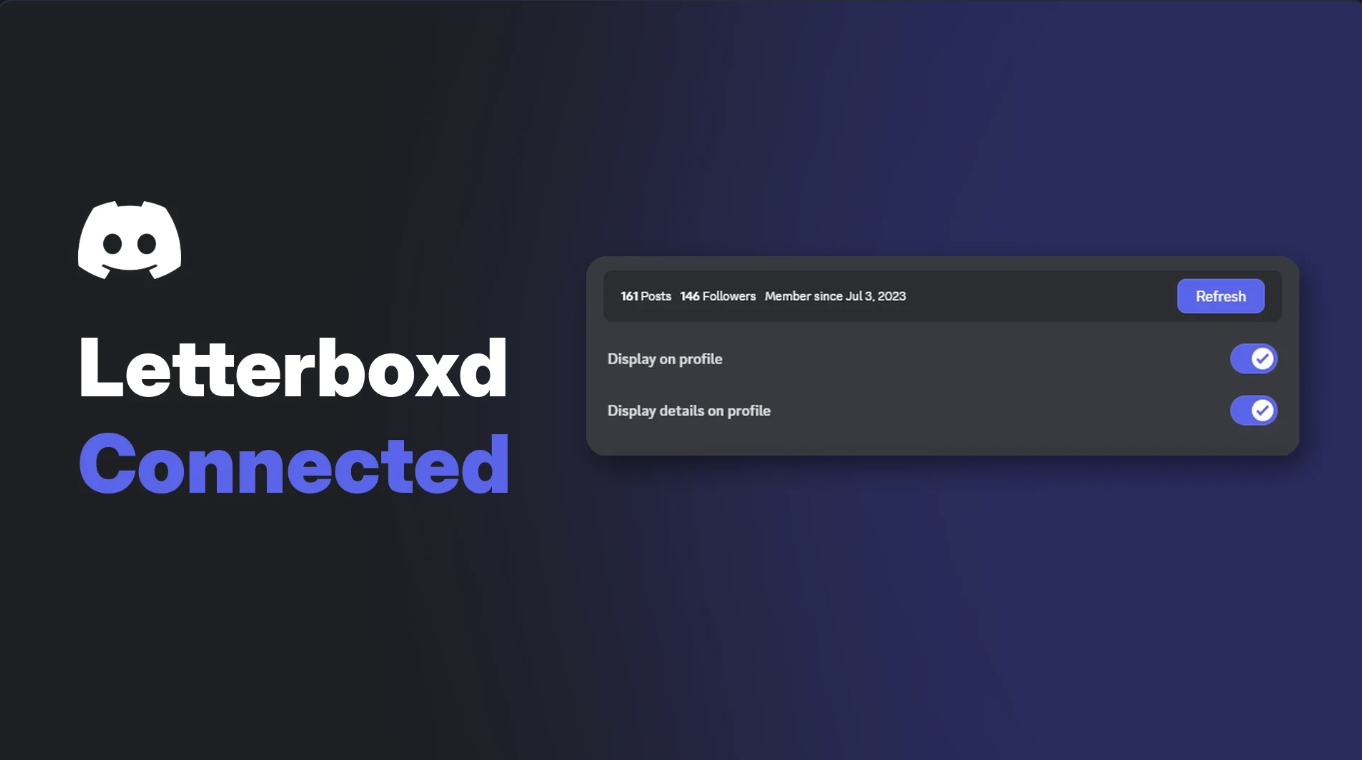

The Letterboxd Discord connection lets you link your Letterboxd film diary account to your Discord profile, the same way you might link Steam, Spotify or Bluesky. Discord announced it on its official X account on 22 October 2026, saying it was available on desktop first, with mobile linking "coming in a couple weeks".
That makes Letterboxd one of the newest entries in the Connections menu. It is also one of the least documented. As of 18 November 2026, Discord's help centre has no Letterboxd article, so some details are still unconfirmed.
This wiki covers what is confirmed, how to link and unlink the account, how the visibility toggles work, and what server owners can do with film activity. For the wider feature, see our Discord Connections wiki from 13 November.
At a glance - What it is: an official Discord account connection for Letterboxd, announced by Discord on 22 October 2026. - Where it works: desktop at launch. Discord said mobile linking would follow a couple of weeks later. - Where to find it: User Settings > Connections > the arrow at the end of the icon row. - Cost: connecting accounts on Discord is free. Discord has not mentioned any Letterboxd Pro requirement. - Not yet documented: exactly which Letterboxd details appear on your profile, and whether Linked Roles can check Letterboxd data.
🎬 What Is the Letterboxd Discord Connection?
Letterboxd is a social site for logging, rating and reviewing the films you watch. Discord's Connections feature lets you add accounts from other services to your Discord profile, so people in your servers can see them.
Discord's help centre describes Connections as a way to show what you are playing, listening to and enjoying. Once linked, a connected account appears in a Connections section on your profile, next to any other services you have added.
Connected accounts appear in their own section on your Discord profile. This example predates Letterboxd. Image: Discord.
When it launched
Here is the timeline as far as public posts show it:
| Date (2026) | What happened | Source |
|---|---|---|
| 20 October | Fan news account Wumpus Central reported that Discord was working on a Letterboxd connection | Wumpus Central on X |
| 22 October | Unofficial tracker Discord Previews posted that the connection was live | Discord Previews on X |
| 22 October | Discord's official account confirmed it was available on desktop, with mobile to follow | Discord on X |
Dates follow US time. In India the official post landed in the early hours of 23 October.
📋 What Shows on Your Profile
Discord has not published a list of what the Letterboxd connection displays. It has not confirmed whether recent watches, diary entries, ratings or favourite films appear anywhere on Discord.
What Discord does document is how connections work in general:
- Display on profile controls whether the account appears on your profile at all.
- Display details on profile appears only for connections that support extra details, such as follower counts or account age. Bluesky, Reddit and Steam are examples.
- Refresh updates those details for services that have them.
If Letterboxd supports details, you will see the second toggle under its card in your Connections settings. If you only see one toggle, the connection shows your account and nothing more.
🔗 How to Connect Letterboxd to Discord
You need a Letterboxd account and a Discord account. Discord has not stated any Nitro or Letterboxd Pro requirement for this connection.
On desktop or browser
- Open User Settings with the cogwheel icon next to your name.
- Select Connections in the left menu.
- Under Add accounts to your profile, press the arrow at the end of the icon row to see every available service.
- Choose Letterboxd. A login window will open.
- Sign in to Letterboxd and approve the request.
- Wait for the confirmation message saying your account is connected.
The Connections tab, with the arrow that opens the full list of services. Image: Discord.
Discord's help centre says the connection flow shows a window listing what information Discord collects from the other account. Read it before you approve, since it varies by service.
On mobile
- Tap your avatar in the bottom-right corner.
- Tap the cogwheel in the top-right corner.
- Tap Connections, then Add in the top-right corner.
- Scroll the Add New Connection list and tap Letterboxd.
- Sign in to Letterboxd and approve the request.
The mobile Add New Connection list. Check it for Letterboxd after updating the app. Image: Discord.
At launch, Discord said mobile linking would arrive a couple of weeks later. We could not confirm that it has reached every user. If Letterboxd is missing from the mobile list, update the app or link the account from a desktop or browser instead.
👁️ Visibility and Privacy
Connections sit on your profile, so anyone who can open your profile may see them. You stay in control with the toggles on each connection card.
- Turn off Display on profile to keep the account linked but hidden.
- Turn off Display details on profile, if it appears, to hide any extra details.
- Remove the connection entirely if you no longer want Discord to hold the link.
Discord says removing a connection revokes its access to that account and deletes the information it collected. Connections also do not carry across accounts in the Account Switcher, so you need to link Letterboxd again on each Discord account.
For the rest of your profile, our Discord privacy settings guide covers who can see what and how to lock it down.
❌ How to Disconnect Letterboxd
- Open User Settings and select Connections.
- Find the Letterboxd card and press the X in its top-right corner.
- Press Disconnect in the confirmation window.
The disconnect prompt looks the same for every service. Image: Discord.
Discord Support cannot remove a connection for you. You have to do it while logged in to your own account.
🛡️ Linked Roles and Letterboxd Discord Servers
Linked Roles let server admins give a role to members who meet checks on a connected account, such as account age on another platform. Admins set them up under Server Settings > Roles, in a role's Links tab.
Discord has not documented any Letterboxd checks for Linked Roles. Admins can open the Links tab to see whether Letterboxd is offered as a requirement on their server. If it is not, the connection is profile display only for now. Our Discord roles and permissions guide explains how roles and channel access fit together.
Sharing film activity in a server
The profile connection does not post anything into channels. Film clubs that want a feed of what members are watching still use third-party bots.
One example is Filmlinkd, a community-made bot. Its documentation says it posts diary entries from followed Letterboxd accounts into a channel, usually within a couple of hours. It needs View Channel, Send Messages, Embed Links and Use External Emojis permissions.
Bots like this are not made by Discord or Letterboxd. Check what any bot can access before you add it. If you run regular watch parties, our Discord events guide shows how to schedule them.
🔧 Troubleshooting
| Problem | What to try |
|---|---|
| Letterboxd is not in the list | Press the arrow at the end of the icon row. On mobile, update the app or use desktop. |
| Login window closes or fails | Allow pop-ups for Discord in your browser and try again. |
| Connected, but not on your profile | Check that Display on profile is turned on. |
| Details look out of date | Press Refresh on the card, if the button appears. |
| Missing on a second Discord account | Connections do not move between switched accounts. Link it again. |
| Lost a server role after removing it | Removing a connection removes any Linked Role that depended on it. |
If none of these work, Discord's help centre points users to its support team at dis.gd/contact.
❓ Frequently Asked Questions
Is the Letterboxd Discord connection official?
Yes. Discord's official X account announced it on 22 October 2026. Discord's help centre had not added a Letterboxd article as of 18 November 2026.
Can I connect Letterboxd to Discord on my phone?
Discord said mobile linking would follow a couple of weeks after the desktop launch. If you do not see it yet, link the account from a desktop or browser.
Do I need Letterboxd Pro or Discord Nitro?
Neither company has said so. Connections are a free Discord feature.
Does Discord show the films I have watched?
Discord has not documented what the Letterboxd connection displays. Check the card in your Connections settings to see which toggles it offers.
Can a server give me a role for my Letterboxd account?
Only if Letterboxd shows up as a requirement in that server's Linked Roles. Discord has not documented Letterboxd checks.
Will my Letterboxd account stay private?
Discord says connection data is not shared outside Discord without your permission. You can hide the connection from your profile at any time.
Summary
The Letterboxd Discord connection is official and lives in User Settings > Connections. It launched on desktop on 22 October 2026, with mobile promised soon after.
Linking takes a minute, and the Display on profile toggle lets you hide it without removing it. What the profile actually shows, and whether servers can use it for Linked Roles, is still undocumented. Treat any claim about those details as unconfirmed until Discord publishes a help article.
Sources
- Discord on X: Letterboxd connection announcement (22 October 2026)
- Discord Previews on X: Letterboxd connection now available (22 October 2026)
- Wumpus Central on X: Discord working on a Letterboxd connection (20 October 2026)
- Account Connections on Discord FAQ, Discord Support
- Connections & Linked Roles: Community Members, Discord Support
- Connections & Linked Roles: Admins, Discord Support
- Filmlinkd Letterboxd Discord bot documentation
Comments
Sign in to join the conversation
Sign inNo comments yet
Be the first to share your thoughts!