

Discord bot hidden channels are guild channels your bot does not have permission to view. Since Discord's channel obfuscation reached all bots on 16 November 2026, the Gateway still sends these channels, but with placeholder data, and the HTTP API leaves them out completely.
This wiki is the practical side of that change. It covers how to detect an obfuscated channel, which fields you can still trust, how your bot learns that it has gained access, and how logging, stats, ticket and backup bots should adapt. Code samples are in JavaScript and Python.
Everything here comes from Discord's developer documentation and change log. Where Discord does not document a behaviour, this page says so.
At a glance - Detect: check the channel
flagsbitfield forCHANNEL_OBFUSCATED(1 << 17, value 131072). - Still real:id,type,positionandparent_id. Treat everything else as unreliable. - HTTP:GET /guilds/{guild.id}/channelsomits channels your bot cannot view. - Gaining access: the Gateway sends a Channel Update with full data. - Interactions: interaction payloads are never obfuscated. - Fix access: ask server admins to allow View Channel for your bot's role or the bot itself.
What Counts as a Hidden Channel
A channel is hidden from your bot when the bot lacks the View Channel permission (VIEW_CHANNEL, 1 << 10) on it. Discord's permissions docs add one exception: a voice channel also counts as viewable while the bot is connected to it.
Categories follow their children. Discord says a category is viewable if any of its child channels are viewable, so a category only becomes hidden when every channel inside it is hidden.
Bots with the Administrator permission are not affected in practice. Discord's permission algorithm returns every permission for administrators and skips channel overwrites, so they can view every channel.
| Where your bot sees the channel | What it gets |
|---|---|
| Gateway (Guild Create, Channel Create, Update, Delete) | The channel, with obfuscated metadata and the flag set |
HTTP GET /guilds/{guild.id}/channels |
Nothing. The channel is omitted |
| Interaction payloads | Full channel data for channels the app can act on |
🔍 How to Detect Discord Bot Hidden Channels
Discord's instruction is simple: check the CHANNEL_OBFUSCATED flag in the channel's flags field. The docs explicitly warn against detecting obfuscation by inspecting name or any other obfuscated field.
The flag is only ever set on channels received over the Gateway. The HTTP API never sets it, because it never returns hidden channels in the first place.
Which fields you can trust
According to the channel resource docs, these fields are not obfuscated:
idtypepositionparent_id
Discord's August 2026 change log says the name becomes "___hidden___" and that other sensitive fields are nulled or reduced. The channel docs do not list every replaced field, so the safe rule is to rely only on the four fields above.
The permission_overwrites array is also replaced. It contains a single overwrite that denies VIEW_CHANNEL to the server's @everyone role, so it does not reflect the server's real setup.
Raw bitfield check in JavaScript
This works on any raw channel object, whatever library you use.
```js const CHANNEL_OBFUSCATED = 1 << 17; // 131072
function isObfuscated(channel) { return ((channel.flags ?? 0) & CHANNEL_OBFUSCATED) !== 0; } ```
discord.js
The ChannelFlags enum from discord-api-types includes ChannelObfuscated (131072) from version 0.38.54 onward, and discord.js v14 re-exports it. Every channel exposes flags as a ChannelFlagsBitField.
```js const { ChannelFlags } = require('discord.js');
const hidden = guild.channels.cache.filter((ch) => ch.flags.has(ChannelFlags.ChannelObfuscated) ); ```
Run npm ls discord-api-types first. If your lockfile pins a version older than 0.38.54, ChannelFlags.ChannelObfuscated is undefined and the check will not work, so update the package or fall back to the raw check.
Raw bitfield check in Python
```python CHANNEL_OBFUSCATED = 1 << 17 # 131072
def is_obfuscated(channel: dict) -> bool: return bool(channel.get("flags", 0) & CHANNEL_OBFUSCATED) ```
discord.py
discord.py 2.7.1, the latest release at the time of writing, has no documented obfuscation flag. Its ChannelFlags class does not include 1 << 17, and text and voice channel objects do not expose flags at all.
Until support lands, you can compare the cache against the HTTP list, which Discord documents as omitting hidden channels:
python
async def hidden_channel_ids(guild: discord.Guild) -> set[int]:
    visible = {c.id for c in await guild.fetch_channels()}
    return {c.id for c in guild.channels if c.id not in visible}
This costs one API request per call, so cache the result. As a lighter check, channel.permissions_for(guild.me).view_channel should also return False for a hidden channel, since the obfuscated overwrite denies View Channel to @everyone. That second method is our reading of the docs, not something Discord states.
🔔 Knowing When Your Bot Gains Access
When a bot can see a previously hidden channel, the Gateway sends a Channel Update event carrying the full, real channel data. If the parent category was hidden too, it also gets a Channel Update.
Discord lists these triggers:
- A permission overwrite on the channel changes
- The bot's roles change
- A role's permissions change
- The bot joins a voice channel it could not see
In discord.js, you can watch for the flag disappearing:
```js const { ChannelFlags, Events } = require('discord.js');
client.on(Events.ChannelUpdate, (oldCh, newCh) => {
const flag = ChannelFlags.ChannelObfuscated;
if (oldCh.flags.has(flag) && !newCh.flags.has(flag)) {
console.log(Access gained: ${newCh.id} (${newCh.name}));
}
});
```
Discord does not document a dedicated event for losing access. Handle it by checking the flag on every Channel Update, not only the gained case.
🔑 How to Give Your Bot Access
If your bot needs a channel, a server admin has to grant it. Discord offers no API route around this. Point admins to these steps:
- Right-click the channel or category and open Edit Channel or Edit Category.
- Go to Permissions, then Advanced permissions.
- Click the + next to Roles/Members and add the bot's role or the bot user.
- Set View Channel to allow (the green tick) and save.
The View Channel permission controls whether a role or member can see a channel. Image: Discord.
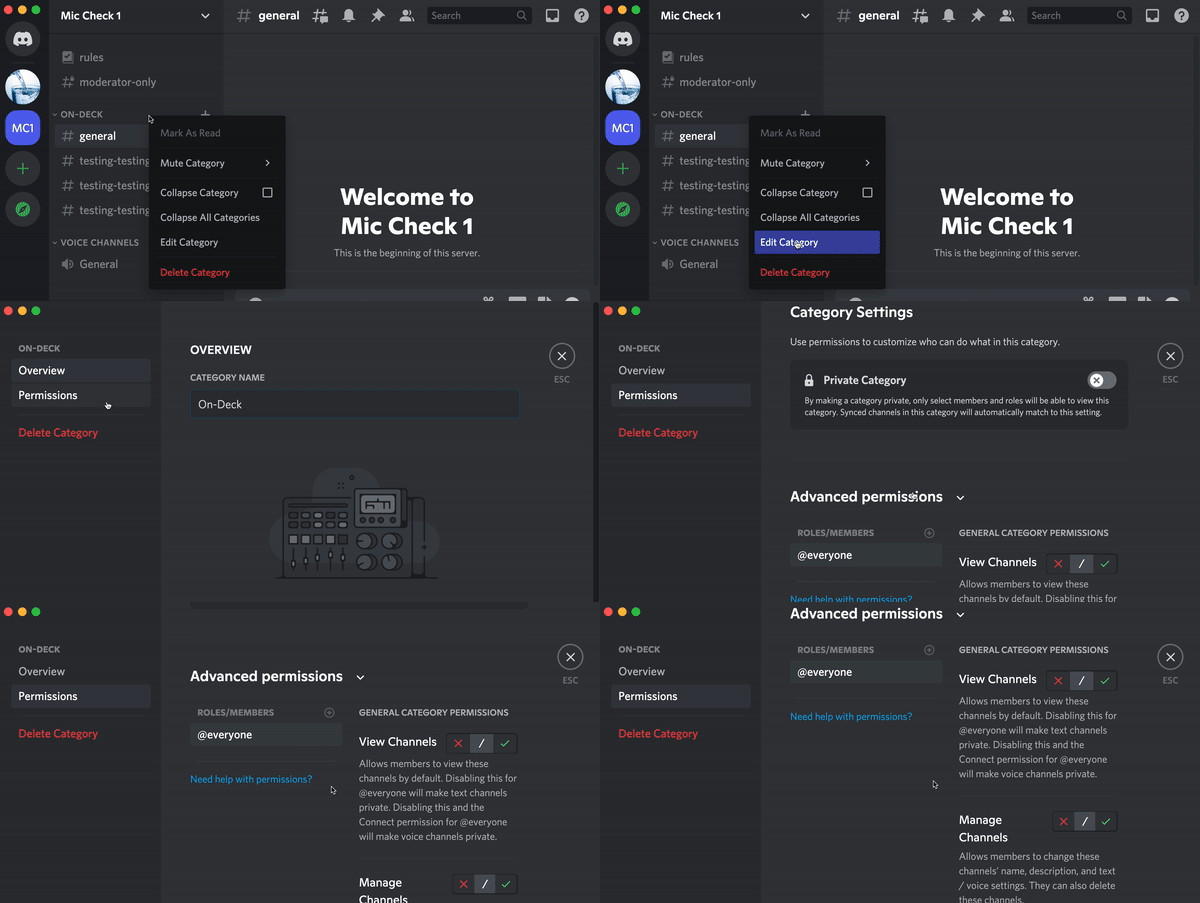
Category permissions live under Edit Category, then Permissions. Image: Discord.
Setting the permission on a category covers every channel synced to it. Channels that are not synced keep their own overwrites, so check those individually. If you are building those private areas yourself, our gaming server setup guide covers channel and category layout. Our Discord roles and permissions guide explains how role order and overwrites stack.
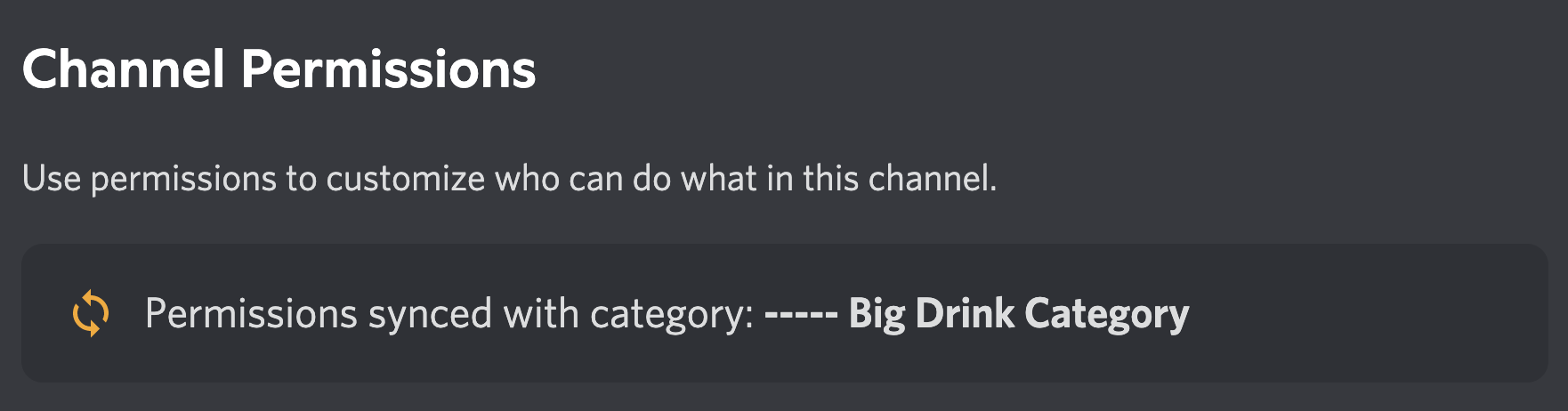
A synced channel inherits its category's permissions. Image: Discord.
A member-level overwrite for the bot beats role overwrites. Discord applies @everyone overwrites first, then role overwrites, then member overwrites, with deny applied before allow at each step.
A private channel usually denies @everyone, which hides it from bots too. This older screen calls the permission Read Messages. Image: Discord.
When you write your invite link, request only the permissions you need. The Discord Developer Portal guide walks through setting up the OAuth2 URL and bot settings.
🛠️ Handling Hidden Channels by Bot Type
Discord says bots that only act in channels they can view are not affected. The bots below often read across the whole server, so they need changes.
| Bot type | What breaks | What to do |
|---|---|---|
| Logging and audit | Channel names show as placeholders; overwrite logs look wrong | Skip or label hidden channels by ID; do not log their fake overwrites as changes |
| Stats and channel counters | Totals drop if you count the HTTP list, or include fakes if you count the Gateway cache | Decide what you are counting and say so; count flagged channels separately if needed |
| Ticket bots | Ticket categories the bot cannot view are invisible over HTTP | Give the bot View Channel on the ticket category before creating tickets |
| Backup and mirror bots | Backups miss hidden channels, or save placeholder names and overwrites | Never back up flagged channels; tell admins which channels were skipped |
| Permission checkers | Overwrite data for hidden channels is not real | Report hidden channels as "no access" instead of computing results |
For logging bots in particular, watch for a hidden channel turning visible. The Channel Update that follows contains real data for the first time, so an admin may not have edited anything. Log it as an access change and keep it separate from real edits.
✅ Testing Checklist
Run through this on a test server before you ship a fix:
- Create a channel and deny View Channel to
@everyoneand to your bot's role. - Restart the bot and confirm the channel arrives with the flag set and only
id,type,positionandparent_idused by your code. - Call
GET /guilds/{guild.id}/channelsand confirm the channel is absent. - Put the hidden channel in a category with no other visible channels and confirm the category is flagged too.
- Allow View Channel for the bot and confirm your Channel Update handler fires with the real name.
- Deny it again and confirm your bot handles the flag returning.
- Run a slash command in a channel the bot can act on and confirm the interaction payload has full data.
- Check logs, dashboards and exports for any
___hidden___names leaking through.
🧰 Troubleshooting
My channel list shows ___hidden___. Your code is reading names from obfuscated channels. Filter by the flag before displaying anything.
guild.fetch_channels() or the HTTP list returns fewer channels than before. That is documented behaviour. Hidden channels are omitted, and threads were never included in that endpoint.
The bot still cannot see a channel after an admin changed permissions. Check for a member or role overwrite that denies View Channel, and check whether the channel is synced to its category. A deny on a higher-priority overwrite wins.
ChannelFlags.ChannelObfuscated is undefined in discord.js. Your installed discord-api-types is older than 0.38.54. Update it or use the raw bitfield check.
Fetching one hidden channel by ID fails. Discord's obfuscation docs do not describe single-channel fetches, so handle errors from those requests and treat the channel as inaccessible.
❓ Frequently Asked Questions
Can my bot read the real names of Discord bot hidden channels?
No. Discord only sends real data once the bot can view the channel. Ask an admin to grant View Channel.
Is it safe to detect hidden channels by the name ___hidden___?
No. Discord's docs say to use the CHANNEL_OBFUSCATED flag and not to rely on name or other obfuscated fields.
Do hidden channels affect slash commands?
Discord says interaction payloads are not obfuscated, and an app always receives full channel data for channels it can act on.
Does giving my bot Administrator fix this?
Administrator grants every permission, including View Channel, so the bot would see everything. Most server owners will not grant it, and you should not need it. Request View Channel on the specific channels instead.
Are threads affected?
Discord's obfuscation docs do not mention threads directly. Test how your bot handles threads inside a hidden parent channel before relying on any behaviour.
Summary
Discord bot hidden channels still arrive over the Gateway, but only id, type, position and parent_id are real, and the HTTP channel list leaves them out. Detect them with the CHANNEL_OBFUSCATED flag (1 << 17), never by name.
Listen for Channel Update to learn when access is gained, keep placeholder data out of logs, stats and backups, and ask server admins to grant View Channel wherever your bot genuinely needs it.
Sources
- Channel Resource: Obfuscated Channels and Channel Flags, Discord Developer Docs.
- Change Log: Channel Obfuscation for Users and Bots (12 August 2026) and Channel Obfuscation is Now Live for All Bots (16 November 2026), Discord Developer Docs.
- Permissions: Channel Visibility, Permission Overwrites and Implicit Permissions, Discord Developer Docs.
- Guild Resource: Get Guild Channels, Discord Developer Docs.
- ChannelFlags enum, discord-api-types documentation.
- discord.flags source, discord.py documentation.
- Channel Permissions Settings 101, Discord Help Center.
- Setting Up Permissions FAQ, Discord Help Center.
- How do I set up a Role-Exclusive channel?, Discord Help Center.
Comments
Sign in to join the conversation
Sign inNo comments yet
Be the first to share your thoughts!