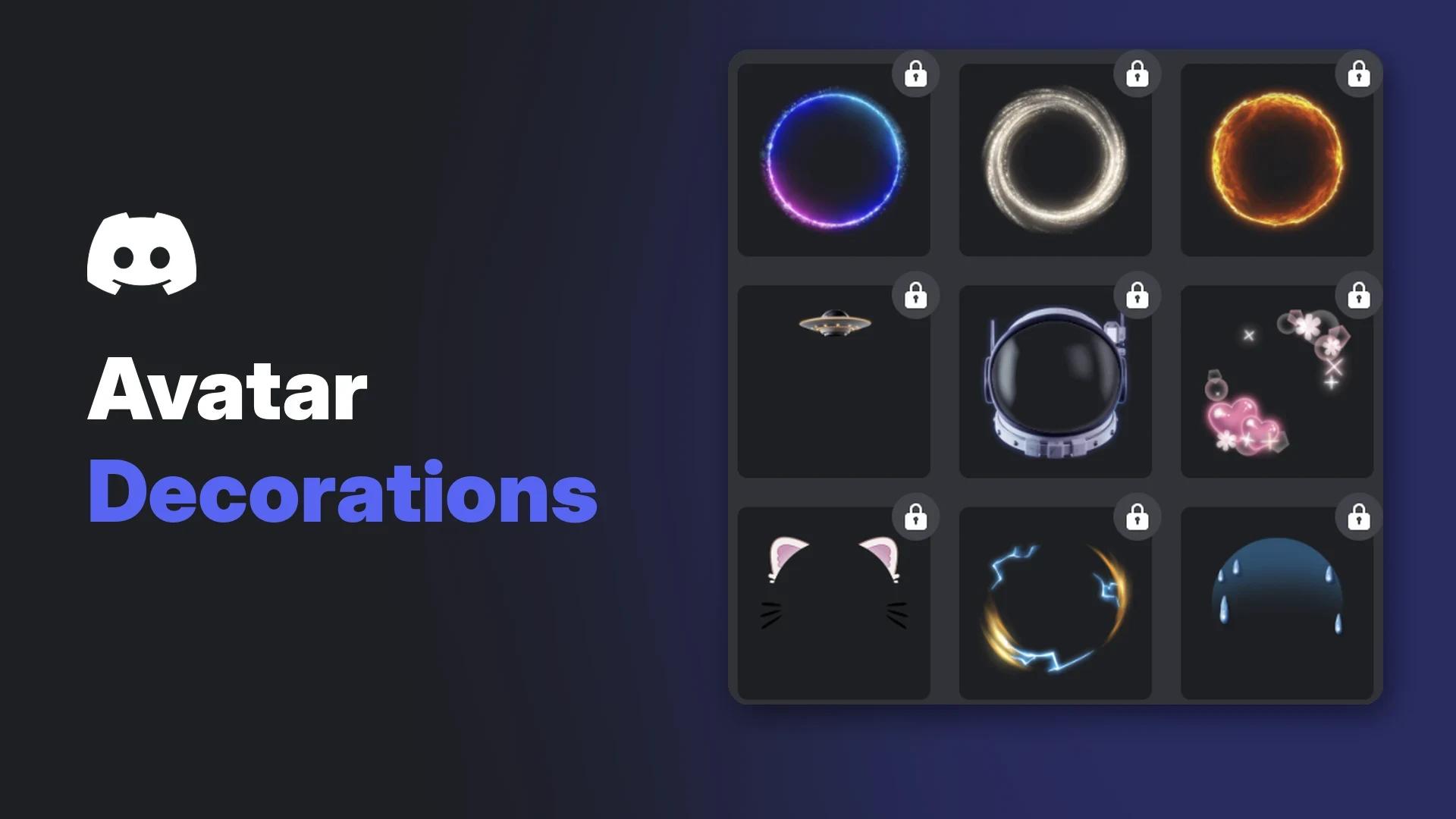

Discord avatar decorations are cosmetic frames and props that sit on top of your profile picture. They range from simple glowing rings to cat ears, space helmets and animated characters, and you can swap them whenever you like.
Most decorations come from the Discord Shop, but they also turn up as Quest rewards, Orbs Shop items and limited promotions. Nitro changes a few of the rules, which is where most of the confusion comes from.
This wiki follows Discord's own help centre articles. Where Discord does not document something, such as a full price list, this guide says so.
At a glance - What they are: cosmetic overlays for your avatar, sold in the Shop and given out through Quests and promotions. - Who can buy: every Discord user. Nitro members get member pricing on eligible items. - Ownership: bought decorations are yours to keep, even without Nitro. Quest decorations usually expire. - Refunds: Discord does not refund avatar decorations. - Per-server: Nitro members can set a different decoration for each server profile (desktop and browser only).
🎨 What Are Discord Avatar Decorations?
An avatar decoration is a layer Discord draws around or over your profile picture. It does not change the picture itself, so you can keep your usual avatar and add a seasonal ring or prop on top.
Discord's Shop previews show the decoration on your profile card and beside your messages in chat. The Change Decoration menu also previews it at several sizes, including with your online status dot. Discord has not published a complete list of every place decorations appear.
A Shop listing previews the decoration on a profile card and next to a chat message. Image: Discord.
According to Discord's Shop FAQ, every Shop item is designed by human artists, either on Discord's team or at partner studios. The Shop does not use AI-generated art.
🛒 How to Get Avatar Decorations
There are four main routes. Each has different rules on cost and how long you keep the item.
| Method | Cost | How long you keep it |
|---|---|---|
| Discord Shop purchase | Real money (Nitro pricing on eligible items) | Permanent |
| Orbs Shop | Orbs earned from Quests and promotions | Permanent (Orbs purchases are final) |
| Quest reward | Free, by completing a Quest | Usually two months; longer with Nitro if eligible |
| Promotions | Free, if you meet the promo terms | Set by each promotion |
| DISXCORE (Nitro exclusive) | Included with Nitro | Usable only while Nitro is active |
Buying from the Shop
On desktop or browser, open your Direct Messages list and select the Shop tab next to the server list. You can also go to User Settings > Profiles and press Change Decoration, then the Shop icon.
On mobile, tap your avatar in the bottom-right corner, then tap the Shop icon in the top-right corner. Shop items change periodically and some are only available for a limited time.
Prices with and without Nitro
Discord does not publish a fixed price list for decorations. The Shop shows the price on each item.
Screenshots in Discord's own help articles show a regular price of $5.99, a Nitro member price of $4.99, and an Orbs price of 4,100 Orbs for single decorations such as Cat Ears and Mallow Jump. Treat these as examples only. Prices can differ by item and can change.
An Orbs-eligible item shows both a money price and an Orbs price. Image: Discord.
A few pricing rules Discord does document:
- Nitro discount: only Nitro members get member pricing. The Shop FAQ says this covers "select items", while the Nameplates FAQ says Nitro discounts apply to all Shop items. The Shop shows the price that applies to you.
- Nitro Basic: Discord's Nitro perk list does not include Shop perks for Nitro Basic.
- Localized pricing: some decoration purchases and gifts have local prices. If local pricing is not available, checkout defaults to US dollars.
- Bundles: bundles pair items from the same collection at a discount, but only if you own none of them yet.
- Gift cards: Discord gift card balance can be spent in the Shop.
Spending Orbs
Orbs are Discord's reward currency. You earn them mainly by completing Quests, and also through select promotions. Discord also lists Orb Challenges, which are an experiment on desktop and browser.
In the Shop, open the Orbs Shop tab to find Orbs-exclusive decorations. Many items in the main catalogue also show an Orbs price. If an item has no Orbs price, it cannot be claimed with Orbs.
Orbs cannot buy gifts or partner-branded collab items. Orbs purchases are final, Orbs cannot be bought or transferred, and earned Orbs do not expire.
Nitro members get two extras. Quests with Orb rewards that started on or after 8 May 2026 give Nitro members a 1.2x multiplier. Paid Nitro members in Discord's experiment group also receive 250 Orbs a month, which Discord says is still rolling out.
Earning decorations from Quests
Some Quests reward an avatar decoration directly. Once you press Claim Reward, the decoration is added to your account automatically.
Quest decorations are normally available for two months. Nitro subscribers on the standard plan can keep many of them longer, and can restore some decorations from Quests they completed in the past. Not every Quest decoration qualifies.
Quest decorations sit under Your Decorations, with any expiry shown on the item. Image: Discord.
If a decoration has an expiry date, Discord shows it under the item in Change Decoration. Extended access ends if your Nitro lapses or you drop to Nitro Basic, and returns when you subscribe again.
If you would rather not see Quest promotions based on your activity, you can switch that off in your Discord privacy settings.
Free promotions
Discord runs time-limited promotions that hand out a decoration for free. Two recent examples:
- Deadpool/Wolverine: collect any 4 items from the collection between 4 and 18 November 2026 (9AM PT) to unlock a free Babypool decoration, then claim it on desktop by 23 November 2026. We cover it in full in our separate Deadpool/Wolverine wiki.
- Nitro Halloween Gifting 2026: gifting a Nitro subscription between 1 October and 2 November 2026 earned a free familiar decoration. This promotion has ended.
Promotions are not offered in every region, and Discord says only users who can see the promo in their Shop are eligible. Be wary of anyone outside Discord promising free decorations; our guide to fake giveaways in creator servers covers the warning signs.
Nitro exclusives
Nitro members can collect the DISXCORE decorations from the Shop at no extra cost. They need an active Nitro subscription to use, and stay in your collection if you cancel. Discord says Nitro trial users do not get the DISXCORE items.
🖱️ How to Equip, Change or Remove a Decoration
On desktop or browser
- Open User Settings with the cogwheel in the lower-left corner.
- Select Profiles.
- Press Change Decoration under Avatar Decoration.
- Pick a decoration from your collection and select Apply.
- Press Save Changes to confirm.
Locked items in the menu are ones you do not own yet. Image: Discord.
To remove a decoration, open the same menu, choose None, apply it and save.
On mobile
- Tap your avatar, then tap Edit Profile.
- Tap Avatar Decoration to open the Change Decoration page. You can also tap your avatar and choose Change Decoration.
- Select a decoration and tap Apply.
- Tap Save in the upper-right corner.
🌐 Per-Server vs Global Discord Avatar Decorations
Your main profile decoration shows everywhere by default. Nitro members can also build per-server profiles, each with its own avatar, decoration and profile effect.
To set one, go to User Settings > Profiles > Per-server Profiles, choose the server, press Change Decoration, then save. Discord says server-specific decorations can only be changed on desktop or browser, and you must own a decoration before you can add it.
Per-server profiles let you wear a different decoration in each server. Image: Discord.
🎁 Gifting Avatar Decorations
You can buy a decoration for a friend straight from the Shop.
- Open the item and press the gift icon next to the Buy button.
- Choose a card design and, if you like, add a note, a soundboard effect and emoji confetti.
- Pick your friend and press Next.
You need a saved payment method to send a gift. Gifts you bought but did not send wait in User Settings > Gift Inventory.
You cannot send an item your friend has already claimed. If they receive the same unclaimed item twice, they claim one and the extras go back to the senders within 48 hours. Orbs cannot be used to buy gifts.
🔁 Refunds and Ownership
Discord's Refund Policy says it does not refund or exchange profile cosmetics such as avatar decorations. Items claimed with Orbs are also non-refundable.
If you bought a decoration on an iPhone or iPad through the App Store, Discord directs purchasing issues to Apple.
Purchased decorations stay yours without Nitro. You may lose access to them if your account is suspended or deleted, so keep your account secure.
🧩 Avatar Decorations vs Profile Effects vs Nameplates
The Shop sells four kinds of profile cosmetic. They are easy to mix up.
| Item | What it changes | Where it shows |
|---|---|---|
| Avatar decoration | A layer around or over your profile picture | Profile card and chat, per Discord's Shop previews |
| Profile effect | An animation that plays across your profile | When someone opens your profile |
| Nameplate | A design behind your display name | Member lists, DMs, group chats and your settings bar |
| Profile frame | A border around your whole profile | Wherever your profile is visible |
Nameplates can only be bought on desktop, though you can view and apply them on mobile. We look at them in more detail in our Nameplates blog.
🛠️ Troubleshooting
- Decoration not showing: check that you pressed Save Changes after Apply. Changes do not stick otherwise.
- Quest decoration vanished: it has probably expired. Check the date under the item in Change Decoration, or whether your Nitro lapsed.
- DISXCORE items locked: they need an active, non-trial Nitro subscription.
- Cannot change a server decoration on mobile: per-server decorations are desktop and browser only.
- Cannot see a promotion: it may not be live in your region or on your platform.
- Quests will not track: Discord says Quest rewards cannot be earned on Linux, and mobile Quests are in beta for specific Quests only.
- Teen accounts: users aged 13 to 17 can complete three Quests per day. Discord does not document any other age limit for decorations.
Discord's Reduced Motion setting (User Settings > Accessibility) is documented as stopping profile effect and nameplate animations. Discord's decoration article does not say whether it affects decorations.
❓ Frequently Asked Questions
Are Discord avatar decorations free?
Most cost money or Orbs. Free ones come from Quests, limited promotions and the DISXCORE set for Nitro members.
Do I lose my decorations if I cancel Nitro?
No, not the ones you bought. You lose use of DISXCORE items and extended Quest decorations until you subscribe again.
Do Discord avatar decorations expire?
Bought decorations do not. Quest rewards normally last two months unless Nitro extends them.
Can I get a refund on a decoration?
No. Discord lists avatar decorations as non-refundable.
Does Nitro Basic get Shop discounts?
Discord's Nitro Basic perk list does not include Shop perks, so expect standard pricing.
How often are new decorations added?
Discord says it has no set schedule for new decorations.
Summary
Discord avatar decorations are bought in the Shop, claimed with Orbs, earned from Quests or picked up in promotions. Bought ones are permanent and non-refundable. Quest rewards usually expire after two months unless Nitro extends them.
Equip them from Profiles > Change Decoration on desktop, or Edit Profile on mobile. Nitro adds member pricing, DISXCORE items, longer Quest rewards and per-server decorations.
Sources
- Avatar Decorations FAQ, Discord Support
- Shop FAQ, Discord Support
- Discord Orbs FAQ, Discord Support
- Monthly Orbs Drop for Nitro Members FAQ, Discord Support
- Nitro Quest Perk, Discord Support
- Discord Quests FAQ, Discord Support
- Deadpool/Wolverine: Unlock a Free Avatar Deco, Discord Support
- Nitro Halloween Gifting 2026, Discord Support
- Per-Server Profiles, Discord Support
- Refund Policy, Discord Support
- What are Nitro and Nitro Basic?, Discord Support
- Localized Pricing on Discord, Discord Support
- Profile Effects, Discord Support
- Nameplates FAQ, Discord Support
- Profile Frames FAQ, Discord Support
Comments
Sign in to join the conversation
Sign inNo comments yet
Be the first to share your thoughts!