
The Ultimate Guide to Discord Native Server Subscriptions
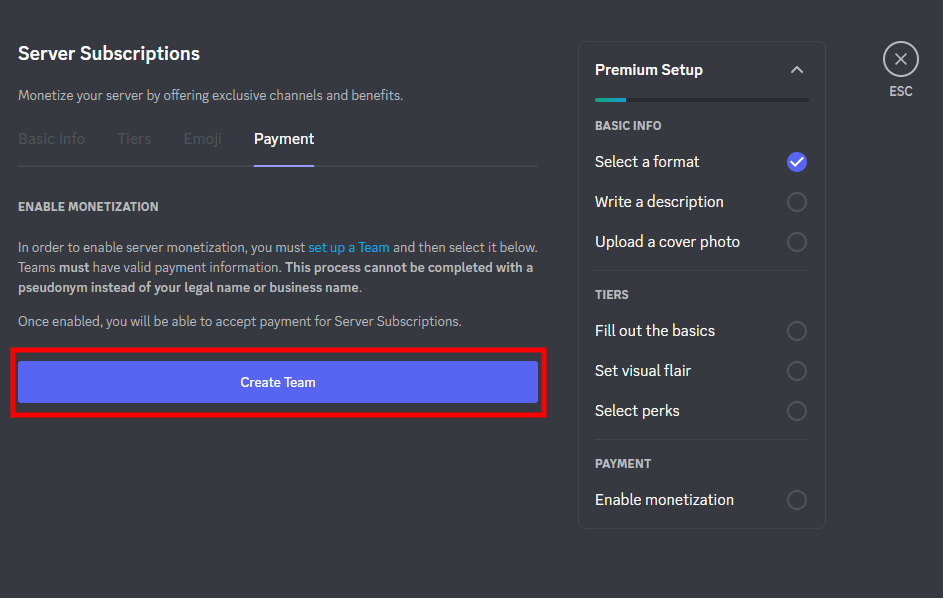
Discord Native Server Subscriptions give eligible server owners a way to turn their communities into recurring subscription businesses without requiring members to use a separate membership platform.
Creators can create between one and three paid tiers, set their own prices, and decide what each membership includes. Perks can include access to exclusive channels, premium emojis and other experiences provided by the server owner.
The important part is that the subscription isn't simply a colored role or badge. The creator is responsible for delivering the premium experience described in each tier.
Here's everything to know about how Discord's native subscription system works.
Discord Server Subscriptions: The Overview
A Server Subscription is a recurring monthly membership that allows community members to financially support a server while receiving premium access or perks in return.
Members can view available tiers, their prices and the benefits attached to them directly through Discord's Server Subscription interface. Subscriptions continue monthly until the member cancels.
For creators, this turns Discord into more than a communication platform.
A server can effectively become a membership community with different levels of access.
For example:
$5 Tier: Supporter role and basic premium perks
$10 Tier: Exclusive channels, premium discussions and custom emojis
$25 Tier: Full premium access, VIP channels and additional creator interaction
The exact pricing and perks are determined by the server owner.
The key is making every tier different enough that members understand why they would pay more.
Pricing and Subscription Tiers

Discord currently allows creators to create between one and three paid subscription tiers. This keeps the system relatively simple while giving creators enough room to build different membership levels.
A strong pricing structure should focus on the value provided rather than simply choosing random price points.
Entry-Level Tier
A lower-priced tier can target members who want to support the community while receiving a few useful benefits.
Possible perks include:
- Supporter role
- Access to a small premium channel
- Premium community discussions
- Subscriber-only announcements
Standard Tier
The middle tier should generally be the main membership.
For example, a $10/month membership could include:
- Multiple exclusive channels
- Premium resources
- Subscriber-only events
- Premium emojis
- Access to specialized discussions
Premium Tier
A higher-priced tier should offer something substantially different rather than simply adding another role color.
A $25/month VIP tier could include:
- Everything in the $10 tier
- VIP-only channels
- Private events
- Direct creator interaction
- Priority feedback
- Additional exclusive content
The goal is to make the progression logical.
More money should unlock more meaningful value.
Premium Channels and Access
One of the most useful parts of Server Subscriptions is the ability to make specific channels exclusive.
Discord describes the option to make selected channels exclusive as its most popular and flexible approach, while creators can also choose to make an entire server exclusive.
This means a creator doesn't have to hide the entire community behind a paywall.
A free server can remain open to everyone while premium members receive access to additional spaces.
For example:
Free Area
#general
#gaming
#community-chat
#announcements
Premium Area
#premium-chat
#premium-resources
#subscriber-events
VIP Area
#vip-chat
#creator-qna
#private-events
This structure makes the difference between memberships immediately visible.
It also gives free members a reason to consider upgrading because they can see that additional experiences exist.
Premium Emojis
Custom emojis are another way to make Server Subscriptions feel more connected to the community.
Discord's current Server Subscription system allows creators to add up to 25 additional Premium Emoji that only Server Subscribers can use.
These can be community-specific reactions, memes, creator expressions or inside jokes.
For example, a gaming server might create subscriber emojis based on its most popular memes or recurring community moments.
A creator-focused server could turn recognizable phrases or reactions into exclusive emojis.
However, emojis work best as an additional perk, rather than the primary reason someone subscribes.
A member is unlikely to remain subscribed for months simply because they have access to five extra emojis.
But when those emojis are combined with useful private channels, exclusive events and valuable resources, they can make the membership feel more personalized.
Discord's Transaction Cut
The financial side is one of the most important things creators need to understand before setting prices.
Discord currently advertises a 90/10 revenue split for Server Subscriptions. In simple terms, Discord says creators receive 90% while Discord keeps 10%. However, Discord also states that additional fees can affect the final payment.
The actual fee structure can depend on where the purchase happens.
Discord's current Monetization Terms list a 6% payment processing fee for desktop app and browser transactions, alongside the 10% platform fee and any applicable transaction fees. Mobile purchases can involve app-store fees as well.
That means creators shouldn't calculate their business purely from the advertised 90/10 headline.
If a tier costs $10, the creator shouldn't automatically assume that exactly $9 will arrive as the final payout.
Payment method, platform and applicable processing costs matter.
This is especially important when deciding whether a $5, $10 or $25 tier provides enough margin to justify the work required to maintain it.
Eligibility and Monetization Setup
Server Subscriptions aren't automatically available to every Discord server.
Discord's current requirements include being 18 or older, having an account in good standing, verified account information and two-factor authentication. Discord also requires servers to meet its monetization requirements, including having Community enabled, MFA configured for moderation actions and not being primarily built around NSFW content.
Creators also need to complete Discord's payout onboarding process through its payment processor, Stripe, before receiving subscription revenue.
Once monetization is enabled, the creator can configure subscription tiers, pricing, exclusive channels and premium emojis through the Server Subscriptions settings.
Because Discord's eligibility and monetization requirements can change, creators should always check the current requirements before building a business around the feature.
How to Build a Good Subscription
The biggest mistake is creating a subscription and then deciding what to put inside it afterward.
A better approach is to start with the member.
Ask:
What does this person actually want?
For a gaming community, that could mean strategy sessions, private tournaments or exclusive resources.
For an education community, it might mean deeper lessons, Q&As or study resources.
For a creator community, it could be direct interaction, feedback or networking.
The role itself isn't the product.
The experience unlocked by the role is the product.
Premium emojis can add personality.
Exclusive channels can create intimacy.
Private events can create scarcity.
Useful resources can create recurring value.
Combining these elements is what makes a subscription worth maintaining.
What to Know at a Glance
| Detail | Information |
|---|---|
| Product | Discord Server Subscriptions |
| Type | Recurring monthly membership |
| Paid Tiers | 1–3 |
| Pricing | Creator-set |
| Premium Access | Exclusive channels or server access |
| Premium Emoji | Up to 25 additional subscriber-only emojis |
| Revenue Split | 90% creator / 10% Discord before applicable fees |
| Payment Processing | Additional fees may apply |
| Payout Processor | Stripe |
| Eligibility | Requirements apply |
The exact terms, fees and eligibility requirements should be checked against Discord's latest monetization documentation before launch.
Why Discord Native Server Subscriptions Matter
Native subscriptions are significant because they remove a major barrier between community and monetization.
Instead of forcing members to leave Discord, create accounts elsewhere and connect an external membership service, creators can put the subscription experience directly inside the community.
That makes Discord particularly useful for communities where the relationship itself is the product.
The strongest strategy isn't necessarily charging the highest possible price.
It's creating a structure where members understand what they're getting at every level.
A $5 supporter tier can serve casual fans.
A $10 membership can provide the core premium experience.
A $25 tier can target the most engaged members who want deeper access.
That creates a scalable membership structure without requiring every member to pay the same amount.
🎮 The Bottom Line
Discord Native Server Subscriptions turn a Discord community into a potential recurring-revenue business.
Creators can set their own tier prices, attach exclusive channels and experiences, and add subscriber-only Premium Emojis to make memberships feel more personalized.
But the most important part is the value behind the subscription.
A colored role isn't enough.
A few emojis aren't enough.
Members need a reason to keep paying month after month.
The best Server Subscriptions combine useful exclusive content, meaningful community access and perks that actually improve the Discord experience.
And before setting a price, creators need to account for Discord's platform cut and other applicable payment fees.
In the end, the winning subscription isn't necessarily the cheapest or the most expensive.
It's the one where members can clearly see why staying subscribed is worth it.
Comments
Sign in to join the conversation
Sign inNo comments yet
Be the first to share your thoughts!