
If you manage a Discord server, you may want to automatically send updates from other platforms, apps, or services into your Discord channels. This is where Discord webhooks become useful.
Webhooks allow external applications to send messages directly to a Discord channel without requiring a traditional Discord bot. They are commonly used for notifications, content updates, automated alerts, and community management.
This Discord Webhooks Guide explains what webhooks are, how they work, and how you can use them effectively.
What Is a Discord Webhook?
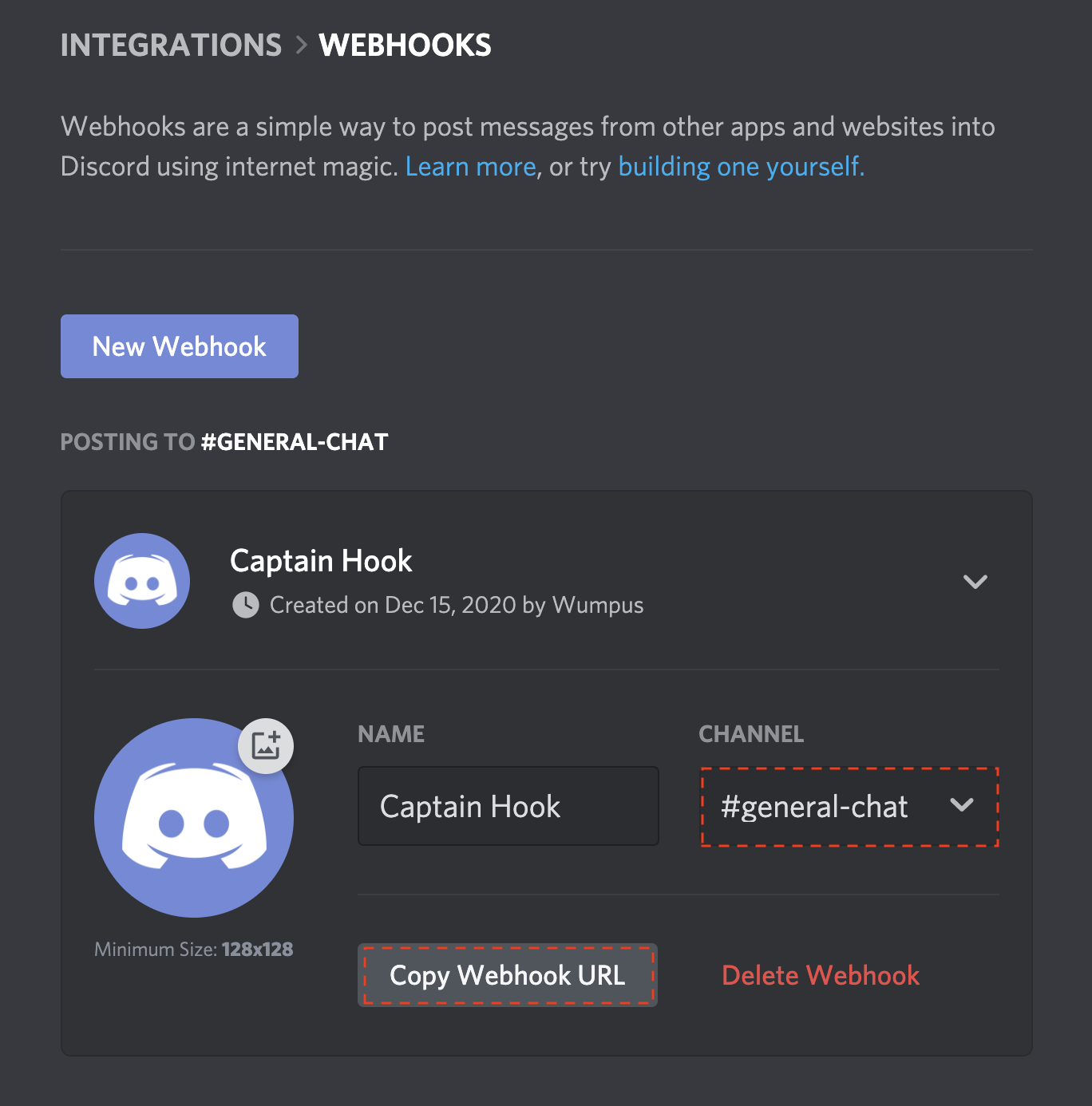
A Discord webhook is a tool that allows another application or service to send messages to a Discord channel.
Instead of manually posting every update, you can connect a service to a webhook and let it automatically deliver information to your server.
For example, a creator could use a webhook to notify their Discord community whenever they upload a new YouTube video. A gaming community could use one to receive game updates, while a development server could receive notifications about new GitHub activity.
Webhooks are especially useful because they can send messages without requiring a bot to remain connected to the server.
How Do Discord Webhooks Work?
A webhook generates a unique URL associated with a specific Discord channel.
An external application sends information to this URL, and Discord delivers the message to the channel connected to the webhook.
The basic process looks like this:
External service → Webhook URL → Discord channel → Community members
Because the webhook URL acts as the destination for incoming messages, it should be treated carefully and never shared publicly.
How to Create a Discord Webhook
Creating a webhook is relatively straightforward if you have the required permissions.
Step 1: Open Your Discord Server
Open the Discord server where you want to create the webhook.
Step 2: Select a Channel
Choose the channel where you want automated messages to appear.
A dedicated channel is often better for notifications because it prevents automated messages from overwhelming regular conversations.
Step 3: Open Channel Settings
Go to the channel settings and look for the Integrations section.
From there, you can access the webhook options if your account has the necessary permissions.
Step 4: Create a Webhook
Choose the option to create a new webhook. You can usually customize details such as the webhook name and avatar.
Step 5: Copy the Webhook URL
Discord will provide a webhook URL.
Copy it and add it to the external service you want to connect.
Never post this URL publicly.
What Can Discord Webhooks Be Used For?
There are many ways communities can use webhooks.
Some popular examples include:
- YouTube upload notifications
- Twitch stream alerts
- GitHub updates
- Game server notifications
- Website updates
- Community announcements
- Automated monitoring alerts
- RSS feed notifications
- Form or application notifications
For creators, webhooks can be particularly useful for automatically notifying a Discord community whenever new content is published.
Discord Webhooks vs Bots
Webhooks and bots are not the same thing.
A webhook is primarily designed to send information into a Discord channel. A bot can perform more complex actions and interact with users.
For example, a webhook can announce a new video, while a bot could respond to commands, assign roles, moderate conversations, or manage automated systems.
If you only need automated notifications, a webhook may be simpler. If you need interactive functionality, a bot may be more appropriate.
Discord Webhook Security
Webhook URLs should be treated like sensitive credentials.
Anyone who obtains a webhook URL may potentially use it to send messages through that webhook.
Avoid sharing webhook URLs in public posts, screenshots, repositories, or videos.
If you accidentally expose one, delete or regenerate the webhook instead of continuing to use a compromised URL.
Final Thoughts
Discord webhooks are a simple way to connect external services with your Discord server.
They can automate notifications, reduce repetitive work, and help communities stay updated without requiring a full Discord bot.
For creators, developers, gaming communities, and server administrators, webhooks can be an effective part of a larger Discord automation strategy.
The key is to use them selectively. Too many automated notifications can overwhelm members, while well-organized webhooks can keep your community informed without unnecessary manual work.