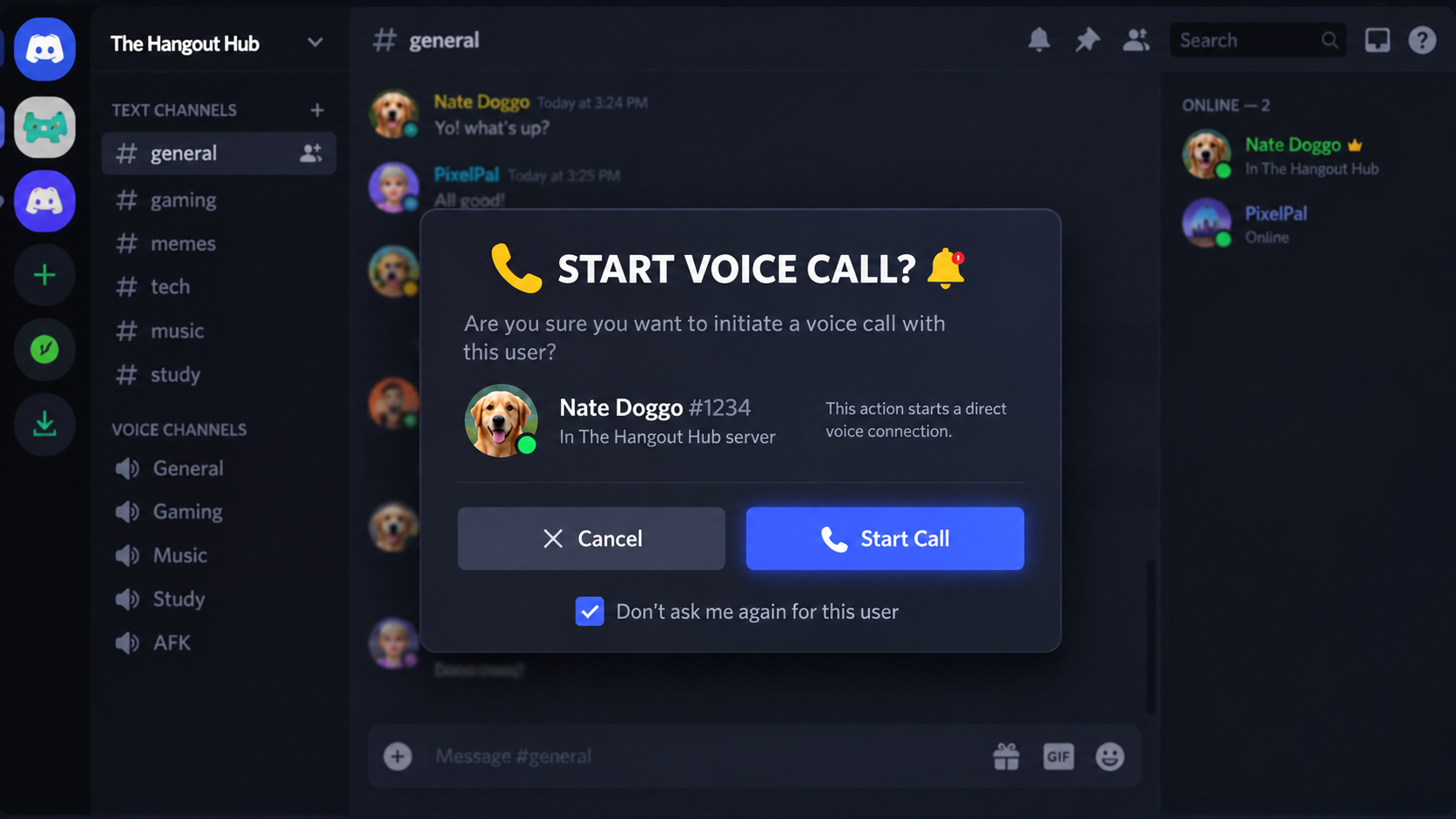

The Complete Wiki to Discord's New Call Confirmation Prompt
Discord's mobile calling experience has gained a small but important quality-of-life change: a call confirmation prompt designed to stop users from accidentally ringing someone when tapping the call controls.
The problem is particularly noticeable on phones because the call buttons sit inside the compact mobile chat interface. A single unintended tap can immediately start a call, and in a Group DM, that action can notify multiple people at once.
Discord's existing documentation confirms that members can start voice or video calls directly from Group DMs on mobile, while community feedback going back several years repeatedly asked Discord to add a confirmation step.
The new confirmation behavior is therefore less about adding a major communication feature and more about adding a safety layer between tapping the call button and actually ringing people.
Quick Facts
| Feature | Details |
|---|---|
| Feature | Mobile call confirmation |
| Platform | Discord mobile |
| Main purpose | Prevent accidental calls |
| Affected areas | DMs and Group DMs |
| Call types | Voice and potentially video calling flows |
| Main benefit | Reduces accidental ringing and unwanted pings |
| Especially useful for | Group chats and small-screen devices |
| Existing call behavior | Discord calls can be started directly from DMs and Group DMs |
| Confirmation setting | Availability can depend on the current Discord mobile rollout |
| Desktop impact | Primarily a mobile UX improvement |
What Is Discord's New Call Confirmation Prompt?
The Call Confirmation Prompt adds an additional confirmation step before a mobile Discord call is actually initiated.
Instead of this:
Tap Call → Call immediately starts
the protected flow becomes:
Tap Call → Confirmation appears → Confirm → Call starts
That extra interaction is deliberately simple.
Its purpose is to catch accidental taps before they turn into an actual call.
This is particularly useful when users are:
- Scrolling through a busy DM
- Holding their phone one-handed
- Opening a conversation while moving
- Tapping around the top navigation area
- Using Discord late at night
- Trying to open another DM function
- Handling a Group DM with several members
Why Accidental Discord Calls Were a Problem
Discord's mobile interface places important controls inside a relatively small area.
On desktop, a mouse click is generally more deliberate. On mobile, however, fingers can easily touch the wrong button.
Discord's own community forums contain multiple requests dating back to 2019-2024 asking for exactly this type of confirmation. Users specifically described accidentally calling friends, strangers, and entire group chats because the call controls were too easy to trigger.
One recurring complaint was particularly simple:
The call happened before the user had a chance to realize they tapped the wrong button.
That creates an awkward situation.
The other person can suddenly receive a Discord call or notification even though the caller never intended to contact them.
How It Works in a DM
In a normal one-to-one DM, Discord supports direct voice calling between the two participants.
The confirmation layer adds another opportunity to stop an accidental call.
The general flow is:
1. Open a DM
Open the conversation with the person you want to contact.
2. Tap the call button
Instead of immediately connecting, Discord can present the confirmation interface.
3. Confirm the call
Confirm that you actually want to start the voice call.
4. Discord starts the call
Only after confirmation does the call proceed.
The important point is that the first tap no longer has to equal an immediate outgoing call.
How It Works in Group DMs
The feature becomes even more useful in Group DMs.
Discord currently allows Group DMs to contain up to 10 members, including yourself. Any member can start a voice call, and members can join or leave while the call remains active.
That means a mistaken call can potentially disturb several people simultaneously.
The traditional flow is:
Tap call → Group call begins → Other members can receive the call notification
The confirmation system introduces:
Tap call → Confirm → Group call begins
That tiny change can prevent an accidental group-wide interruption.
Why Group Chats Benefit the Most
A mistake in a one-to-one DM affects one other person.
A mistake in a group chat can affect everyone.
Imagine a Group DM containing eight people. You are scrolling through the conversation at night and accidentally touch the call button.
Without a confirmation layer, the action can immediately start a group call.
With confirmation enabled, the accidental tap stops at the confirmation screen.
This makes the feature particularly valuable for:
- Gaming squads
- Creator teams
- Friend groups
- Study groups
- Work chats
- International communities
- Large Group DMs
Discord's own documentation confirms that starting a Group DM voice call is designed to involve the group, making accidental activation more disruptive than a normal message tap.
The Main Goal: Fewer Unwanted Pings
The feature is not really about improving call quality.
It is about preventing unwanted notifications before they happen.
An accidental call can create:
- A ringing notification
- A missed-call notification
- A vibration
- A sound
- A disruption for people who are sleeping
- Confusion inside group conversations
Discord users have repeatedly described accidental calls as particularly annoying because the recipient can interpret the call as intentional. Community feedback includes examples of accidental calls waking people up or disturbing group chats.
The confirmation prompt therefore acts as a notification-prevention mechanism.
Call Confirmation vs Muting Notifications
Call confirmation is different from muting.
Call Confirmation
Prevents the call from being initiated accidentally.
Muting
Allows the call or other activity to happen but prevents or reduces notifications.
Discord already allows users to mute notifications for Group DMs. On mobile, users can open the Group DM settings and use the bell icon to manage notification muting.
The two features solve different problems.
Confirmation: "Did I really mean to call?"
Mute: "I don't want to be notified."
The confirmation prompt is therefore useful even for people who normally keep their Discord notifications enabled.
Why This Is a Mobile-First Improvement
Touchscreens create a different UI problem from keyboards and mice.
A mobile screen has:
- Less physical space
- Larger touch targets
- Finger-based input
- Less precise pointer control
- More accidental taps while scrolling
- Greater risk when using the phone one-handed
Discord's historical feature requests specifically connected accidental calling to mobile interface placement and touchscreen input.
That makes call confirmation a logical mobile UX safeguard.
The Feature Has Been Requested for Years
One interesting part of this update is that the underlying problem is not new.
Discord community requests for mobile call confirmation date back years.
In 2021, users asked Discord to add a confirmation window because mobile call controls were too easy to hit accidentally.
Another request from 2022 described accidental mobile calls as a recurring problem caused by the placement of the call button.
There were even earlier requests in 2019 asking for a toggleable confirmation option.
The 2026 change therefore addresses a longstanding mobile Discord UX complaint.
What Happens After You Confirm?
Once the user confirms the action, Discord proceeds with the normal call system.
For a one-to-one DM, that means calling the other participant.
For a Group DM, the call becomes available to the group and members can join.
Discord's current Group DM documentation explains that calls remain open as long as at least one person remains in the call. Members can join or leave freely.
The confirmation prompt does not fundamentally change the underlying call technology.
It changes how the call is initiated.
Does It Change Voice Call Quality?
No.
The feature is primarily a user-interface safeguard.
It does not inherently change:
- Audio quality
- Voice codecs
- Microphone processing
- Server voice infrastructure
- Call participant limits
- Screen sharing
- Video quality
Its purpose is simply to introduce a confirmation step before an outgoing call is initiated.
Does It Affect Video Calls?
Discord supports video calls in Group DMs on both desktop and mobile.
The broader design principle of confirmation is especially useful for video calling because an accidental video call can feel more intrusive than an accidental voice call.
Users may not want to unexpectedly activate their camera or appear to someone when they only intended to navigate the conversation.
However, the exact availability and behavior of confirmation around every individual call entry point can depend on Discord's current mobile rollout.
Is the Prompt Optional?
This is one area where users should be careful.
Community reports around the initial rollout show that some users wanted a setting to disable the confirmation because they preferred the previous one-tap behavior. Others considered the confirmation essential.
That means there is a clear UX tradeoff:
Safety
One extra tap greatly reduces accidental calls.
Speed
Frequent callers may find the additional confirmation step slightly slower.
As Discord continues adjusting the feature, a future setting could theoretically provide more control, but users should not assume a toggle exists unless it appears in their current app version.
Why a Confirmation Step Makes Sense for Group DMs
Group DMs are particularly sensitive because calling is not a private action.
When you call one person, you affect one recipient.
When you call a group, you potentially interrupt multiple people.
Discord's Group DM system allows up to 10 members and supports voice and video calling directly inside the conversation.
That makes a confirmation screen a sensible safeguard against:
one accidental tap → multiple unwanted notifications
Accidental Calls vs Accidental Messages
There is an important UX difference.
If you accidentally tap a message:
You usually still have time to decide whether to send it.
If you accidentally tap a call button:
The communication attempt can happen immediately.
That makes calls a good candidate for confirmation.
The feature effectively adds an intentionality check:
"You are about to interrupt another person. Are you sure?"
That is especially useful on a platform where people frequently use mobile devices while multitasking.
Who Benefits Most From the Feature?
Casual Discord Users
People who rarely make calls benefit because accidental calls become less likely.
Gaming Groups
Gaming communities frequently use Group DMs for quick coordination, making accidental group calls especially disruptive.
Creators
Creators often have many active conversations and may receive or manage several DMs simultaneously.
Community Managers
A confirmation layer can prevent accidental calls when navigating large numbers of conversations.
Night-Time Users
The feature is particularly useful when a phone is being used quietly late at night.
Users With Large Group DMs
The more people in a group, the greater the potential impact of an accidental call.
What the Feature Does Not Do
The call confirmation prompt does not:
- Block unwanted DMs
- Stop people from calling you intentionally
- Replace notification settings
- Replace DM privacy controls
- Prevent someone from inviting you to a call
- Change Discord's voice infrastructure
- Make Group DMs private
- Prevent notifications from other Discord activity
It is specifically an outgoing-call confirmation mechanism.
Existing Discord Notification Controls
Users who still receive too many notifications have additional options.
Discord's mobile notification settings include controls for:
- In-app notifications
- System notifications
- Direct messages
- Reaction notifications
- Friend activity
- Voice activity
- Call integration on iOS
- Server notifications
Discord also allows individual Group DMs to be muted.
This creates several layers of control:
Call Confirmation → Prevent accidental call
Mute → Reduce notifications from a conversation
Notification Settings → Control Discord alerts
Each addresses a different problem.
Discord Mobile Call Confirmation vs Desktop Calling
| Area | Mobile | Desktop |
|---|---|---|
| Touchscreen risk | High | Low |
| Accidental tap risk | Higher | Lower |
| Confirmation value | High | Lower |
| DM calling | Supported | Supported |
| Group DM calling | Supported | Supported |
| Notification controls | Available | Available |
| Main UX concern | Mis-taps | Deliberate pointer interaction |
This explains why the feature makes particular sense on mobile.
The desktop interface has more room and relies on precise pointer input, while mobile users interact with relatively small controls using their fingers.
A Better Calling Flow
The ideal mobile experience can now be thought of as:
Open DM
↓
Tap Call
↓
Confirm
↓
Call begins
This is only one extra action, but it provides a valuable buffer.
Without the confirmation step:
Open DM → Tap Call → Immediate ring
The difference is tiny from a usability perspective, but significant from a notification perspective.
Why Discord Users Are Welcoming the Change
Community reaction to the feature has generally highlighted how long users have wanted protection against accidental calls.
A May 2026 Reddit discussion about the mobile confirmation feature received strong positive engagement, with users describing it as overdue. Some commenters also asked for an option to disable the confirmation because they preferred immediate calling.
That mixed response is typical of confirmation prompts.
Users who frequently trigger calls accidentally see it as a major quality-of-life improvement.
Users who intentionally call friends many times per day may see it as unnecessary friction.
The Biggest UX Tradeoff
Every confirmation dialog creates a small amount of friction.
If you call friends constantly:
Tap → Confirm → Call
may feel slower.
But if you accidentally call people regularly:
Tap → Confirm
can prevent an embarrassing or disruptive situation.
Discord therefore has to balance:
Speed vs Intentionality
For a communication action that can immediately notify several people, adding a small confirmation step is arguably a reasonable tradeoff.
How to Avoid Accidental Calls Even Without the Prompt
Users can still reduce accidental calling by:
- Keeping Discord updated so the latest mobile UI behavior is available.
- Using the mute controls for noisy Group DMs.
- Checking the top navigation area carefully before tapping.
- Avoiding rapid taps while scrolling.
- Reviewing Discord's mobile notification settings if unwanted alerts remain.
The confirmation prompt should be treated as an additional safety layer, not the only notification-management tool.
Timeline
2019
Discord users were already requesting a mobile call-confirmation option to prevent accidental calls.
2021
Multiple Discord community posts again requested confirmation dialogs for mobile voice and video calls.
2022
Users continued reporting accidental calls caused by the mobile call-button placement.
2024
Discord community feedback continued to include requests for confirmation before starting calls.
May 2026
Community discussion surfaced a mobile call-confirmation implementation, with users reporting a confirmation step in the mobile DM header.
2026
Discord's current Group DM documentation continues to support voice and video calls directly from mobile conversations.
FAQ
What is Discord's new call confirmation prompt?
It is an additional confirmation step designed to prevent users from accidentally starting calls from Discord's mobile DMs and Group DMs.
Why did Discord add it?
The feature addresses the long-running problem of accidental calls caused by tapping mobile call controls. Discord community requests for such a safeguard date back several years.
Does it work in Group DMs?
The feature is designed around Discord's mobile calling experience, including Group DMs where accidental calls can potentially notify multiple members.
Why are Group DMs more affected?
A Group DM call can involve multiple people. Discord currently supports Group DMs with up to 10 members, including yourself.
Does the confirmation stop notifications?
It prevents the call from being initiated accidentally. Because the call never starts, it can prevent the unwanted call notification that would otherwise follow.
Does it replace Discord notification settings?
No. Notification settings still control how Discord alerts are delivered, while call confirmation helps prevent an accidental call from being created in the first place.
Can I disable the confirmation prompt?
Availability of a dedicated toggle can vary by Discord version and rollout. Community feedback shows that some users have requested an option to disable it, but users should check their current mobile settings rather than assume a toggle is available.
Does it affect desktop calls?
The feature is primarily aimed at the mobile calling experience.
Does it change Discord call quality?
No. It is a UI and interaction safeguard rather than a change to Discord's voice technology.
Can I still make instant calls?
If the confirmation prompt is active for your account, you need to complete the additional confirmation step before the call begins.
Current Status
Discord's mobile call-confirmation prompt is a small but meaningful quality-of-life improvement aimed at reducing accidental calls and unwanted pings.
The feature addresses a problem Discord users have been reporting for years, particularly on touchscreen devices where the call controls can be activated unintentionally. Community requests for a confirmation dialog stretch back to 2019 and repeatedly mention accidental calls in both individual and group conversations.
The biggest benefit is in Group DMs, where one accidental tap can disturb several people at once.
Discord already provides separate notification controls and Group DM muting, but those tools deal with notifications after the conversation exists. The new confirmation approach tackles the problem earlier by asking users to confirm the call itself.
For mobile Discord users, the change is simple:
One extra confirmation tap can prevent an entire group from being unexpectedly rung.
That makes the feature less about adding another step and more about making Discord calling intentional instead of accidental.
Comments
Sign in to join the conversation
Sign inNo comments yet
Be the first to share your thoughts!