

A Discord server can go from a normal conversation to complete chaos in seconds.
One moment, members are chatting about a new game, sharing memes, or organizing their next community event. The next, dozens of unfamiliar accounts begin posting spam, flooding channels, or disrupting conversations all at once.
By the time a moderator starts banning accounts, the damage may already be done.
The smartest way to fight a Discord raid is to make it harder for suspicious accounts to participate in the first place.
That is where Discord’s built-in verification levels come in. Instead of relying entirely on moderators to remove troublemakers after they arrive, server owners can introduce different entry requirements that limit what newly joined accounts can do.
Discord offers five native verification levels, ranging from None to Highest. Each one adds a different degree of restriction, giving communities control over how easily new members can participate.
For server owners dealing with automated bots, spam accounts, or sudden waves of suspicious joins, understanding these settings can make a real difference.
What Are Discord Verification Levels?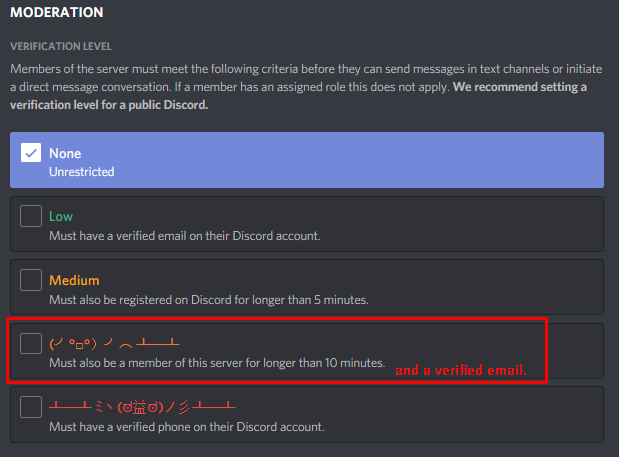
Discord verification levels are security settings that determine which requirements an account must satisfy before it can send messages in a server.
Think of them as a series of checkpoints.
A server with minimal restrictions makes participation easy for newcomers. A server with stricter requirements asks users to establish more trust before they can start chatting.
This matters because raids often depend on speed and volume. Attackers may use large numbers of accounts to overwhelm a community before its moderation team can respond.
Verification adds friction to that process.
Discord provides five levels:
- None: No additional account verification requirements.
- Low: The account must have a verified email address.
- Medium: The account must also have been registered for more than five minutes.
- High: The account must have been a member of the server for more than ten minutes.
- Highest: The account must have a verified phone number associated with it.
These requirements build on one another. Moving up the scale introduces additional barriers that can help reduce the impact of newly created accounts.
However, verification levels are not a complete anti-raid system. They work best as one layer of a broader security setup that includes moderation tools, permissions, and sensible channel access.
The Five Verification Levels Explained
1. None: An Open Door for Everyone
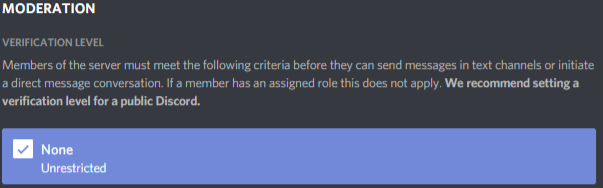
The None level provides the fewest barriers to participation.
New members can generally begin messaging without meeting the additional verification requirements imposed by higher levels, although other server settings and platform restrictions may still apply.
For small, private communities with trusted invitations, this can be convenient. Members can join and participate immediately without completing extra steps.
The problem appears when a server attracts unwanted attention.
If an attacker has a collection of accounts ready to use, minimal entry restrictions may allow those accounts to start posting quickly. Moderators are then left responding to the disruption rather than preventing it.
Best suited for: Small, trusted communities where easy participation matters more than additional verification barriers.
2. Low: Verify the Email Address

Low requires members to have a verified email address.
This introduces a basic checkpoint without significantly changing the joining experience for most legitimate users.
Email verification can discourage some low-effort spam attempts, especially when attackers are trying to register accounts quickly. However, it is not a guarantee against bots or coordinated raids.
Attackers can obtain or verify email addresses, and some malicious accounts may already meet this requirement.
Low is therefore a useful starting point, but it may not offer enough protection for a large public server experiencing repeated attacks.
Best suited for: Communities that want basic account verification while keeping onboarding relatively simple.
3. Medium: Add an Account-Age Requirement

Medium builds on Low by requiring the account to have been registered for more than five minutes.
That small delay can matter when an attack relies on creating accounts and deploying them immediately.
However, five minutes is not a particularly strong barrier by itself. Attackers can prepare accounts in advance, and established malicious accounts may already satisfy the requirement.
Medium helps introduce a little more friction, but it should not be mistaken for a complete defense against coordinated abuse.
Best suited for: Growing communities that want an additional safeguard against freshly created accounts.
4. High: Give New Members a Waiting Period

High adds another requirement: members must have been in the server for more than ten minutes.
This is different from checking how old an account is. An account could have existed for months and still be subject to the server-membership waiting period immediately after joining.
That distinction is important.
A raid can involve accounts that were created long before the attack. Account age alone may not stop them, but a server-membership requirement can delay their ability to send messages.
The trade-off is that genuine newcomers must also wait before participating. That can be frustrating in communities built around live events, gaming sessions, giveaways, or fast-moving discussions.
Best suited for: Public servers that experience suspicious joining patterns and can tolerate a short waiting period.
5. Highest: Require a Verified Phone Number

Highest is Discord’s strictest native verification level. It requires a verified phone number associated with the account before members can send messages.
This creates a more substantial barrier than email verification alone.
Phone verification can make automated raids harder because attackers may need access to additional verified accounts rather than simply creating fresh accounts and confirming email addresses.
It is particularly useful when a server repeatedly experiences waves of newly created or low-trust accounts.
But there is an important distinction: a verified phone number does not prove that an account is trustworthy.
Malicious users can operate accounts that satisfy phone verification, and attackers may have access to previously verified accounts. The setting raises the cost of some attacks; it does not eliminate every possible attack.
There is also a legitimate accessibility trade-off. Some users may not want to associate a phone number with Discord, may have difficulties verifying their number, or may prefer to participate without that additional requirement.
Best suited for: Communities facing persistent raids, spam waves, or coordinated abuse where stronger entry requirements are worth the inconvenience.
Why Phone Verification Can Stop a Raid Before It Starts
The biggest advantage of verification is that it changes the attacker's workload.
Without meaningful entry restrictions, a raid may depend on bringing a large number of accounts into a server and letting them post immediately.
With Highest enabled, accounts that lack the required verified phone number cannot simply bypass the requirement and begin sending messages.
That changes the situation for moderators.
Instead of having to remove every account after it begins flooding channels, the server has a built-in restriction that prevents accounts that do not meet the requirement from messaging in the first place.
There are three main benefits.
1. It raises the cost of mass participation.
An attacker may be able to create accounts quickly, but obtaining access to enough phone-verified accounts can be more difficult. This can reduce the attractiveness of a raid that depends on sheer account volume.
2. It reduces reliance on reactive moderation.
Moderators still need to monitor joins and respond to suspicious behavior. However, blocking some accounts from messaging before they meet the requirements gives the moderation team more room to respond.
3. It works without a separate CAPTCHA bot.
Discord's native verification setting does not require a server owner to install a third-party CAPTCHA bot just to enforce phone verification. That means fewer external systems to configure and maintain.
This does not mean Discord's native settings can prevent every raid instantly. An attacker using verified accounts may still get through, and the verification setting does not automatically identify every malicious member.
The real advantage is straightforward: make participation harder for accounts that have not met the server's security requirements.
Do You Really Need a CAPTCHA Bot?
Not every Discord server needs a complicated verification workflow.
Third-party CAPTCHA systems can ask new members to complete a challenge before receiving access to selected channels or roles. Depending on the setup, they may provide additional screening and help filter suspicious joins.
But they can also introduce extra steps.
Members might need to open a verification channel, interact with a bot, complete a challenge, and wait for a role to be assigned. Poorly configured systems can create confusion, and external bots introduce their own permissions, maintenance, and reliability considerations.
For a server whose main concern is preventing unverified accounts from messaging, Discord's native Highest setting offers a simpler option.
There is no additional CAPTCHA challenge to configure merely to require a verified phone number.
Still, the two approaches serve slightly different purposes.
- Native verification: Enforces Discord's built-in account requirements.
- CAPTCHA-based verification: Can add a separate challenge or onboarding process.
- Role-based access: Controls which channels and features members can access.
- Automated moderation: Helps detect or respond to suspicious behavior.
A CAPTCHA system is not automatically better, and phone verification is not automatically sufficient. The right combination depends on the community's threat level and how much friction its members can reasonably tolerate.
How to Choose the Right Verification Level
Choosing a verification level is a balancing act between security and accessibility.
A casual friend group may have little reason to require phone verification. A large public gaming server with thousands of members and repeated raid attempts may need stronger restrictions.
Here is a practical way to approach the decision:
- Small, trusted server: Consider None or Low if invitations are controlled and abuse is uncommon.
- Growing public community: Consider Medium as a basic additional safeguard.
- Server experiencing suspicious joins: Consider High to introduce a server-membership waiting period.
- Server facing repeated raids: Consider Highest if the additional phone-verification requirement is appropriate for the community.
These are starting points, not universal rules. No verification level guarantees protection, and a server's risk can change as its membership grows.
Before raising the level, communicate the change to existing members and explain why it is necessary. If users suddenly discover that they cannot send messages because they lack phone verification, confusion can quickly turn into frustration.
It is also worth reviewing the server's channel permissions, administrator access, moderation tools, and available raid-response features. Verification is only one part of the picture.
What Happens Next?
Discord communities will continue to face a familiar challenge: keeping participation easy for genuine members while making abuse more difficult.
Verification levels offer a practical first step because they are built directly into Discord. Server owners do not need to build a custom security system before introducing basic account requirements.
For communities dealing with persistent raids, the next step is to combine verification with sensible permissions and a clear moderation plan.
That might mean restricting access to sensitive channels for new members, monitoring sudden increases in joins, limiting unnecessary permissions, and preparing moderators to respond when suspicious activity appears.
It also means knowing when to ease restrictions. A server that has moved into a safer period may be able to reduce its requirements, while a community experiencing another wave of attacks may need to tighten them.
The goal is not to make joining a Discord server difficult for everyone. It is to ensure that the level of access matches the risks the community actually faces.
And if your server repeatedly experiences raids, starting with Discord's native verification settings may be simpler than immediately adding another bot to the stack.
🎮 The Bottom Line
Discord verification levels are more than settings hidden in a server's security menu. They are a way to control how easily new accounts can move from joining a community to participating in it.
The five levels, from None to Highest, let server owners choose between convenience and stronger entry requirements. Email verification and waiting periods provide basic barriers, while requiring a verified phone number creates an additional obstacle for attackers who rely on large numbers of unverified accounts.
Highest is not a magic shield, and phone verification cannot stop every coordinated attack. But for communities dealing with repeated raids, it can raise the effort required to participate in an attack without forcing every member through a separate CAPTCHA challenge.
The best defense is not always another moderation bot. Sometimes, it starts with changing who can send the first message.
Would you enable Discord's Highest verification level on your server, or do you think requiring a verified phone number creates too much friction for genuine members? Let us know in the comments!


Comments
Sign in to join the conversation
Sign inNo comments yet
Be the first to share your thoughts!