
Every server outgrows its first owner eventually, and that's when you need to transfer Discord server ownership. Maybe you're stepping back, handing the keys to your best moderator, or you need to transfer ownership before you can delete your account.
This guide shows how to transfer Discord server ownership in a few clicks, what changes for you afterwards, and what to do if the owner has disappeared and nobody can manage the server.
At a glance - Who can transfer: the current server owner - Where: right-click the member > Transfer Ownership - Can it be undone? No. Discord support can't transfer it back - After: you stay in the server with whatever roles you have - Owner gone? Request a transfer from Discord if you meet the criteria
👑 How to Transfer Discord Server Ownership on Desktop
- Open your server and go to the Members list.
- Right-click the person you want to make owner.
- Select Transfer Ownership.
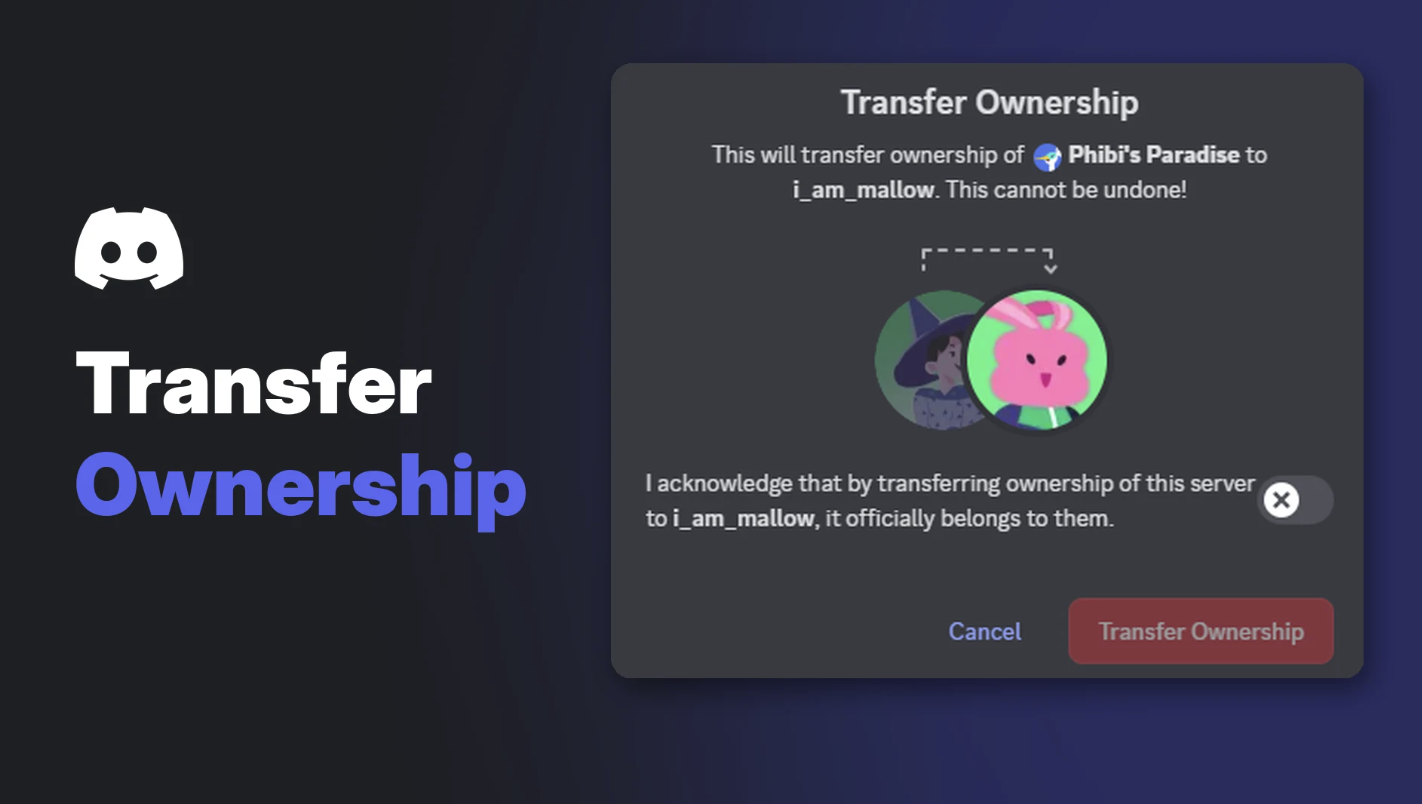
- Turn on the acknowledgement toggle, then select Transfer Ownership.
- Enter your two-factor code if you use 2FA.
Confirm the transfer. Image: Discord.
📱 How to Transfer Server Ownership on Mobile
- Open the server and tap Server Settings.
- Tap Members.
- Tap the member, then Transfer Ownership.
- Confirm the acknowledgement and tap Transfer.
- Enter your 2FA code if asked.
Transfer Ownership on mobile. Image: Discord.
🔄 What Happens After the Transfer?
- The new owner gets the crown and full control.
- You stay in the server. Your access depends on the roles you still have.
- It's permanent. Discord says: "Once a server has been transferred, Discord's Support team is not able to transfer it back."
Tip: before transferring, give yourself an admin or moderator role if you want to keep helping, and only hand ownership to someone you trust completely.
🆘 The Owner Is Gone: How to Request Ownership
If the owner has gone inactive, Discord can sometimes transfer the server to an active admin or moderator. The server must meet all of these:
| Requirement | Detail |
|---|---|
| Server size | At least 100 members (active user count) |
| Owner inactivity | The owner hasn't used their account for at least a month |
| Your activity | You've been active in the last 30 days |
| Your role | You have admin or moderator permissions |
| Monetization | The server isn't monetized |
Discord says requests that don't meet the criteria "will be denied, no exceptions."
How to submit the request
- Go to support.discord.com/hc/requests/new.
- Choose Help & Support and enter your account email.
- Under Type of Question, choose Server Related Requests, then Server Ownership Transfer Request.
- Provide the server name and server ID, the inactive owner's username and user ID, and the new owner's username and user ID.
To copy IDs, turn on Developer Mode in settings, then right-click a user or server and choose Copy User ID or Copy Server ID.
What happens next
If the owner isn't banned, Discord contacts them. They have 7 days to respond. If they approve or don't reply, and the server is eligible, Discord transfers it. If they say no, it won't happen.
The person who'll become owner must submit the ticket themselves, unless the server is Partnered or Verified. File one ticket per server.
🛡️ Protect Your Server Before Something Goes Wrong
- Turn on 2FA for the owner account.
- Have a trusted co-admin in case you disappear.
- Back up your server setup. Our Discord server backup and recovery guide shows how.
- Plan for handovers before you need them, not after.
If you're transferring because you're leaving Discord, our guide to Discord roles and permissions helps you set up the new team properly first.
Frequently Asked Questions
How do I transfer ownership of a Discord server?
Right-click the member in the Members list, select Transfer Ownership, confirm the toggle and select Transfer Ownership.
Can I undo a server ownership transfer?
No. Discord's support team can't transfer it back. Only the new owner can transfer it again.
Can I get ownership if the owner is inactive?
Possibly. The server needs 100 members, the owner must be inactive for a month, and you must be an active admin or moderator.
Do I stay in the server after transferring?
Yes. You keep your membership and whatever roles you have.
Why do I need to transfer ownership before deleting my account?
Discord won't delete or disable your account while you still own servers.
🎮 The Bottom Line
It only takes a few clicks to transfer Discord server ownership, but the decision is permanent. Pick someone you trust, keep yourself a role if you want to help, and if an owner vanishes, Discord's request process can rescue a server that meets the criteria.
Who would you hand your server to?
Sources
- Discord Help Center: How to Transfer Ownership of a Discord Server, updated 24 October 2026
- Discord Help Center: Requesting a Transfer of Server Ownership, updated 23 October 2026
- Discord Help Center: How to Delete your Discord Account, updated 24 October 2026
Comments
Sign in to join the conversation
Sign inNo comments yet
Be the first to share your thoughts!