
Spam, harassment, scams or something much worse: sooner or later you'll see a message that breaks the rules. Knowing how to report someone on Discord means you can flag it to the Safety team in a few taps instead of just scrolling past.
This guide covers how to report someone on Discord on desktop and mobile, including messages, user profiles and servers. You'll also learn what happens after a report, whether the other person finds out, and what to do in an emergency.
At a glance - Report a message: right-click it (desktop) or press and hold it (mobile) > Report Message - Report a profile: three-dot menu on their profile > Report User Profile - Report a server: report the messages or profiles, and tell the server's moderators - Is your name shared? Discord never intentionally discloses who reported, unless legally required - Emergency: contact local law enforcement
🚩 How to Report Someone on Discord for a Message
The in-app report flow works in servers, DMs and group chats.
- Desktop: right-click the message. Mobile: press and hold it.
- Select Report Message.
- Pick the type of policy violation that fits best.
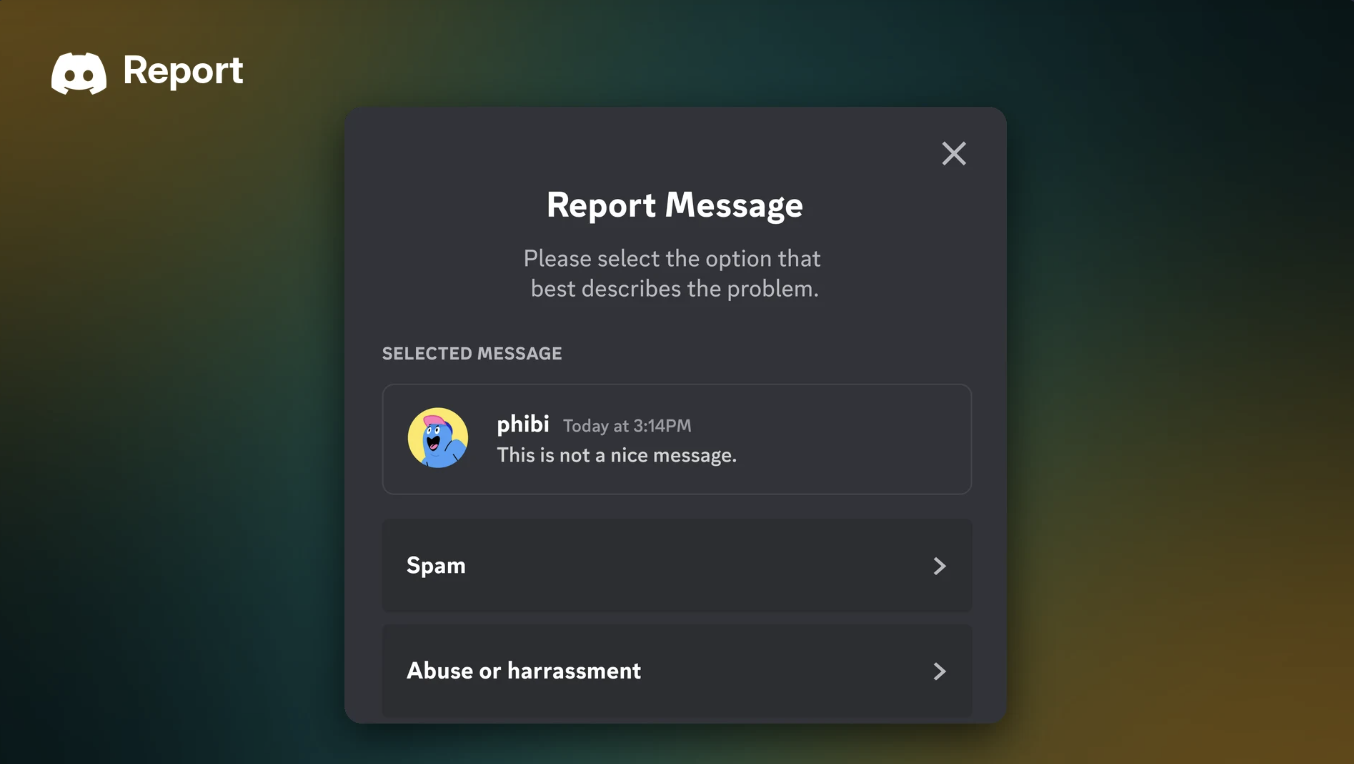
- On the next screen, choose the more specific violation. You can go back and change your first answer.

Report Message sits at the bottom of the message menu on desktop. Image: Discord.

Choose the option that best describes the problem. Image: Discord.
👤 How to Report a User Profile
Sometimes the problem is an offensive avatar, a hateful username or a scam link in someone's bio.
- Open the person's profile and select the three-dot menu.
- Choose Report User Profile.
- Tick the parts of the profile you're reporting. You can pick more than one: - Their photo (avatar or banner) - Their name (username or display name) - Their text descriptors (About Me, status or pronouns)
- Select the type of violation, then the more specific reason on the next screen.

Pick which parts of the profile break the rules. Image: Discord.

Then tell Discord what's happening. Image: Discord.
🏠 What About Reporting a Server?
Discord's Safety Center doesn't describe a separate "report server" flow. To flag a server that breaks the rules, report the specific messages and profiles involved, using the steps above.
If the problem happened inside a server, Discord also suggests contacting that server's moderators, who may be able to act straight away. Discord's enforcement can go further: its Safety team can remove servers and disable accounts when it confirms violations.
Running your own server? Our Discord AutoMod setup guide helps you catch spam before anyone needs to report it.
🌐 In-App Reports vs Web Forms
Most people should report inside the app. A few situations use a web form instead.
| Route | Who it's for | What you need |
|---|---|---|
| In-app report | Anyone with access to the content | The message or profile |
| EU Digital Services Act form (discord.com/report) | People in the EU reporting illegal content | Verification, plus a message link |
| Parents and guardians form | Parents without access to their teen's account | A message link |
| Reporting apps | Problems with a bot or app | See Discord's app reporting page |
To get a message link, right-click the message on desktop (or press and hold on mobile) and select Copy Message Link.
🔍 What Happens After You Report Someone?
Discord reviews reports using a mix of automated and human review. Its Safety Center says reports are handled by priority:
- High harm (such as child safety, extremism or imminent harm): Discord aims to review these within 24 to 48 hours.
- Lower harm (such as harassment or hate speech): Discord aims to review these within a week.
- Complex cases (such as coordinated abuse or appeals): these can take days to weeks.
Discord says it will let you know if it finds a violation based on your report, and it may point you to safety features that help sooner. People who break the rules get a system DM explaining the violation, and it can affect their Account Standing.
Will the person know I reported them?
Discord says it never intentionally discloses the identity of a reporter unless it's legally required. The exception is copyright (DMCA) claims, where the reported user can ask for the claimant's details. Discord doesn't say whether someone is told that a report was made about them.
Don't spam the report button
Discord counts false or malicious reports, duplicate reports about the same issue, and asking a group to report the same content as misleading its teams. One honest report is enough.
🆘 Emergencies and Extra Help
If someone faces immediate danger from a credible threat of violence, or is at immediate risk of self-harm, contact local law enforcement first. A Discord report isn't a replacement for emergency services.
In the US, you can text DISCORD to 741741 to reach Crisis Text Line. Outside the US, Discord points people to ThroughLine (discord.findahelpline.com) for free, confidential support.
Want to stop someone contacting you while you wait? Blocking or ignoring them limits interaction. Our Discord privacy settings guide shows how to lock down DMs and friend requests too.
🛡️ The Discord Safety Center
The Discord Safety Center is Discord's hub for safety advice. It covers reporting, controlling your experience, resources for parents and the policies behind enforcement.
Spotted a scam giveaway? Our guide to the fake giveaway epidemic in creator Discord servers explains the warning signs.
Frequently Asked Questions
How do I report someone on Discord?
Right-click their message on desktop, or press and hold it on mobile, then select Report Message. To report their profile, use the three-dot menu and choose Report User Profile.
Does Discord tell people who reported them?
No. Discord says it never intentionally shares a reporter's identity unless legally required. Copyright claims work differently.
How long does Discord take to review a report?
Discord aims for 24 to 48 hours on high-harm reports and about a week on lower-harm ones. Complex cases can take longer.
Can I report a whole Discord server?
Discord's guidance is to report the messages and profiles involved and contact the server's moderators. Its Safety team can remove servers that break the rules.
🎮 The Bottom Line
Now you know how to report someone on Discord: Report Message for a single post, Report User Profile for the person, and the server's moderators for problems inside a community. Your identity stays private, and real emergencies go to local law enforcement first.
One clear, honest report does more than a dozen angry ones. Have you ever reported someone on Discord, and did you hear back?
Sources
- Discord Safety Center: Reporting Content or Behavior to Discord
- Discord Help Center: Reporting Abusive Behavior to Discord
- Discord Help Center: How to Contact Discord Safety for Parents and Guardians
- Discord Help Center: Discord Warning System
- Discord Help Center: Crisis Text Line
- Discord Safety Center: Reporting Applications to Discord


Comments
Sign in to join the conversation
Sign inNo comments yet
Be the first to share your thoughts!