
Discord Server Storefronts: Selling Digital Assets Directly in Chat
Your best gaming guide is probably sitting in a pinned message right now, free to anyone who joins.
Meanwhile, the usual way to earn from a Discord community is still a premium role. That works, but it sells access, not the thing members actually remember: the guide, the pack, the walkthrough.
Discord's Server Shop changes that. It puts a storefront at the top of your channel list, and the Discord Server Shop can sell files as well as roles.
🔥 Main Story: The Discord Server Shop Goes Beyond Roles
Server Shop is where owners manage Server Products, which Discord describes as digital products sold as one time purchases. According to Discord's official creator support page, there are two kinds:
- Downloadables: Digital files you upload and members pay once to download
- Premium Roles: Special roles that unlock a channel or perk without a monthly subscription
Once you publish a product, a Server Shop entry appears at the top of your channel list. Members click it and buy.
For community owners, the pivot is simple. Stop treating roles as the product and start treating them as the wrapper around something worth owning.
🎮 What Happened: From Beta Idea to Built In Storefront

Discord first floated this idea in June 2023. In its announcement of new creator tools, the company said it would experiment with letting owners sell things like a recipe ebook, a gaming guide or a digital wallpaper as one time purchases.
That example list is worth noticing. A gaming guide was one of Discord's own use cases from day one.
Here's how the feature has developed:
Downloadables Announced (June 2023) → Server Shop Testing → Premium Roles Sold Standalone → Beta for Select Servers → Wider Rollout (Not Announced)
⚠️ Important: Discord's help page says Server Products are in beta testing and available to a select group of servers. A members' FAQ also described the feature as a limited experiment in the United States, available on desktop and web only. Both pages may be out of date, so check your server settings to see whether you have access.
🧠 Why It Matters: Roles Rent Access, Files Sell Value
A premium role is rented access. When the perk ends or the channel goes quiet, so does the reason to pay.
A downloadable is different. It's an asset a member keeps, which makes it easier to price, easier to promote and easier to explain.
One third party guide from Peakbot puts the rule of thumb clearly: sell a file when the value is the asset itself, and sell a role when the value is ongoing access. Many creators do both.
That second option is the real opportunity. Instead of choosing between roles and files, you can combine them.
⚡ Key Details
| Detail | Information |
|---|---|
| Feature | Server Products inside Server Shop |
| Product Types | Downloadables, Premium Roles |
| Payment Model | One time purchase |
| Supported File Types | .png, .jpeg, .gif, .pdf, .mov |
| Not Supported | .zip, .rar |
| File Limits | Up to 10 files, 500MB total per product |
| Revenue Split | 90% to you, 10% to Discord, before other fees |
| First Payout | After earning at least $100 |
| Later Payouts | After earning at least $25 |
| Where to Create | Desktop or browser only |
| Availability | Beta, select servers (per Discord) |
| Refunds | Discord says it can't provide refunds for server products |
🔍 Deeper Breakdown
What You Can Actually Sell
Discord's list of file types is shorter than many people assume. Anything outside it isn't supported.
That still covers a lot of ground for gaming communities:
- Guides and ebooks: Export as PDF
- Tier lists and cheat sheets: Share as PDF or PNG
- Digital art and wallpapers: Use PNG or JPEG
- Animated assets: GIF works
- Video walkthroughs or coaching clips: MOV is supported, within the file limits
Templates are trickier. A printable planner or layout reference works as a PDF or image. But an editable spreadsheet, document or zipped asset pack doesn't appear on the supported list, so test with Discord's current rules before building a product around one.
The Bundle Strategy
Here's where the Server Shop gets interesting. When you create a product, Discord lets you choose whether to include a role, a downloadable, or both.
That means one purchase can deliver:
- The file itself: A guide, pack or walkthrough
- A buyers only role: Access to a channel for questions, updates and community
Discord's own announcement described this idea, saying role gated channels let customers connect with each other and get support for their purchases.
For a gaming guide, that might look like a build pack plus a private channel where buyers share results. The file justifies the price. The role keeps the community around it alive.
How to Set It Up
The setup is mostly paperwork. Per Discord's help page, the steps are:
- Enable Monetization: Only the server owner can do this, starting in the Discord Developers Portal under Servers
- Meet the requirements: Community must be enabled, multifactor authentication must be set up for moderation actions, and the server can't be primarily NSFW
- Open Server Products: Admins can find this tab in Server Settings
- Create a product: Choose Create New Product, add details and a price, then attach a role, a downloadable, or both
- Publish twice: Publish the product, then open it and publish once more so the Server Shop becomes visible
- Customize the shop: Add a description and cover image under Basic Info
Products can only be created and managed on desktop or in a browser, not on mobile.
Who Is Eligible
According to Discord's page, owners must be 18 or older, have a verified email and two factor authentication enabled, and be in good standing. The same page says owners must be based in the United States with a US bank account and identification for Stripe.
Payouts go through a third party provider, and you can't receive money until it provisions your account.
What You Can't Sell
Discord's monetization policy restricts several categories, including intellectual property, sexually explicit content, online dating, political activity, charity and marketing third parties.
For gaming communities, the intellectual property line deserves a careful read. A guide written in your own words is one thing. Reusing a publisher's art, logos or assets inside a paid product could create problems, so review the policy before you sell.
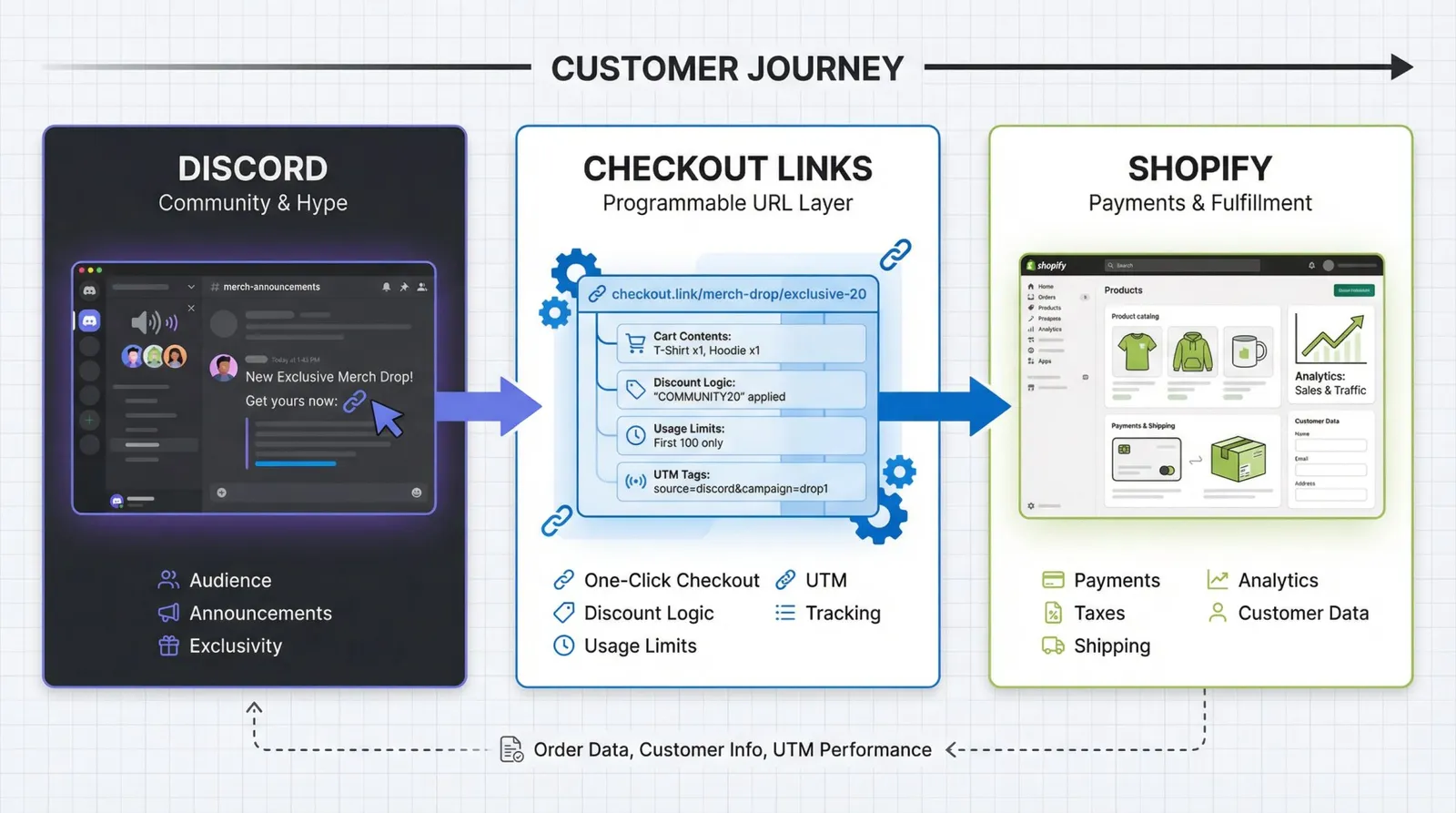
Physical goods are also out. As Checkout Links notes, anything that needs shipping requires an external store, while Server Shop is built for digital products.
Buying and Delivery
For members, the process is simple. They click Server Shop, pick a product and pay once. According to Discord's members FAQ, premium roles apply to a profile instantly, and downloads appear under User Settings in the Server Products section.
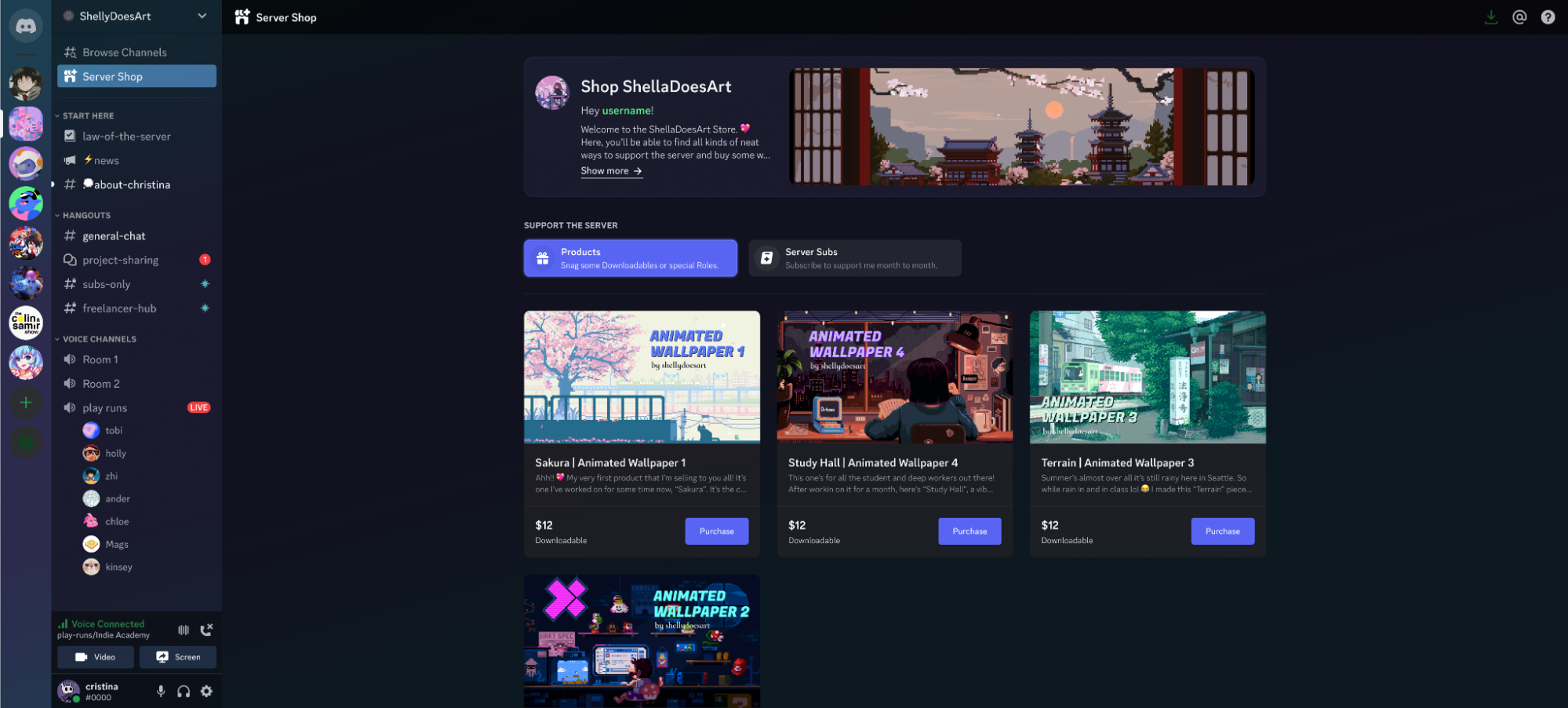
You can also paste a product link into a channel so members can buy through an embed. That embed doesn't appear if you share the link outside your server.
No Refunds, So Describe Honestly
Discord says it's unable to provide refunds for server products. That puts the burden on you.
Be specific about what's inside, including page counts, file types and what the guide covers. An honest description protects your reputation more than any discount.
What We Know
- Confirmed by Discord: Downloadables and Premium Roles, 90/10 revenue split, supported file types and limits
- Confirmed by Discord: Server Products are in beta for select servers
- Not confirmed: A wider rollout date, new file types or mobile creation tools
📊 Quick Comparison
| Option | Payment | Best For | Main Limit |
|---|---|---|---|
| Server Subscriptions | Monthly | Ongoing premium content | Needs constant value |
| Premium Role | One time | Event access, special channels | Sells access, not an asset |
| Downloadable | One time | Guides, ebooks, art | Limited file types |
| Bundle (Role plus file) | One time | Guides with community support | Needs active moderation |
| External store | Varies | Physical goods, unsupported files | Leaves Discord checkout |
💡 Creator Note
For community owners and gaming creators, a few moves can turn this into real revenue.
- Start with one flagship product: A single strong guide beats five thin ones
- Post a free sample page: Show the quality before asking for money
- Bundle a buyers channel: Give customers a place to talk and share results
- Price against your time: Think about how long the guide saves a member
- Pin the product link: Make it easy to find without constant reminders
- Collect feedback from buyers: Use it to update the next version
🚨 What Happens Next
Here's what to watch:
- Wider access: Discord hasn't said when Server Products leave beta
- File type changes: Support for editable files or archives would open up templates
- Mobile tools: Creation is desktop and browser only for now
- Policy updates: Rules around intellectual property and payouts could change
- Creator results: Early sellers will show which products actually convert
Beta Access → First Product → Buyer Feedback → Bundle Upgrade → Wider Rollout
Final Takeaway
Most Discord communities have already built something people value. They just give it away, then wonder why a premium role feels hard to sell.
The Server Shop offers a cleaner idea: put the guide, the pack or the walkthrough in a storefront, wrap it with a role, and let the community around it do the rest.
It's still beta, the file list is short and the rules matter. But for owners who qualify, the pivot from selling access to selling assets might be the most practical monetization upgrade Discord has offered yet.
🔗 Sources
- Discord Monetization Policy: Lists the content categories that can't be sold, including intellectual property.
- Discord Monetization Terms: Covers eligibility, payout timelines and fee details for server monetization.


Comments
Sign in to join the conversation
Sign inNo comments yet
Be the first to share your thoughts!