
Discord started rolling out age checks to everyone on 23 September 2026. Most people won't notice anything: Discord says more than 90% of users will never be asked to confirm their age. But every account now gets an age group, and that group decides which servers, channels and settings you can use.
Here is what changed, how Discord decides your age group, what happens if it gets it wrong, and what server owners should do now.
At a glance - What changed: every account is placed in one of three groups: Adult (18+), Teen (13 to 17) or Unconfirmed. - How: Discord estimates your group from account signals such as account age and activity. It says it does not read messages or calls. - Who has to verify: only people Discord can't confidently place as adults, and only if they want age-restricted spaces or settings. - Where to check: User Settings > Account Status.
How Discord decides your age group
In a blog post on 22 September, Discord's co-founder and CTO Stanislav Vishnevskiy explained that a machine learning model now estimates each account's age group. It looks at signals like how old the account is, which servers and games it's connected to, and general activity levels.
Discord says the model does not read messages, calls or other content, and that no single server or friend decides your group. When there isn't enough signal, the account is marked Unconfirmed rather than guessed.
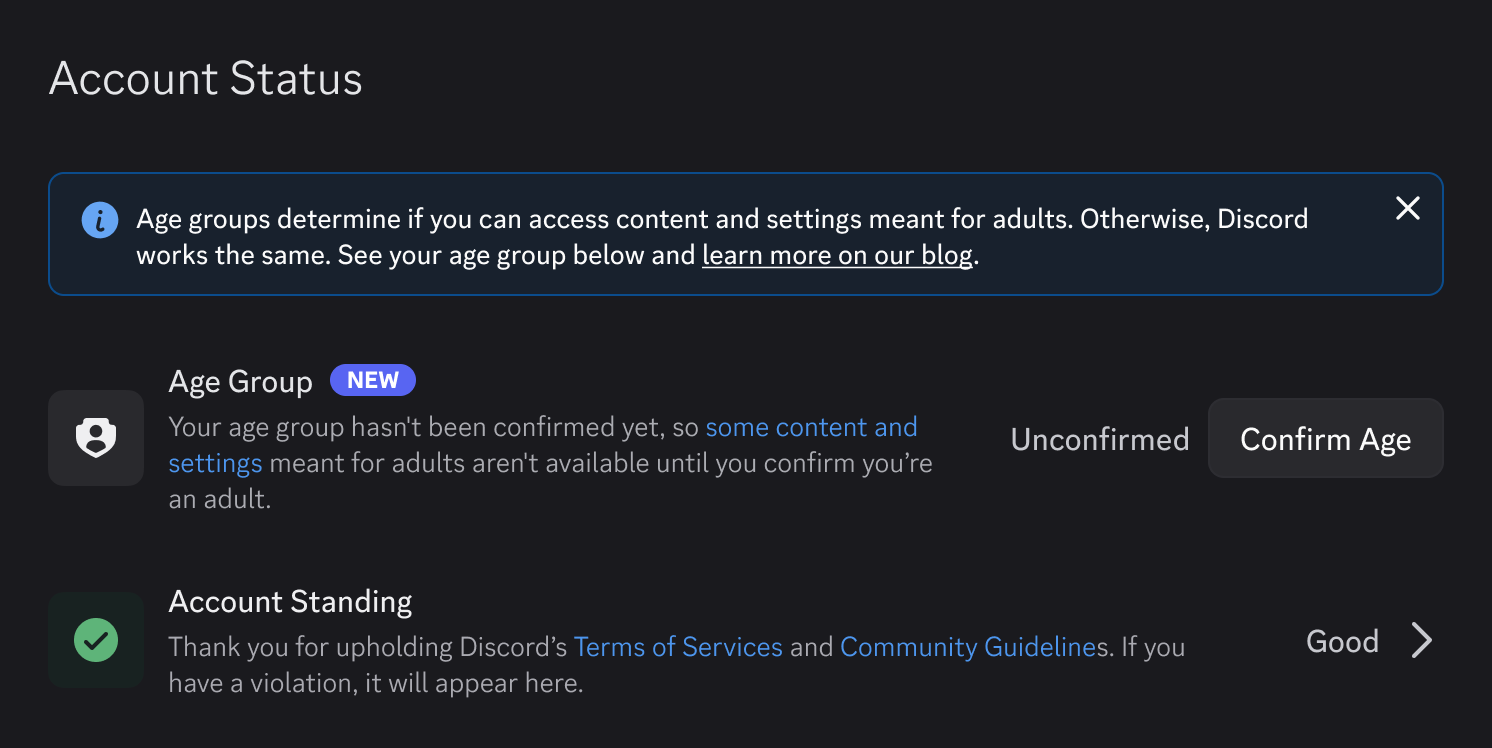
Your age group appears under User Settings > Account Status. Image: Discord.
Discord admits the estimate is probabilistic, so some accounts will land in the wrong group. Status can take a few days to appear because the rollout runs gradually.
What each age group can and can't do
| Adult | Teen | Unconfirmed | |
|---|---|---|---|
| Age-restricted servers, channels and bot commands | Yes | No | No |
| Sensitive images | As set by you | Blurred or blocked | Blurred or blocked |
| Messages from non-friends | Normal inbox | Message requests | Message requests |
| Alert on friend requests from strangers | No | Yes | Yes |
| Full profile and activity visible to | Your settings | Friends and smaller shared servers | Friends and everyone in shared servers |
Adults see no change. Teens and Unconfirmed accounts keep their friends, DMs, voice chat and normal servers, according to Discord's Age Assurance FAQ. Turning off the teen protections requires confirming you're an adult.

Teen accounts keep messaging and voice, with extra filters on who can reach them. Photo: Maxim Ilyahov on Unsplash.
How to confirm your age if Discord gets it wrong
If you're an adult who has been placed in Teen or Unconfirmed, go to User Settings > Account Status and confirm your age group. Dexerto's breakdown and Discord's blog list the options, which vary by region and device:
- Credit card: checked through k-ID and Stripe. Discord says neither it nor k-ID sees your card details. A small temporary charge is refunded within 14 business days.
- Apple App Store or Google Play: shares an age range, not your birthday.
- Google Wallet: uses a passport already saved in your wallet. It currently supports passports from Brazil, Singapore, Taiwan, the UK and the US.
- AgeKey: a reusable age credential that works across supported services.
- Video selfie: facial age estimation that runs on your device.
- ID scan: handled by a verification partner.
If you already confirmed your age before the rollout, you keep your group.
What happens to your data
Privacy was the biggest reason people pushed back, and Discord delayed this plan once already, in February 2026. TechCrunch notes that in 2025 a third-party vendor working with Discord was breached, potentially exposing ID photos and selfies from about 70,000 users.
For the new system, Discord says:
- It receives only an age group, never your name, card number, ID or face scan.
- Video selfies are analysed on your device and never uploaded.
- Vendors must delete ID scans immediately after checking them.
- Your age group isn't shown on your profile or to other members.
- Age data isn't used for targeted ads or sold.
Discord also says the manual review process run by the customer service vendor involved in the 2025 breach has been retired.

Discord says video selfies are processed on your own device and never reach its servers. Photo: Ales Nesetril on Unsplash.
Why Discord is doing this now
Discord's stated reason is that age assurance laws are spreading. It had already launched age checks in the UK, Australia, Brazil and Texas because local rules required them, and the estimation model isn't used in the UK or Australia.
The legal pressure is real. In August, Brazil's government sued Discord, alleging it failed to comply with laws protecting young users, and is seeking around $97 million, Al Jazeera reported. Discord called the lawsuit excessively harsh and said it does not reflect its compliance with Brazilian law.
The rollout hasn't been smooth
The first day brought bugs. GamesRadar reported that some verified adults were locked out of age-restricted servers and that age groups weren't syncing across devices. Discord says both are fixed.
The same week, US users spotted FanDuel ads in the app. Discord told GameSpot it uses age group signals to keep teens from seeing ads like these. If you'd rather not see them either, go to Account Settings > Data & Privacy, open the sponsored content settings and hide the Real Money Gaming topic.
What server owners should do
Discord's announcement doesn't list new steps for server owners, but the new groups change who can see what in your server. A few practical checks:
- Review your age-restricted channels. Teens and Unconfirmed accounts can't open them. Only restrict what genuinely needs it.
- Consider spoiler channels for borderline content. Discord introduced them earlier this year so communities can hide content behind a click without age-gating it.
- Check your bots. Age-restricted bot commands are blocked for Teen and Unconfirmed members, so tell members if a command suddenly stops working for them.
- Point confused adults to Account Status. Many "I can't see the channel" messages this month will come from adults who haven't been placed yet.
- Never ask members for ID in your server. Age checks happen only inside Discord's own settings. Anyone asking for ID or card details in a DM is running a scam.

A quick audit of your age-restricted channels now saves a lot of support questions later. Photo: Andras Vas on Unsplash.
FAQ
Do I have to verify my age to keep using Discord?
No. You only need to confirm your age to reach age-restricted servers, channels or settings, and most adults are placed automatically.
Can other people see my age group?
No. Discord says your age group is not shown on your profile or to other members.
Does Discord read my messages to guess my age?
Discord says no. The model uses account signals such as account age and activity, not message or call content.
What if I'm put in the wrong group?
Confirm your age in User Settings > Account Status using one of the methods available in your region.
Is my age group the same on every device?
It should be. A syncing bug on launch day caused problems, and Discord says it has been fixed.
Next steps
Check your own status in Account Status, and if you run a server, spend ten minutes on the checklist above before members start asking questions.
Looking for communities that suit you? Browse Discord servers on Discords.ai, or add your own server so more people can find it.
Sources
- Discord blog: Safer for Teens, Same Discord for Adults, 22 September 2026
- Discord: Age Assurance Update FAQ
- TechCrunch: Discord's age-verification era is upon us, 22 September 2026
- Dexerto: Discord reveals age-check rollout, 22 September 2026
- GamesRadar+: Discord admits it's taking gambling sponsors, 24 September 2026
- Al Jazeera: Brazil sues chat platform Discord, 27 August 2026


Comments
1Sign in to join the conversation
Sign in