
Discord age groups decide whether an account can reach adult-only content and settings. Since late September 2026, Discord places every account into one of three groups: Adult (18+), Teen (13-17) or Unconfirmed.
For most people nothing changes. Discord says "more than 90% of you won't have to confirm your age." This page explains how the groups work, what each one can and can't do, and how to fix your group if it's wrong.
Key Information
| Detail | Summary |
|---|---|
| Announced | 22 September 2026 |
| Groups | Adult (18+), Teen (13-17), Unconfirmed |
| How groups are set | An estimate based on account signals |
| Where to check | User Settings > Account Status |
| Visible to others? | No. It isn't shown on your profile or to server members |
| How to change it | Confirm your age in Account Status |
| Not used in | The UK and Australia, which have their own age checks |
The Three Discord Age Groups
| Group | Who it's for | What changes |
|---|---|---|
| Adult (18+) | Accounts estimated or confirmed as adults | Nothing. Discord works as before |
| Teen (13-17) | Accounts estimated or confirmed as teens | Adult-only content and settings are off, with extra safety defaults |
| Unconfirmed | Accounts without enough signal yet, including new accounts | Teen-style protections until you confirm you're an adult |
Discord stresses that teens can still chat, call and join servers as normal. If you already confirmed your age before this change, you keep that status.
How Discord Estimates Your Age Group
Discord uses a model that looks at general patterns, including:
- How old your account is
- The types of communities, servers and games you're connected to
- General activity levels
Discord says the model "does not look at your messages, calls, or other content," and that no single server or friend decides your group. Because it's an estimate, mistakes can happen. That's why you can confirm your age manually.
How to Check Your Age Group
- Open User Settings.
- Select Account Status.
- Look for Age Group, which shows Adult, Teen or Unconfirmed.
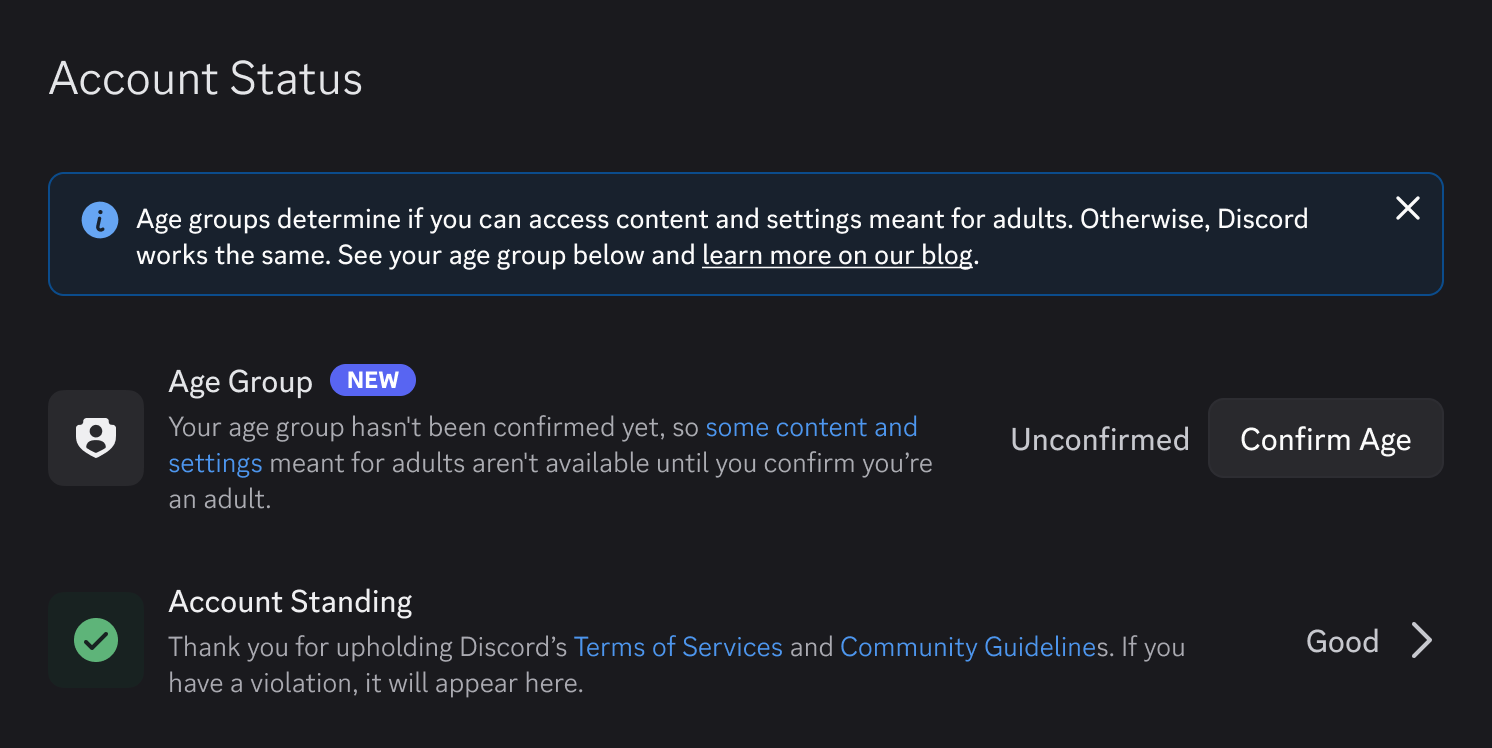
The Age Group section in Account Status. Image: Discord.
On mobile, you need app version 343.0 or later to see it.
What Teens Get by Default
According to Discord's help centre, the Teen group gets these defaults:
| Area | Teen default |
|---|---|
| Sensitive media | Blurred in friends' DMs and servers, blocked in DMs from strangers |
| Age-restricted servers and channels | Not accessible |
| Age-restricted app commands | Off |
| Message requests | On. Messages from non-friends go to a separate inbox |
| DM spam filter | Filter all |
| Friend request alerts | On for unfamiliar users |
| Profile and activity | Visible to friends and servers with 200 or fewer members |
| Stage channels | Can listen but not speak |
What a Teen account sees when opening an age-restricted server. Image: Discord.
What teens can change themselves
- Profile visibility and activity sharing
- The DM spam filter
What needs adult confirmation
- Viewing blurred content or setting sensitive content to Show
- Joining age-restricted servers and channels
- Turning on age-restricted app commands
- Turning off message requests
- Speaking on Stage channels
Message requests stay on for the Teen group. Image: Discord.
Friend request alerts for unfamiliar users can't be turned off by anyone, adult or teen.
What the Unconfirmed Group Means
Unconfirmed accounts get the same protections as teens, with one difference. Their profile and activity are visible to friends and all servers, not just small ones.
Profile Privacy options. Unconfirmed accounts default to Friends and All Servers. Image: Discord.
Being Unconfirmed doesn't limit messaging friends, voice calls or regular servers. You only need to act if you're an adult who wants age-restricted content or settings now.
How to Confirm Your Age Group
- Go to User Settings > Account Status.
- Select Confirm Age. You'll also see this button when you try to open something age-restricted.
- Pick a method on the Confirm your age group screen.
- Follow the steps for that method.
- Wait for a DM from Discord's official account with your result.
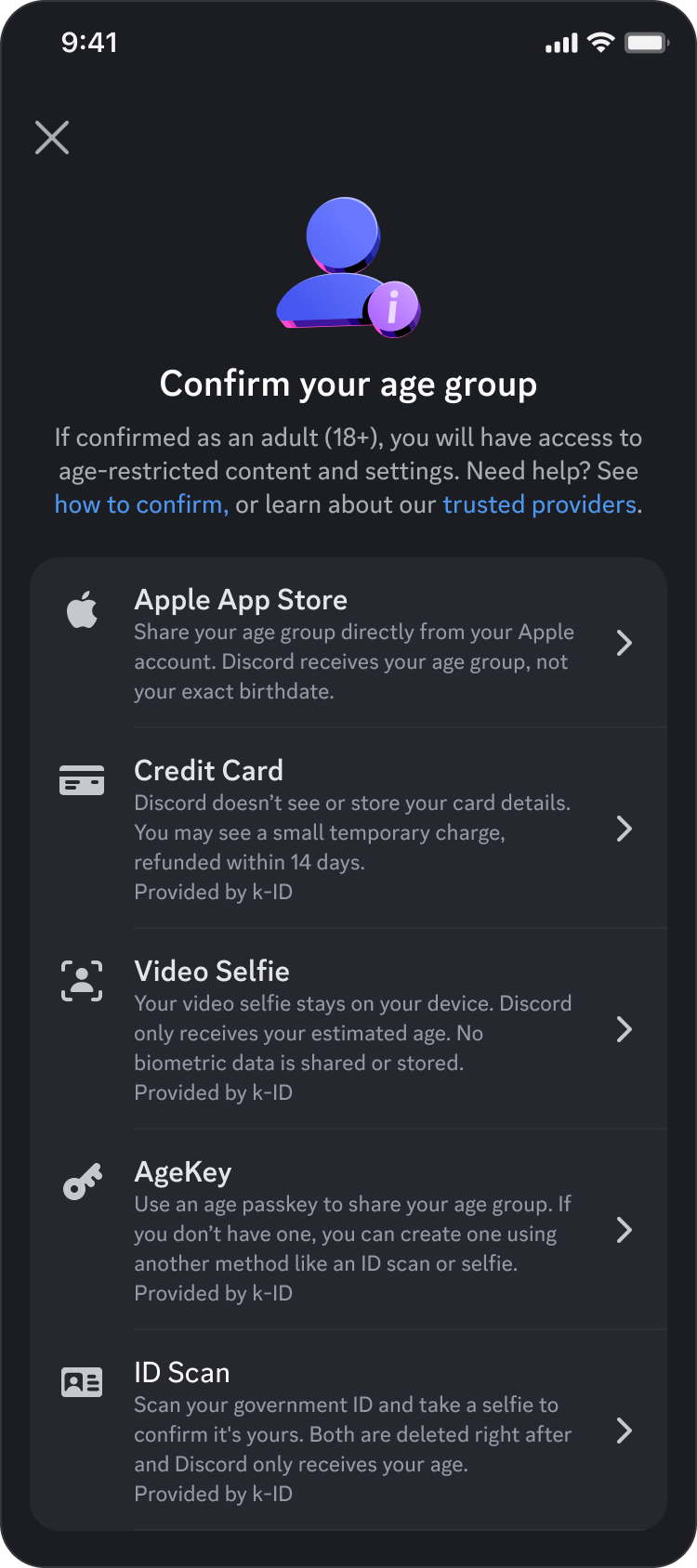
The methods you see depend on your region and device. Image: Discord.
Confirmation methods
| Method | How it works | What Discord receives |
|---|---|---|
| Apple App Store | Shares your age range from your Apple account | Age range, not your birthdate |
| Google Play Store | Shares your age range from Google Play | Age range, not your birthdate |
| Credit card | Checked by k-ID through Stripe. Credit cards only, not debit or prepaid. A temporary charge under $0.50 is refunded within 14 business days | Age signal only |
| Google Wallet | Uses a passport stored in Google Wallet (Brazil, Singapore, Taiwan, UK or US) | Age and issuing country |
| Video selfie | Age is estimated on your device | Estimated age only |
| ID scan | Government ID plus a selfie, deleted right after | Age only |
| AgeKey | A reusable age passkey made with k-ID, usable across services | Age signal only |
Discord confirms your result by DM. Image: Discord.
Privacy and Safety
- Discord says it gets only an age-group signal, not your name, card number, ID or face scan.
- Vendors must delete uploaded data right after confirming your age.
- Your age group is never shown on your profile.
- Discord never asks you to confirm your age by email or text. Treat any link that does as a scam.
For more ways to lock down your account, see our Discord privacy settings guide.
Troubleshooting
| Problem | What to do |
|---|---|
| I'm an adult but I'm in the Teen group | Go to Account Status and select Confirm Age or Retry |
| My confirmation failed | Select Retry and try a different method |
| A method isn't listed | Methods vary by region and device, and some may reappear later |
| My status differs between devices | Close and reopen the app, and update to the latest version |
| I can't see Age Group on mobile | Update to app version 343.0 or later |
| My account was banned as underage by mistake | Use the appeal steps in Discord's help centre |
Regional Differences
Some protections and methods vary by location because of local laws. Discord's age estimation model isn't used in the UK or Australia, which already have their own age assurance rules. Texas and Brazil also have region-specific guides.
Discord's minimum age still applies everywhere. Our Discord age requirements guide covers the minimum age by country.
For background on why platforms are tightening teen safety, read what the Florida Discord lawsuit means for users and parents.
Frequently Asked Questions
What are Discord age groups?
They're three categories (Adult, Teen and Unconfirmed) that decide whether an account can use adult-only content and settings.
How do I know my Discord age group?
Open User Settings > Account Status and look at the Age Group section.
Can other people see my age group?
No. Discord says it isn't shown on your profile or to other members.
Do I have to confirm my age on Discord?
Only if you're in the wrong group or you're Unconfirmed and want age-restricted content. Discord says most users won't need to.
Does Discord read my messages to guess my age?
No. Discord says its model doesn't look at messages, calls or other content.
Why am I Unconfirmed?
Your account doesn't have enough signal yet, which is common for new accounts.
Summary
Discord age groups sort every account into Adult, Teen or Unconfirmed using an estimate based on account signals, not messages. Adults see no change. Teens and Unconfirmed accounts get safer defaults and can't reach adult-only content. You can check your group in User Settings > Account Status and confirm your age there if it's wrong, using an app store, credit card, Google Wallet, video selfie, ID scan or AgeKey.
Sources
- Discord: Safer for Teens, Same Discord for Adults, 22 September 2026
- Discord Help Center: What Protections Do You Get in the Teen Age Group?, updated 22 September 2026
- Discord Help Center: How to Confirm Your Age Group on Discord, updated 24 September 2026
- Discord: Age Assurance on Discord: Vendors, Methods and Your Data
Comments
Sign in to join the conversation
Sign inNo comments yet
Be the first to share your thoughts!