
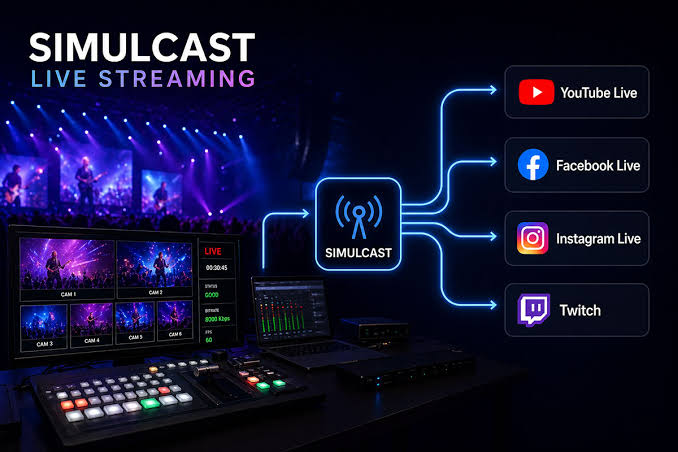
YouTube Live simulcasting allows creators to broadcast the same live content on YouTube and other platforms at the same time.
For creators trying to build audiences across multiple streaming services, this can mean reaching viewers without forcing them to move to a single platform.
YouTube's current official guidance explicitly says creators can go live with the same content across multiple platforms simultaneously, commonly known as simulstreaming.
However, simulcasting still comes with important requirements involving account standing, monetization, copyright, platform agreements and content rights.
Here's everything creators need to know.
What Is Simulcasting on YouTube?
Simulcasting means broadcasting one live production to multiple platforms at the same time.
For example, a creator could send the same broadcast to:
- YouTube Live
- Twitch
- Facebook Live
- Kick
- Another supported streaming platform
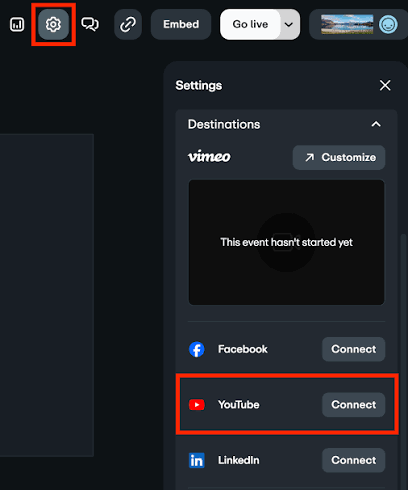
The creator generally uses an encoder or streaming service to distribute the broadcast to different destinations.
YouTube's official guidance confirms that simulstreaming is supported and recommends that creators maintain accounts in good standing on the platforms where they are broadcasting.
YouTube's Simulcasting Rules
The basic YouTube position is relatively straightforward:
YouTube allows simulstreaming.
Creators need to make sure their YouTube channel is verified and has live streaming enabled. YouTube also requires creators to comply with its Community Guidelines and other applicable policies.
Before going live, creators should check:
- YouTube live-stream eligibility
- Account standing
- Community Guidelines
- Copyright permissions
- Music licensing
- Agreements with other streaming platforms
- Monetization eligibility
- Technical requirements
A creator's contract with another platform can still impose separate exclusivity restrictions.
In other words, YouTube allowing simulcasting does not automatically cancel an exclusivity agreement with another service.
Platform Exclusivity Rules
Exclusivity is one of the most important issues for professional streamers.
YouTube itself permits simulcasting, but creators may have separate contractual obligations with agencies, networks, sponsors or competing platforms.
This means a creator should distinguish between:
YouTube's platform policy
and
the creator's individual contract.
For example, a creator could technically be allowed to simulcast under YouTube's rules while still being prohibited from doing so by an agreement with another streaming service.
Creators working under exclusive contracts should therefore review those agreements before broadcasting simultaneously.
Revenue Sharing for Simulcast Creators
Simulcasting does not create a separate universal YouTube revenue-share rate simply because a creator is broadcasting elsewhere.
YouTube's monetization system allows eligible creators to earn through several sources, including:
- Live-stream advertising
- Channel memberships
- Super Chat
- Super Stickers
- YouTube Premium revenue
- Shopping features where eligible
For eligible YouTube Partner Program creators, YouTube currently states that the Commerce Product Module pays creators 70% of net revenue from memberships, Super Chat, Super Stickers and Super Thanks. The Watch Page Monetization Module provides 55% of net advertising revenue from ads on public videos, including eligible live content viewed through the YouTube player.
These rates are tied to the applicable YouTube Partner agreements and monetization modules—not simply whether someone is simulcasting.
Does Streaming Elsewhere Reduce YouTube Revenue?
There is no general official YouTube rule saying that a creator automatically loses a percentage of YouTube revenue because the same broadcast is appearing on another platform.
However, revenue can vary depending on:
- Whether the channel is monetized
- Which monetization modules have been accepted
- Ad availability
- Viewer location
- Content eligibility
- Copyright restrictions
- Membership and fan-funding activity
YouTube also notes that advertisements are not guaranteed to serve in every available ad slot.
Native YouTube Broadcasts vs Simulcasts
One frequently discussed question is whether YouTube gives algorithmic priority to streams that are broadcast exclusively or natively on YouTube.
At present, creators should be careful about treating this as an official 2026 policy.
YouTube's public documentation confirms that simulcasting is supported, but it does not establish a simple rule stating that native-only broadcasts automatically receive higher search, recommendation or homepage ranking.
Discovery can depend on many factors, including viewer behavior, relevance, engagement and the way YouTube's recommendation systems operate.
Therefore, creators should not assume that simulcasting automatically makes a stream invisible—or that broadcasting exclusively on YouTube guarantees algorithmic promotion.
Why Native Streaming Can Still Matter
Even without a confirmed algorithmic preference, broadcasting directly to YouTube provides access to YouTube-native features.
Depending on the stream format and eligibility, creators can use features such as:
- Live chat
- Super Chat
- Super Stickers
- Memberships
- Live redirects
- Live ads
- YouTube Premium revenue
- Vertical live discovery
YouTube's current live-stream documentation also shows differences between horizontal and vertical live streams, including Shorts-feed discovery for vertical live content.
This means the strongest reason to prioritize YouTube may not necessarily be an algorithmic boost.
It can simply be the native ecosystem surrounding the broadcast.
Copyright and Simulcasting
Copyright becomes particularly important when the same broadcast is distributed across several platforms.
YouTube requires creators to have the necessary rights for the content they livestream, including applicable rights to music and other audiovisual material.
Live broadcasts can also be subject to YouTube's copyright enforcement systems.
If YouTube detects another copyrighted live broadcast being retransmitted, enforcement can include warnings, interruption or termination of the stream.
Creators should therefore be especially careful with:
- Licensed music
- Sports footage
- Movies and television
- Third-party livestreams
- Concert footage
- Broadcast clips
- Commercial material
A license that works on one platform may not automatically cover another.
Technical Requirements
Creators who want to simulcast generally need a method of sending their broadcast to multiple platforms.
YouTube recommends having:
- A verified YouTube channel
- Live streaming enabled
- Accounts in good standing on other platforms
- The necessary stream keys or RTMP server URLs
- A compatible encoder or streaming setup
Creators should also consider bandwidth and encoder performance.
Sending a single production to multiple platforms can increase technical complexity, particularly when different platforms require different resolutions, bitrates or layouts.
Live-Stream Limits
YouTube currently states that channels can have up to 10 active streams per channel and up to 3 active streams per stream key. These limits apply simultaneously.
For most simulcasters, these limits are more than sufficient.
However, creators operating multiple broadcasts or channels should understand that hitting either limit prevents additional streams from starting.
Members-Only Streaming
Simulcasting also becomes more complicated when exclusive content is involved.
YouTube supports members-only live streams, allowing eligible creators to restrict broadcasts to channel members.
This can create a different strategy from completely open simulcasting.
For example, a creator could use:
Public stream → broad audience
and then transition into:
Members-only stream → premium community
YouTube allows creators to schedule a transition from public to members-only during a live broadcast.
Creators should still consider whether another platform's contractual or technical rules permit the same structure.
Why Simulcasting Matters
The biggest advantage is simple:
One broadcast can reach multiple communities.
A creator doesn't have to force every viewer onto the same platform.
A Twitch audience can watch on Twitch.
A YouTube audience can watch on YouTube.
And the creator can potentially expand their reach without producing two completely separate shows.
This is particularly useful for:
- Gaming creators
- Esports personalities
- Music streamers
- Podcasters
- IRL creators
- VTubers
- Large creator teams
Simulcasting can therefore become a distribution strategy rather than simply a streaming trick.
What to Know at a Glance
| Detail | Information |
|---|---|
| Feature | YouTube Live Simulcasting |
| Also Known As | Simulstreaming |
| YouTube Support | Yes |
| Multiple Platforms | Supported |
| YouTube Verification | Required for live streaming |
| Account Standing | Must comply with platform requirements |
| Monetization | Ads, memberships, Super Chat, Super Stickers and other eligible features |
| Commerce Revenue Share | 70% of net revenue for eligible Commerce Product Module features |
| Watch Page Ad Share | 55% of net ad revenue for eligible content |
| Native Broadcast Advantage | No publicly confirmed universal algorithmic priority rule |
| Main Risk | Contractual exclusivity and copyright restrictions |
| Technical Setup | Encoder/streaming service, stream key or RTMP destination |
Revenue-share figures are based on YouTube's current Partner Program documentation and can depend on the creator's applicable agreements and modules.
Why It Matters
YouTube's support for simulcasting reflects the changing economics of livestreaming.
Creators increasingly want to own audiences across several platforms rather than depending entirely on one service.
At the same time, YouTube has built a substantial native monetization ecosystem around live content.
That creates an interesting balance.
Simulcasting maximizes distribution.
Native YouTube streaming maximizes access to YouTube's own ecosystem.
The best choice depends on the creator's contracts, audience, monetization strategy and technical setup.
The biggest misconception to avoid is assuming that YouTube's simulcasting policy automatically means every creator can stream everywhere without restrictions.
The platform permits simulcasting.
Contracts and copyright can still say otherwise.
🎮 The Bottom Line
YouTube Live's 2026 simulcasting rules make multi-platform broadcasting a viable strategy for creators, with YouTube officially supporting the ability to stream the same content across platforms.
The most important considerations are not a supposed universal "native stream boost," but platform contracts, copyright ownership, monetization eligibility and the benefits of YouTube's native live features.
For creators, the decision is ultimately about distribution versus platform focus.
Simulcasting can put one broadcast in front of several audiences.
But creators who understand YouTube's monetization, copyright and live-stream requirements can decide when reaching everywhere makes more sense than staying exclusive to one platform.
Comments
Sign in to join the conversation
Sign inNo comments yet
Be the first to share your thoughts!