
Discord server verification levels are built-in security settings that determine what requirements members must meet before they can send messages in a server. They help server owners reduce spam, discourage automated raids, and make it harder for newly created or unverified accounts to disrupt conversations.
Discord provides five verification levels: None, Low, Medium, High, and Highest. Each introduces additional requirements, ranging from basic account access to verified phone numbers.
Understanding these settings is especially useful for public gaming communities, large social servers, and servers that frequently experience spam or suspicious account activity. Here's everything you need to know about configuring Discord verification levels and choosing the right protection for your community.
Discord Verification Levels: Overview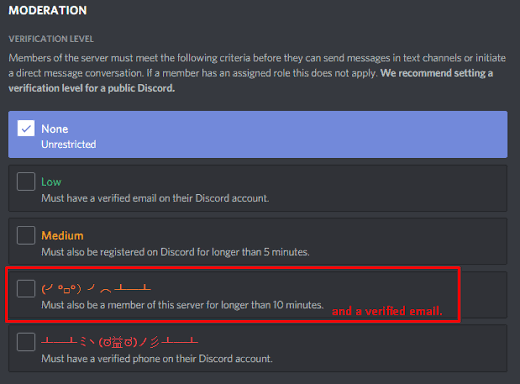
Verification levels act as a first layer of protection between joining a server and participating in its conversations.
They do not automatically identify every fake account or prevent every raid. Instead, they establish minimum requirements that members must satisfy before they can send messages.
For example, a server using email verification can restrict accounts without verified email addresses. A server using the Highest level can require members to have a verified phone number associated with their Discord account.
These restrictions make some low-effort attacks more difficult, particularly those relying on large numbers of newly created or unverified accounts.
However, verification requirements generally control messaging rather than guaranteeing that every member is trustworthy. Malicious users with established, verified accounts may still enter a server.
Discord's Five Verification Levels Explained
1. None
The None level applies no additional verification requirements through the server's verification-level setting.
New members can generally begin participating without satisfying the email, account-age, server-membership, or phone-verification requirements associated with higher levels. Other Discord restrictions and server permissions may still apply.
Best for: Small private communities, trusted friend groups, and servers where easy participation is the priority.
Limitation: It offers little protection against attacks that rely on newly created or unverified accounts.
2. Low: Verified Email
The Low level requires members to have a verified email address associated with their Discord account.
Email verification introduces a basic barrier against some low-effort spam accounts while keeping the joining experience relatively simple.
However, email verification does not prove that an account belongs to a trustworthy person. Attackers can use verified accounts to conduct spam campaigns, so this setting should be treated as a basic safeguard rather than a complete security solution.
Best for: Communities that want a simple entry requirement without introducing phone verification.
3. Medium: Account Older Than Five Minutes
The Medium level requires members to have a verified email address and a Discord account that is more than five minutes old.
This adds an account-age requirement to the existing email-verification check.
It can discourage attacks that depend on creating accounts immediately before sending spam. However, the delay is short, and attackers can prepare accounts in advance.
Best for: Growing communities that want a basic additional barrier against freshly created accounts.
4. High: More Than Ten Minutes in the Server
The High level requires members to satisfy the preceding requirements and have been a member of the server for more than ten minutes.
This requirement is different from account age.
An account may have existed for months but still need to wait after joining a server before it can send messages under this verification level.
That distinction can be useful when attackers join with older accounts and immediately attempt to flood channels.
Best for: Public servers that experience suspicious joining activity and can accommodate a short waiting period for new members.
5. Highest: Verified Phone Number
The Highest level is Discord's strictest native verification level. It requires members to have a verified phone number associated with their Discord account, in addition to meeting the requirements of the lower levels.
This can make automated raids and mass account abuse more difficult because attackers need access to accounts that meet the phone-verification requirement.
However, phone verification is not a guarantee of legitimacy. Malicious users may operate verified accounts, and previously established accounts can still be used for spam or phishing.
Best for: Large public communities and servers experiencing repeated raids where stronger verification requirements are appropriate.
Setting Up Discord Server Verification Levels
Discord's native verification settings can be configured through the server settings menu. The exact interface may differ between desktop, browser, and mobile versions.
Follow these general steps:
- Open your server: Select the Discord server you want to secure.
- Open Server Settings: Select the server name and choose Server Settings.
- Find the safety settings: Look for the Safety Setup or moderation-related section containing the verification-level setting. The menu location may vary as Discord updates its interface.
- Choose a verification level: Select the level that matches your community's security needs.
- Save or confirm the change: Follow any prompts shown by Discord.
- Test the experience: Check that legitimate members can participate and that the requirements match your intended security policy.
You need the appropriate server permissions to change these settings.
Before choosing the Highest level, consider whether phone verification is reasonable for your community. A stricter requirement may reduce some forms of abuse, but it can also prevent otherwise legitimate users from participating if they cannot or do not wish to verify a phone number.
Email Verification vs. Phone Verification
Email and phone verification serve related but different purposes.
Email verification confirms that an account has access to its associated email address. It is a relatively accessible requirement and can filter out some unverified accounts.
Phone verification adds another requirement that can raise the effort needed to operate large numbers of accounts. It can be useful when email verification alone does not provide enough protection.
Neither method guarantees that an account is genuine, safe, or controlled by a single individual.
| Feature | Email Verification | Phone Verification |
|---|---|---|
| Main requirement | Verified email address | Verified phone number |
| Setup complexity | Generally low | Generally low for server owners |
| Barrier against throwaway accounts | Basic | Stronger for some account-abuse patterns |
| Stops every raid | No | No |
| Potential onboarding friction | Relatively low | Higher for some users |
For many communities, email verification is a reasonable starting point. Phone verification becomes more relevant when a server repeatedly experiences raids or when the risks justify stricter access requirements.
How Verification Levels Help Block Throwaway Alt Accounts
Throwaway alt accounts are secondary accounts created or used for a particular purpose, such as evading moderation, spamming channels, or disrupting conversations.
Verification levels can make certain types of abuse more difficult, but the effectiveness depends on how the accounts are created and used.
Three mechanisms are particularly relevant.
- Email verification: Prevents accounts without verified email addresses from messaging under the applicable requirement.
- Account-age restrictions: Make immediate use of freshly created accounts more difficult.
- Phone verification: Requires accounts to meet an additional verification condition before messaging.
The server-membership waiting period at High can also delay accounts that join immediately before an attack.
These measures work best when combined with other safeguards. For example, server owners can restrict access to sensitive channels, limit permissions for new members, use appropriate moderation bots, and monitor suspicious patterns of joins and messages.
Verification levels do not automatically identify an account as an alt, determine whether a user has evaded a ban, or stop every account that meets the requirements. They reduce some opportunities for abuse rather than eliminating them entirely.
Additional Security Features to Use With Verification
Verification levels are most effective when supported by a broader moderation strategy.
- AutoMod: Use Discord's available AutoMod rules to help detect and block certain unwanted messages before they spread.
- Role permissions: Limit who can post announcements, manage webhooks, create invites, or change server settings.
- Channel restrictions: Keep sensitive channels accessible only to members who need them.
- Raid-response tools: Use available moderation and security features to respond to sudden waves of suspicious joins or messages.
- Moderator coordination: Establish a clear process for reporting suspicious activity, reviewing new accounts, and handling ban evasion.
- Regular security reviews: Recheck verification settings and permissions as the server grows.
Third-party bots may provide additional features, but choose them carefully and avoid granting unnecessary administrative permissions.
Verification is only one layer of security. Account protection, permission management, and active moderation remain important even when the Highest level is enabled.
Technology and Development
Discord's verification levels are native server-management features designed to establish account requirements before members can send messages.
They provide a built-in way to increase entry restrictions without requiring every server owner to create a custom verification system.
Unlike a separate CAPTCHA bot, native verification levels do not require an additional challenge workflow simply to enforce Discord's email or phone requirements. This can reduce the number of external integrations a server needs to maintain.
However, these levels are not a substitute for every form of anti-raid protection. They do not independently inspect every message, identify all malicious users, or guarantee that established accounts are safe.
Server owners should also follow Discord's current documentation because settings, menus, and platform behavior can change over time.
Platforms and Availability
Discord verification levels are part of Discord's server-management features.
They can be accessed through supported versions of Discord, although the precise settings interface may vary.
- Windows and macOS: Manage server settings through the desktop application or supported browser interface.
- Web browser: Access Discord's server-management features through the web client.
- Mobile devices: Use the Discord mobile application where the relevant server settings are available.
The ability to change verification settings depends on having the appropriate server permissions. Phone verification also depends on meeting Discord's account-verification requirements.
Why Discord Server Verification Levels Matter
Verification levels give server owners control over the balance between accessibility and security.
A server with very low entry requirements may be convenient for newcomers, but it can also be easier for some spam campaigns to exploit. Higher requirements introduce additional barriers while potentially increasing friction for legitimate members.
The right setting depends on the server's size, audience, moderation capacity, and history of abuse.
A private group of friends may not need phone verification. A large public gaming community that repeatedly experiences raids may benefit from the Highest level, especially when less restrictive measures have not been enough.
The important point is that verification should match the actual risk. Choosing the strictest option by default is not always necessary, and choosing the most permissive option may leave a public server unnecessarily exposed.
What to Know at a Glance
| Detail | Information |
|---|---|
| Feature | Discord server verification levels |
| Available levels | None, Low, Medium, High, Highest |
| Main purpose | Establish requirements before members can message |
| Email requirement | Included from Low upward |
| Account-age requirement | Medium and above |
| Server-membership waiting period | High and Highest |
| Phone-verification requirement | Highest |
| Main benefit | Adds barriers against certain types of spam and account abuse |
| Main limitation | Does not guarantee protection against every raid |
🎮 The Bottom Line
Discord server verification levels provide a straightforward way to make communities more resistant to spam, automated raids, and some forms of throwaway account abuse.
The five levels range from minimal restrictions to verified phone numbers, allowing server owners to choose requirements that suit their community. Email verification offers a basic barrier, account-age and server-membership requirements add delays, and phone verification introduces a stronger hurdle for certain types of mass account abuse.
For servers experiencing repeated raids, the Highest level can be a useful part of a wider security plan. It should still be combined with careful permissions, moderation tools, and regular reviews of suspicious activity.
The goal is not to make every newcomer jump through unnecessary hoops. It is to make your server safer without making genuine members feel unwelcome.
Comments
Sign in to join the conversation
Sign inNo comments yet
Be the first to share your thoughts!