
A Discord server doesn't need a separate channel for every possible conversation.
When dozens of text channels compete for attention, important discussions can become difficult to find and inactive channels can make a community appear quieter than it really is. Consolidating Discord text channels is a way to simplify that structure without removing the conversations that matter.
The basic idea is simple: group related topics together, keep the most important channels visible, and use roles or permissions to reveal more specialized spaces when members actually need them.
The Main Idea Behind Channel Consolidation
Channel consolidation means combining overlapping or low-activity text channels into a smaller number of clearly defined spaces.
For example, instead of creating separate channels for:
#gaming-news#gaming-discussion#gaming-clips#gaming-help
a server could organize its primary community area around a broader #gaming channel, while keeping genuinely specialized conversations elsewhere when activity justifies them.
The goal isn't to minimize the number of channels at all costs.
It's to make every channel easy to understand and useful to the people who can see it.
Setting: Organizing a Discord Server
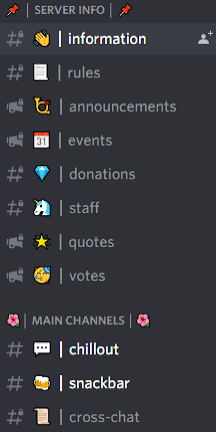
A well-structured Discord server usually has a clear hierarchy.
New members should immediately see the information and conversations they need, while experienced or highly active members can gain access to more specialized areas.
A common structure can include:
START HERE
#welcome#rules#announcements
COMMUNITY
#general#gaming#media
SPECIALIZED
- Private interest channels
- Competitive channels
- Contributor spaces
- Event planning
- Staff or volunteer areas
This structure prevents the main server interface from becoming overloaded while still allowing the community to expand.
Grouping Related Topics
The first step is identifying channels that serve nearly identical purposes.
Ask whether two channels genuinely need to exist separately.
For example, #game-discussion and #gaming-chat may attract the same conversations. Combining them can concentrate activity rather than splitting it between two quiet spaces.
Similarly, multiple entertainment channels could potentially become a broader #off-topic or #media channel if the individual categories don't receive enough activity.
Create Channels Around User Intent
Instead of asking, "What topic can we create a channel for?", ask:
"What does a member actually want to do here?"
This can produce much cleaner categories.
A gaming server might need:
- Discussion: Talk about games.
- LFG: Find teammates.
- Media: Share clips and screenshots.
- Support: Ask for technical or gameplay help.
Those purposes are clearer than creating a separate channel for every individual game before there is enough activity to support them.
Characters / Key People
Discord channel consolidation does not revolve around individual characters or people. Instead, the important roles are the different member groups that interact with the server.
New Members
New members should see a limited set of essential channels.
Their first experience should be simple enough that they immediately understand where to go.
Active Members
Members who regularly participate can be given roles that unlock additional channels relevant to their interests or level of involvement.
Moderators and Staff
Moderation and administration spaces should remain separate from general community channels and should only be visible to authorized roles.
Gameplay / Features / Major Details
- Logical Grouping: Combine channels covering closely related subjects or activities.
- Reduced Clutter: Keep the main channel list focused on conversations that receive meaningful activity.
- Role-Based Access: Use Discord roles and permissions to reveal specialized channels to appropriate members.
- Progressive Access: Allow members to discover additional areas as they become active or select relevant interests.
- Clear Categories: Organize channels into recognizable sections so members understand where conversations belong.
- Activity-Based Expansion: Create dedicated channels when an existing topic has enough participation to justify its own space.
- Channel Archiving: Remove, archive, or repurpose channels that are no longer useful.
Using Roles to Progressively Reveal Channels
One of the most useful ways to simplify a large server is to combine channel consolidation with role-based permissions.
Instead of showing every possible channel to everyone, server owners can create roles around interests, activities, or responsibilities.
For example:
Member
→ General community channels
Minecraft Role
→ Minecraft-specific channels
Competitive Role
→ Competitive discussion and LFG spaces
Creator Role
→ Content creation and collaboration channels
This creates a progressive structure.
A new member isn't confronted with 40 channels immediately. As they become involved and select relevant roles, additional spaces become available.
The result is a server that can remain large without feeling unnecessarily complicated.
How to Decide Which Channels to Consolidate
Before deleting or merging channels, review their actual activity.
Consider:
- How frequently is the channel used?
- Are conversations happening elsewhere?
- Does the channel have a clearly different purpose?
- Would combining it with another channel increase activity?
- Do members actively request the separate space?
- Is the channel needed for moderation, permissions, or organization?
If two channels consistently attract the same type of conversation, consolidation may make sense.
If a specialized channel has a highly active community of its own, keeping it separate may be more useful.
Activity should guide structure.
Technology / Development
Discord's permission and role systems make progressive channel access possible.
Server owners can configure channel permissions so that specific roles can view or interact with particular channels. This allows communities to create different experiences for new members, regular participants, specialized groups, moderators, and staff.
The exact settings available can vary depending on Discord's current features and server configuration, so administrators should review channel permissions carefully after making structural changes.
Platforms and Availability
Discord server organization and channel management are supported across Discord's major platforms, although the exact settings interface can vary.
- Android
- iOS
- Windows
- macOS
- Linux
- Web
Server owners should verify permission changes after restructuring, particularly when managing a server from mobile.
Why It Matters
A large Discord server doesn't necessarily need a large visible channel list.
In fact, excessive channel choices can make a community harder to navigate. New members may struggle to understand where conversations belong, while existing discussions become fragmented across multiple low-activity spaces.
Consolidation concentrates activity.
Instead of having five channels with occasional messages, one well-organized channel can create the impression of a much more active community.
Role-based access adds another layer of flexibility. It allows the server to remain simple for newcomers while still supporting specialized communities as they develop.
The result is a structure that grows with the member, rather than overwhelming them on day one.
Quick Facts
| Detail | Information |
|---|---|
| Topic | Discord Text Channel Consolidation |
| Main Purpose | Reduce clutter and improve navigation |
| Core Strategy | Group related topics logically |
| Access Control | Discord roles and permissions |
| Best For | Growing and large communities |
| Key Benefit | Concentrates activity and simplifies discovery |
| Platforms | Android, iOS, Windows, macOS, Linux, Web |
🎮 The Bottom Line
Consolidating Discord text channels isn't about making a server smaller. It's about making it easier to understand.
Group related conversations, remove unnecessary duplication, and keep the most important channels visible to everyone. Then use roles and permissions to progressively reveal specialized spaces to members who actually need them.
A well-organized server should feel simple when someone joins and become more useful as they participate.
The best Discord structure isn't the one with the most channels. It's the one where every visible channel has a clear reason to exist.
Comments
Sign in to join the conversation
Sign inNo comments yet
Be the first to share your thoughts!