
One of the biggest reasons people subscribe to iCloud+ is privacy.
Whether you're signing up for newsletters, shopping online, or creating accounts for new apps, Apple's Hide My Email feature lets you generate a random email address that forwards messages to your real inbox keeping your actual email address hidden from websites and businesses.
It's a simple idea that has become one of Apple's most popular privacy features.
But in July 2026, security researchers disclosed a flaw that challenged that promise.
Under specific conditions, a bug caused some users' real Apple ID email addresses to appear in mail server logs, potentially exposing information that Hide My Email was specifically designed to keep private.
Here's what happened, who could have been affected, and what you should do now.
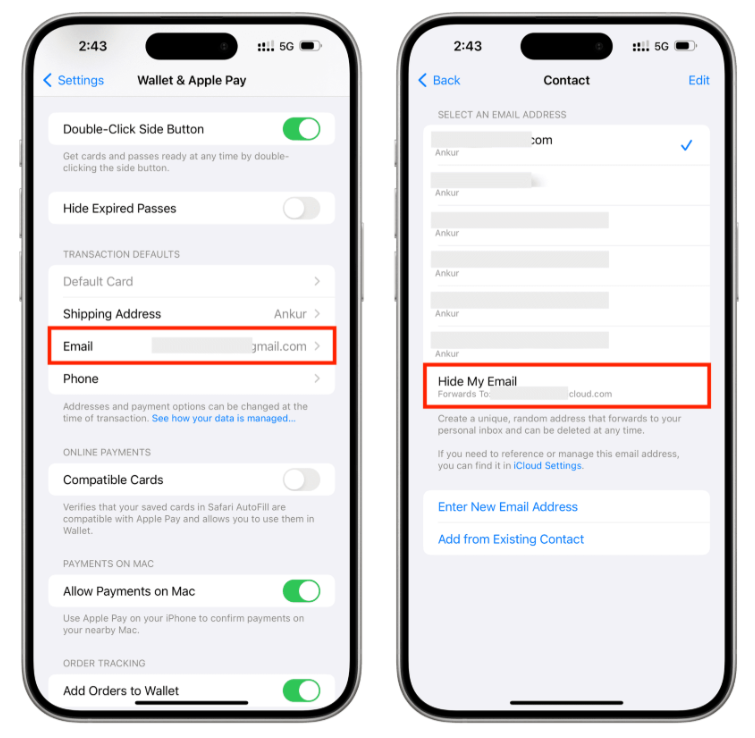
What Is Hide My Email?
Hide My Email is an iCloud+ feature that creates unique email aliases.
Instead of giving a website your real email address, Apple generates a random forwarding address.
When someone sends an email to that alias:
- Apple receives the message.
- The email is forwarded to your real inbox.
- The sender never sees your actual email address.
If the alias begins receiving spam, you can simply deactivate it without changing your primary email account.
This provides an extra layer of privacy and reduces unwanted tracking across different websites.
What Went Wrong?
Researchers discovered that the privacy protection wasn't working correctly in one specific scenario.
Normally, the forwarding system hides your real Apple ID email address completely.
However, when certain incoming emails were automatically rejected as spam by receiving mail systems, the resulting bounce messages could include information that revealed the underlying forwarding destination.
Instead of exposing only the anonymous Hide My Email address, the mail logs sometimes contained the user's real email address.
The emails themselves never needed to reach your inbox for this to happen.
Simply triggering the rejection process could expose information inside server logs maintained by third-party mail providers.
Why Was This a Privacy Concern?
The biggest concern wasn't that hackers could instantly read your inbox.
The issue was that your anonymous email identity could potentially be linked back to your real address.
For many users, that's merely inconvenient.
For others, it could be much more serious.
People often use Hide My Email for:
- Anonymous online accounts
- Marketplace purchases
- Privacy-focused communities
- Journalistic work
- Security research
- Personal projects
- Reducing spam
If the forwarding address can be connected to the real inbox behind it, some of the privacy benefits disappear.
Who Could Have Been Affected?
According to the researchers who disclosed the issue, the vulnerability existed for an extended period before being fully resolved.
The timeline reported publicly was:
- June 2025: Vulnerability reported to Apple.
- March 2026: Initial mitigation attempted.
- July 3, 2026: Final server-side fix deployed.
Because the fix occurred on Apple's infrastructure rather than on individual devices, users didn't need to install an iPhone, iPad, or Mac update to receive protection.
However, aliases used before the server-side fix may have been exposed under the specific conditions required to trigger the bug.
Do You Need to Update Your iPhone?
No.
Unlike many security issues, this wasn't caused by software running on your device.
The problem existed within Apple's email infrastructure.
Once Apple completed the server-side fix, the vulnerability was resolved for all users automatically.
No iOS, iPadOS, or macOS update was required specifically for this issue.
Should You Be Worried?
For most people, the practical risk is relatively low.
The bug required a very specific sequence of events involving rejected email messages and server-generated bounce logs.
However, users who depend heavily on anonymity may wish to take additional precautions.
This includes people who use Hide My Email for:
- Sensitive communications
- Investigative journalism
- Security research
- Activism
- Personal safety reasons
If maintaining complete separation between identities is essential, it's worth reviewing the aliases you've used over the past several years.
What Should You Do Now?
Although Apple has already fixed the vulnerability, there are still several good security practices to follow.
Consider:
Review Existing Aliases
Delete aliases you no longer use.
Fewer active forwarding addresses reduce your overall exposure.
Watch for Unexpected Email
If your primary email address suddenly begins receiving unusual spam or targeted phishing attempts, monitor the activity carefully.
While many factors can contribute to spam, unexpected changes are worth investigating.
Use Separate Email Accounts for Sensitive Activities
If complete anonymity is essential, consider maintaining a dedicated email account used exclusively as the destination for privacy-focused forwarding services.
Keeping that address separate from your personal identity adds another layer of protection.
Continue Using Hide My Email
Despite this incident, Hide My Email remains one of the strongest privacy features available to everyday users.
The vulnerability has already been fixed, and using unique aliases is still significantly safer than giving every website your primary email address.
Frequently Asked Questions
Did Apple leak my email address?
Not directly. Under specific circumstances, a flaw could allow your real email address to appear in third-party mail server logs instead of remaining fully hidden.
Has Apple fixed the problem?
Yes. Apple completed a server-side fix in early July 2026, eliminating the vulnerability without requiring users to install a software update.
Do I need to change my Apple ID?
Most users do not need to change their Apple ID email address.
However, users with exceptionally high privacy requirements may choose to rotate sensitive forwarding addresses.
Should I stop using Hide My Email?
No. The feature continues to provide valuable privacy benefits, and Apple has already addressed the disclosed issue.
Can I check if my email was exposed?
There is currently no public method to determine whether a specific alias appeared in third-party mail server logs.
If you used Hide My Email for highly sensitive purposes before July 2026, it's reasonable to review those accounts and consider replacing older aliases.
Final Thoughts
Privacy tools are only as strong as the systems behind them.
While Apple's Hide My Email service remains one of the best consumer privacy features available, this incident serves as a reminder that even well-designed security systems can contain unexpected weaknesses.
The good news is that Apple has already fixed the issue on its servers, meaning current aliases are protected against this specific bug.
For most users, there's no reason to abandon Hide My Email just continue following good privacy habits, retire unused aliases, and stay informed about future security updates.
Sources
- Apple iCloud+ Documentation
- Apple Security Updates
- EasyOptOuts Security Research
- Responsible Disclosure Timeline
Comments
Sign in to join the conversation
Sign inNo comments yet
Be the first to share your thoughts!