
How to Make Your Discord Server Look Professional
First impressions matter. Whether you're building a gaming community, an AI hub, a startup workspace, or a study group, people decide within seconds if your Discord server is worth joining.
A clean, organized, and professional server builds trust, encourages conversations, and keeps members coming back. On the other hand, cluttered channels, confusing roles, and poor onboarding can cause people to leave before they even say hello.
In this guide, you'll learn practical tips to make your Discord server look polished and welcoming, even if you're just getting started.
Choose a Clear Server Name and Icon
Your server name is your brand. Keep it short, memorable, and easy to search.
Good examples:
- AI Builders Hub
- Pixel Gamers
- Dev Connect
- Startup Circle
Avoid names filled with random emojis or excessive symbols, as they can make your server appear unprofessional.
Your server icon should also be high quality. Use a simple logo or recognizable image that looks good even at smaller sizes.
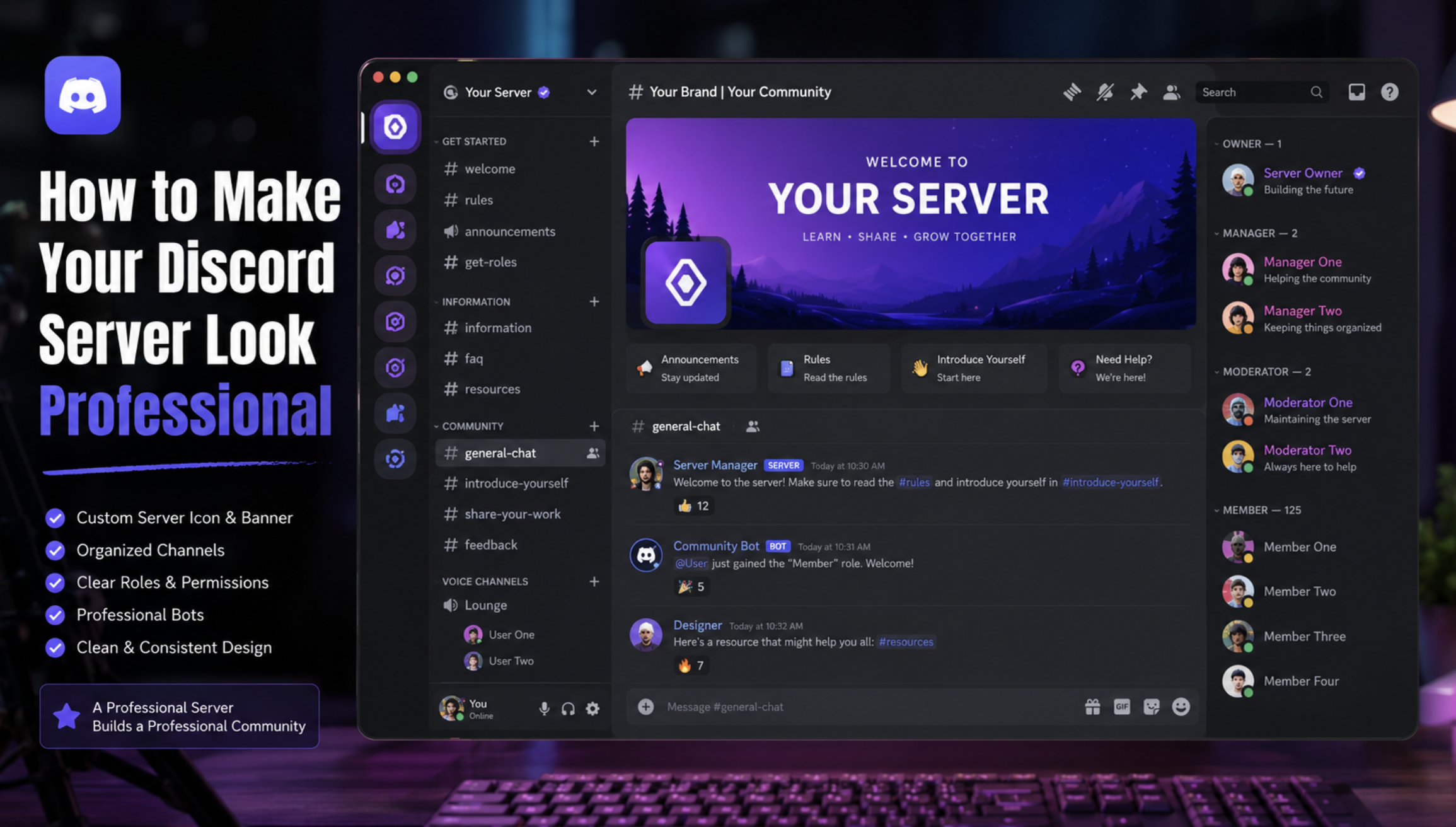
Image Suggestion: Example of a clean Discord server icon and banner.
Create an Attractive Server Banner
If your server has access to banners, take advantage of them.
A professional banner should:
- Match your community's theme
- Use consistent colors
- Avoid clutter
- Include minimal text
Consistency across your icon, banner, and branding makes your community feel established.
Organize Your Channels
Nothing scares new members more than joining a server with 80 random channels.
Instead, organize everything into categories.
Example layout:
Welcome
- 👋 welcome
- 📜 rules
- 📢 announcements
Community
- 💬 general
- 🎉 introductions
- 🤝 networking
Resources
- 📚 guides
- 🔗 useful-links
- ❓ faq
Voice Channels
- General Voice
- Gaming Voice
- Study Room
Keep channel names simple and easy to understand.
Use a Logical Role Structure
Roles help members instantly understand who's who.
A professional server typically includes:
- Owner
- Admin
- Moderator
- Helper
- Verified Member
- VIP
- Bots
Avoid creating dozens of unnecessary roles. Too many colors and titles can make the server feel chaotic.
Write a Great Welcome Message
Your welcome message sets the tone for the entire community.
Instead of simply saying:
Welcome!
Try something like:
👋 Welcome to our community! Introduce yourself, check the rules, and don't hesitate to ask questions. We're glad you're here!
A friendly welcome encourages participation immediately.
Add Only Essential Bots
Many new server owners install every bot they find.
This usually creates unnecessary commands and spam.
Instead, choose bots based on your needs.
Recommended categories:
- Moderation
- Ticket system
- Analytics
- Events
- Auto roles
- Server growth
Our guide on 25 Best Discord Bots Every Server Needs can help you choose the right ones for your community.
Create Easy-to-Follow Rules
Rules don't need to be long.
Keep them simple.
Example:
- Be respectful.
- No spam.
- No hate speech.
- Keep discussions on topic.
- Follow Discord's Community Guidelines.
Clear rules create a safer environment and reduce moderation issues.
Use Consistent Emojis
Emojis make navigation easier, but consistency is key.
For example:
- 📢 Announcements
- 💬 General
- 🎮 Gaming
- 🎨 Art
- 📚 Resources
- 🎉 Events
Avoid mixing random emoji styles across different channels.
Enable Onboarding
Discord's onboarding feature helps new members choose their interests and automatically gain access to relevant channels.
Instead of overwhelming users with dozens of channels, onboarding provides a personalized experience from day one.
It's one of the easiest ways to make your server feel modern and organized.
Keep Your Server Active
Even the best-looking server won't retain members if nothing happens.
Try to post regularly:
- Weekly discussions
- Community polls
- Game nights
- Study sessions
- AMAs
- Giveaways
- Voice chats
Consistent activity makes your community feel alive.
Make Your Server Easy to Discover
Once your server looks professional, the next step is getting people to find it.
Listing your server on Discords.ai helps increase visibility among users searching for communities like yours.
You can also use the Discords.ai Bump Bot to regularly bump your server, making it easier for potential members to discover your community.
A professional server deserves an audience.
Review Your Server Regularly
Communities evolve over time.
Every few months, review your:
- Channels
- Roles
- Bots
- Permissions
- Rules
- Welcome message
- Events
Removing outdated content keeps your server clean and easier to navigate.

Common Mistakes to Avoid
- Too many channels
- Excessive role colors
- Complicated permissions
- Poor onboarding
- No welcome message
- Installing unnecessary bots
- Inactive announcement channels
- Inconsistent branding
- No community events
- Ignoring member feedback
Frequently Asked Questions
How many channels should a Discord server have?
Start with only the channels your community actually needs. It's easier to add more later than to remove unused ones.
What makes a Discord server look professional?
A clean layout, consistent branding, organized roles, clear rules, active moderation, and regular community engagement.
Should I use lots of bots?
No. Install only bots that solve a specific problem. Too many bots can make your server harder to manage.
Is onboarding worth enabling?
Yes. Onboarding helps new members quickly find relevant channels and improves the joining experience.
Where should I promote my Discord server?
After setting up your server, list it on Discords.ai, share it on social media, and collaborate with related communities to attract new members.
Resources
- Discord Safety Center - https://discord.com/safety
- Discord Community Guidelines - https://discord.com/guidelines
- Discord Server Templates - https://discord.new
- Discords.ai - https://www.discords.ai/
Final Thoughts
A professional Discord server isn't about having hundreds of channels or flashy decorations. It's about creating a space that's organized, welcoming, and easy to navigate.
Focus on clear branding, a simple channel structure, helpful roles, and consistent community engagement. Once your server is ready, increase its visibility by listing it on Discords.ai and using the Discords.ai Bump Bot to reach more potential members.
Small improvements can make a big difference in how people perceive and interact with your community.
Comments
Sign in to join the conversation
Sign inNo comments yet
Be the first to share your thoughts!