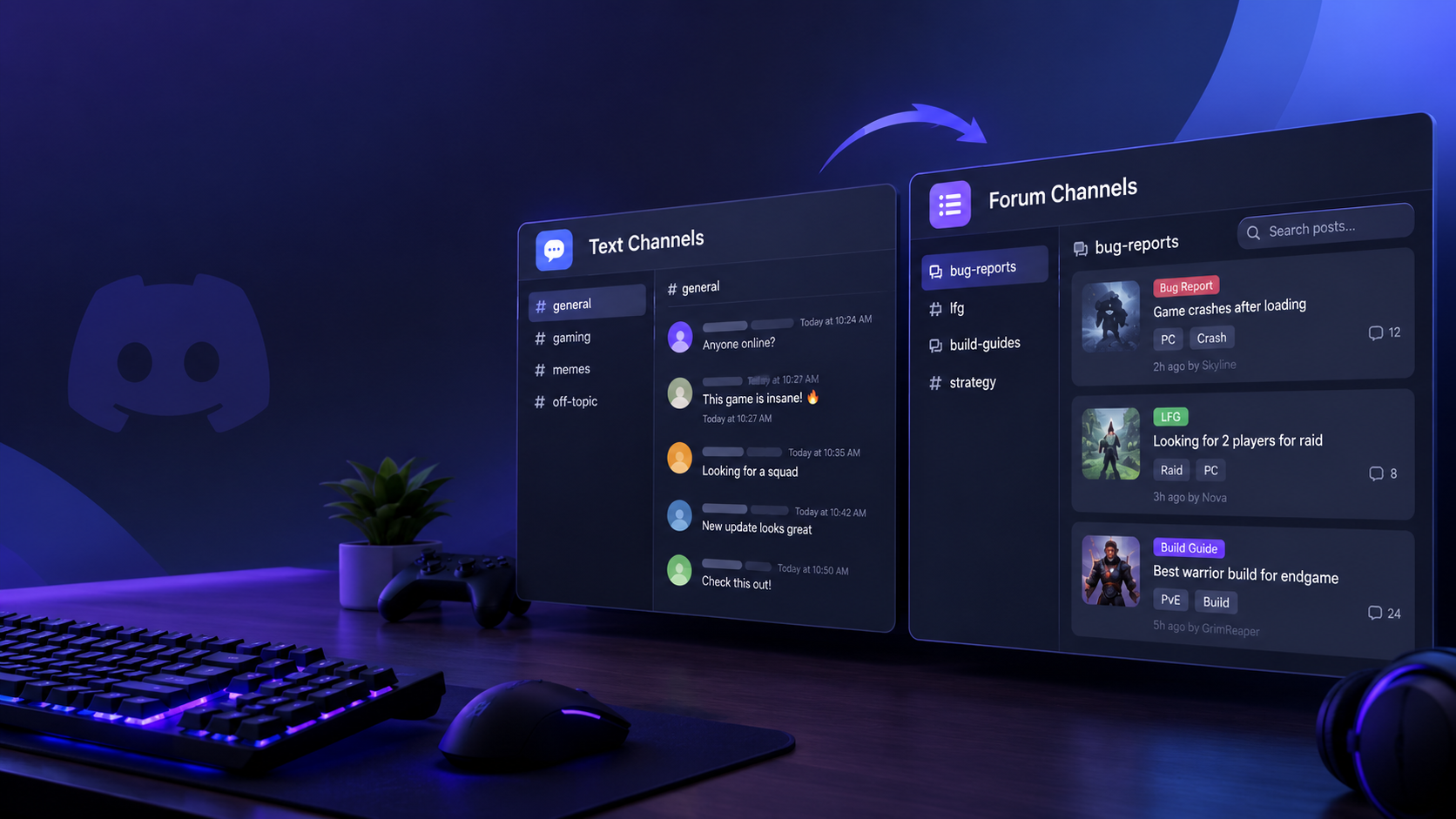

Forum Channels vs Text Channels: How to Organize Massive Game Discussion Hubs
When a gaming Discord grows from a few dozen players into thousands of members, the biggest problem is often not moderation. It is finding the right conversation.
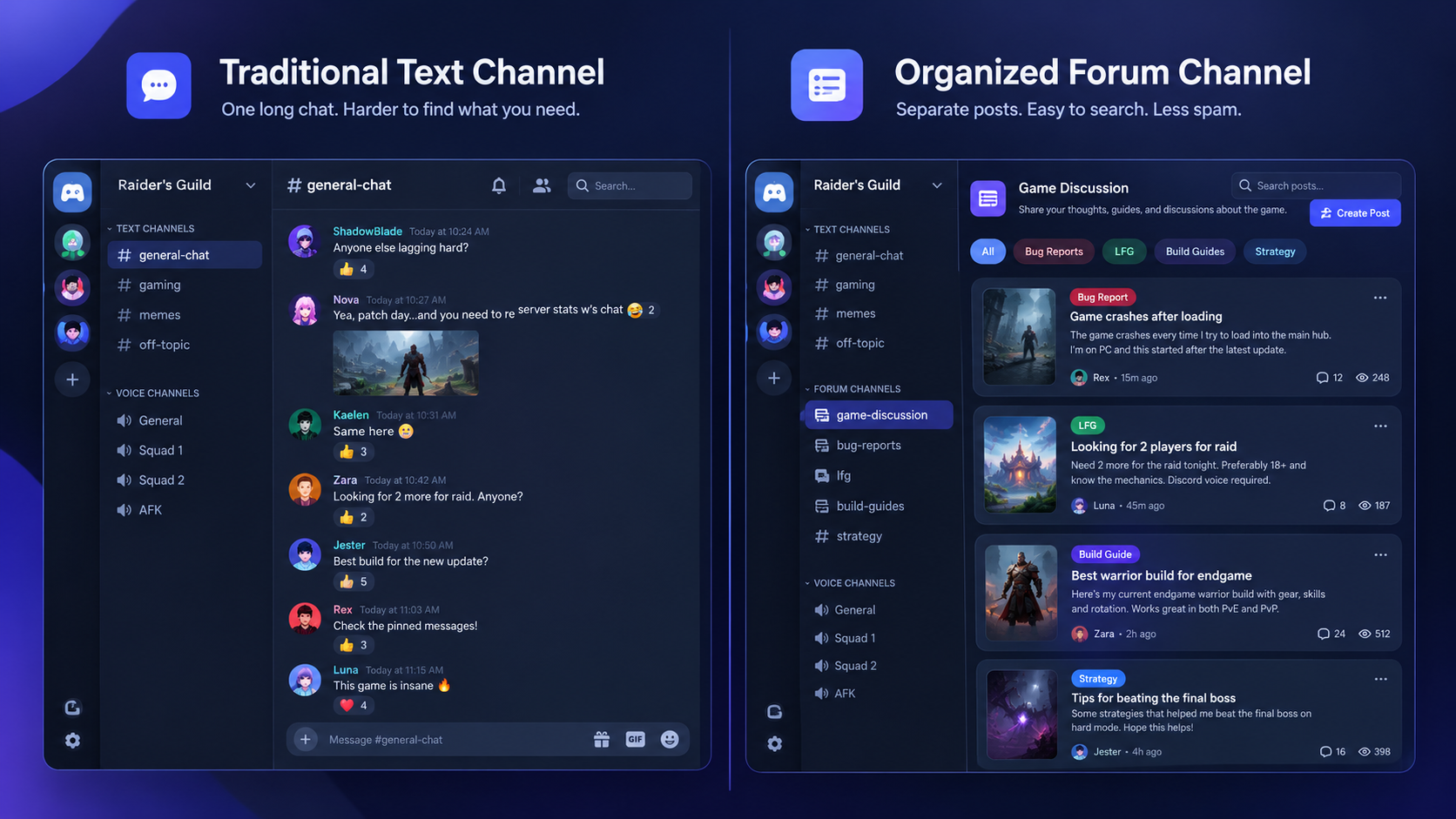
That is where Forum Channels vs Text Channels becomes an important decision for server owners. A standard text channel is excellent for fast-moving conversation, reactions, announcements, memes, and live community chatter. But when a server needs to manage hundreds of bug reports, LFG requests, build guides, troubleshooting questions, or detailed discussions, a constantly moving message feed can become difficult to navigate.
Discord's own documentation describes Text Channels as spaces for in-the-moment discussion, while Forum Channels are designed around individual posts and longer-running conversations.
The difference sounds simple, but it can completely change how a large gaming community works.
────────────────────────────────────────
────────────────────────────────────────
────────────────────────────────────────
What Is a Discord Text Channel?
Text Channels are Discord's traditional format for written communication. Members enter a channel, send messages, react to them, reply, share files, post links, and continue the conversation.
They are particularly useful when the conversation is happening in real time.
Imagine a gaming server preparing for a new expansion. Players might jump into #general to discuss the trailer, react to a developer announcement, share memes, or talk about their first impressions.
That speed is the strength of a Text Channel.
The problem appears when the same channel is expected to handle dozens of unrelated subjects at once.
A player might post a question about a weapon build, another member could ask for an LFG group, someone reports a crash, and another person starts discussing the latest patch.
Within minutes, important information can disappear beneath newer messages.
Discord's general search can still locate older messages using filters for users, channels, dates, and content types, but finding an entire conversation is often easier when the discussion has its own dedicated space.
────────────────────────────────────────
What Is a Discord Forum Channel?
Forum Channels are designed around individual discussions rather than one continuous message stream.
Instead of throwing every message into the same feed, members create posts. Each post becomes its own conversation that can be opened, followed, searched, tagged, or closed.
Discord says Forum Channels are intended for organized discussions where conversations do not constantly talk over each other.
For a gaming community, that creates a much more structured environment.
Instead of:
#game-discussion
"Anyone know why my game keeps crashing?"
"Try updating your drivers."
"Looking for two players."
"What's the best shotgun?"
"Patch notes are crazy."
"Does this build still work?"
A Forum Channel could contain separate posts:
[BUG] Game crashes after loading
[LFG] Looking for three players
[BUILD] Best endgame shotgun setup
[GUIDE] Fastest way to level weapons
[QUESTION] How does armor penetration work?
Each discussion stays attached to its own topic.
That is the fundamental difference.
────────────────────────────────────────
Forum Channels vs Text Channels
| Feature | Text Channel | Forum Channel |
|---|---|---|
| Fast conversation | Excellent | Good |
| Live reactions | Excellent | Moderate |
| Memes | Excellent | Good |
| Bug reports | Good | Excellent |
| LFG matching | Good | Excellent |
| Build guides | Moderate | Excellent |
| Long discussions | Moderate | Excellent |
| Topic organization | Low | High |
| Tags | No dedicated post tags | Yes |
| Dedicated search | General channel search | Forum post search |
| Persistent discussions | Moderate | Excellent |
| Best for | Real-time chat | Structured topics |
The important point is that Forum Channels are not simply "better Text Channels."
They solve a different problem.
Text Channels are built around conversation flow.
Forum Channels are built around conversation organization.
────────────────────────────────────────
Why Forums Work Better for Bug Reports
Bug reports are one of the clearest examples of where Forums can improve a gaming server.
A normal #bug-reports Text Channel can quickly become overwhelming.
Players report crashes, missing textures, matchmaking failures, audio problems, controller issues, performance drops, and dozens of other problems. Members may respond with potential solutions, but newer reports continuously push older ones down the channel.
A Forum Channel gives every issue its own post.
For example:
[CRASH] Game crashes after entering the desert area
[PC] Stuttering after latest update
[PS5] Controller disconnects during matchmaking
[AUDIO] Dialogue disappears during cutscenes
The server can then create tags such as:
PC
PS5
Xbox
Crash
Performance
Audio
Under Review
Fixed
Discord specifically recommends using Forum Channels for bug reports in its game-community documentation, including post guidelines that ask players to provide information such as reproduction steps, platform, and game version.
That turns a chaotic complaint feed into something closer to a lightweight community support database.
────────────────────────────────────────
The Real Advantage: Better Information Quality
The best bug-report system does not simply collect more reports.
It collects better reports.
A Forum Channel can have post guidelines asking users to include:
Game version
Platform
Steps to reproduce
Expected result
Actual result
Screenshot or video
Frequency of the issue
Moderators can then respond inside the relevant discussion instead of searching through hundreds of unrelated messages.
This also makes recurring problems easier to identify.
────────────────────────────────────────
────────────────────────────────────────
Using Forums for LFG
Looking for Group, or LFG, is another area where Forum Channels can make a huge difference.
Traditional LFG channels are extremely fast-moving.
A player might write:
"Need 2 for raid."
Someone replies five minutes later.
Then another player posts:
"Anyone running ranked?"
A few minutes later, that request disappears underneath newer messages.
For highly active games, players can miss useful LFG requests simply because they were not online at the right moment.
A Forum Channel can give every group request its own post.
For example:
[LFG] Need 2 players for Saturday raid
[LFG] Ranked squad looking for support
[LFG] Casual players for evening sessions
[LFG] New players looking for beginner group
Tags can then identify:
Raid
Ranked
Casual
Beginner
Competitive
PC
Console
This creates a much more searchable LFG environment.
────────────────────────────────────────
LFG Forums Can Also Reduce Repeated Posts
One of the biggest advantages of structured discussions is that members can discover existing conversations before starting another one.
Imagine a player looking for a beginner raid group.
Instead of immediately posting:
"Anyone want to play?"
They can search existing posts and potentially find an active group already looking for members.
That means fewer duplicate requests and less unnecessary message volume.
It does not eliminate the need for real-time LFG channels, especially when players need an immediate response.
But it gives large communities another layer of organization.
────────────────────────────────────────
Build Guides Become Easier to Find
Build discussions are another perfect use case.
A traditional #builds channel might contain:
weapon builds
character builds
PvP builds
PvE builds
beginner builds
endgame builds
patch-specific builds
theorycrafting
questions
Everything exists in one stream.
A Forum Channel can turn that into a searchable library.
For example:
[BUILD] Best Mage Build for Season 8
[BUILD] Beginner Tank Setup
[GUIDE] Endgame Critical Damage Build
[PVP] Competitive Assassin Setup
[PATCH 8.1] Best builds after balance update
Users can search the forum for specific topics instead of scrolling through hundreds of messages.
This is where Forums stop feeling like another chat feature and start functioning like a community knowledge base.
────────────────────────────────────────

────────────────────────────────────────
Tags Turn Discussions Into Categories
Tags are one of the most useful features of Forum Channels.
Discord allows server administrators to create tags that can label forum posts, and tags can even be required before members create a post. Forum posts can also be filtered by tags, including multiple tags at once.
For a large gaming server, tags should not be random.
They should represent categories that members actually search for.
For a competitive shooter, that might be:
Bug
LFG
Loadout
Strategy
Ranked
Patch
Question
For an RPG:
Build
Quest
Boss
Lore
Gear
Guide
Spoiler
The goal is simple.
Make the tag system reflect how your community thinks about the game.
────────────────────────────────────────
Searchability Is the Biggest Advantage
The biggest reason to use Forums is not simply that they look cleaner.
It is that information becomes easier to retrieve later.
Discord's Forum Channels include a dedicated search bar for finding posts by keywords, while tags can be used to filter discussions.
That changes the lifecycle of community content.
A normal chat message might be useful for five minutes.
A well-organized forum post can remain useful for months.
Consider a build guide posted after a game update.
In a normal Text Channel, that guide might disappear underneath thousands of new messages.
In a Forum Channel, the post can remain discoverable.
Six months later, another player can search for the same topic and potentially find the discussion.
That is extremely valuable for games with long lifespans.
────────────────────────────────────────
Forums Can Reduce Message Spam Without Killing Conversation
The goal should not be to eliminate messages.
The goal is to put different types of conversation in the right place.
A good server might use:
Text Channels for:
General chat
Memes
Live reactions
Patch-day excitement
Community announcements
Quick questions
Forum Channels for:
Bug reports
LFG requests
Build guides
Troubleshooting
Feedback
Strategy discussions
Frequently repeated questions
This creates a natural separation between live conversation and persistent knowledge.
────────────────────────────────────────
When Text Channels Are Still Better
Forums are not the answer to everything.
If your community needs rapid back-and-forth conversation, Text Channels remain the better option.
A #general channel should probably remain a Text Channel.
So should a channel dedicated to:
Live event reactions
Memes
Casual conversation
Quick jokes
Streamer reactions
Patch-day chat
The reason is simple.
These conversations benefit from speed.
People are not necessarily looking for an old meme discussion from three months ago.
They want to talk right now.
Discord itself describes Text Channels as being suited to in-the-moment discussion, while Forums are designed for more drawn-out topic-based conversations.
────────────────────────────────────────
A Recommended Gaming Server Structure
For a large gaming community, a hybrid structure usually makes more sense than replacing every Text Channel with a Forum.
COMMUNITY
#announcements
#general
#memes
#off-topic
GAME DISCUSSION
#game-chat
#patch-discussion
#screenshots
FORUMS
#bug-reports
#lfg
#build-guides
#strategy
#technical-support
VOICE
General VC
Squad 1
Squad 2
Competitive
This structure gives fast conversation its own home while giving important topics a more permanent structure.
────────────────────────────────────────
────────────────────────────────────────
How to Set Up a Forum Channel
Forum Channels are currently available to Community servers. Discord's setup process starts by creating a new channel and selecting Forum as the channel type.
A practical setup looks like this:
Step 1: Enable Community
Your server needs Community enabled to use Forum Channels.
Step 2: Create the Forum
Open the category where you want the forum and create a new channel.
Choose:
Forum
Step 3: Write Post Guidelines
Explain exactly what members should include.
For a bug report:
Include your platform, game version, reproduction steps, and screenshots when possible.
For LFG:
Include game mode, region, platform, preferred play time, and group size.
For builds:
Include the character, equipment, game version, and intended playstyle.
Step 4: Create Useful Tags
Do not create 40 tags just because Discord allows you to.
Start with the categories members will actually use.
Step 5: Choose the Layout
Discord supports List View and Gallery View. List View is generally better for text-heavy discussions, while Gallery View is more suitable for media-focused posts.
Step 6: Publish Example Posts
Before announcing the new forum, create several example posts.
This shows members exactly how the system is supposed to work.
────────────────────────────────────────
A Smart Tag System for Gaming Servers
Here is a practical starting point:
| Forum | Recommended Tags |
|---|---|
| Bug Reports | PC, Console, Crash, Performance, Audio, Fixed |
| LFG | Raid, Ranked, Casual, Beginner, Competitive |
| Build Guides | PvE, PvP, Beginner, Endgame, Patch |
| Strategy | Guide, Tips, Boss, Mechanics, Meta |
| Feedback | Suggestion, Balance, UI, Feature |
The important part is consistency.
If one moderator uses Performance while another uses FPS, Frame Rate, and Optimization for the same problem, your organization becomes less useful.
Choose one naming convention and stick to it.
────────────────────────────────────────
Common Mistakes to Avoid
Turning Every Conversation Into a Forum
Do not create a Forum Channel for every topic.
That can make a server feel more complicated instead of less.
Keep fast-moving conversations in Text Channels.
────────────────────────────────────────
Creating Too Many Tags
A tag system should make information easier to find.
If members need to study a manual before creating a post, the system is too complicated.
Start small.
Expand only when you identify a genuine organizational problem.
────────────────────────────────────────
No Post Guidelines
A Forum without guidelines can quickly become another messy discussion area.
Tell members what information belongs in each type of post.
────────────────────────────────────────
Replacing General Chat
Forums should complement your community chat, not replace it.
People still need somewhere to joke around, react to news, share clips, and talk about what they are playing.
────────────────────────────────────────
Letting Old Posts Become Dead Weight
Discord supports automatic movement of inactive Forum posts into an Older Posts section. The inactivity settings include 1 hour, 24 hours, 3 days, and 1 week, with 3 days selected by default.
Use this to keep the active forum clean without destroying older discussions.
────────────────────────────────────────
The Best Setup for a Massive Gaming Community
If your server has thousands of members, the ideal solution is rarely "Text Channels or Forums."
It is both.
Use Text Channels for what is happening now.
Use Forum Channels for what people will want to find later.
That distinction makes server organization much easier.
A player asking:
"Anyone online?"
belongs in Text.
A player asking:
"What's the best endgame build after Patch 8.2?"
belongs in a Forum.
A player saying:
"This patch is crazy."
belongs in Text.
A player reporting:
"Game crashes every time I enter the new dungeon."
belongs in a Forum.
The difference is not about how important the message is.
It is about whether the conversation benefits from having its own persistent topic.
────────────────────────────────────────
FAQ
Are Discord Forum Channels better than Text Channels?
Neither is universally better. Text Channels are better for fast, real-time conversation, while Forum Channels are better for organized, persistent topic-based discussions.
────────────────────────────────────────
Can Forum Channels be used for bug reports?
Yes. Discord's own game-community guidance specifically recommends Forum Channels for bug reports because posts and tags can help organize issues and make reports more actionable.
────────────────────────────────────────
Can I use Forum Channels for LFG?
Yes. LFG is a strong use case because individual posts can represent separate group requests, while tags can help players filter by activity type.
────────────────────────────────────────
Can Forum Channels replace Text Channels?
They can replace some specialized Text Channels, but they should not replace everything. Real-time conversation is still better suited to Text Channels.
────────────────────────────────────────
Do Forum Channels support tags?
Yes. Forum posts can use tags, and server administrators can configure tags as part of the Forum Channel setup. Tags can also be used to filter posts.
────────────────────────────────────────
Are Forum Channels searchable?
Yes. Discord provides a dedicated search bar for Forum Channels, allowing members to search for posts by keywords.
────────────────────────────────────────
Can Forum posts be moderated?
Yes. Discord supports moderation features including AutoMod and Slow Mode for Forum Channels, along with API support for developers.
────────────────────────────────────────
Final Verdict
The Forum Channels vs Text Channels debate is really about two different styles of communication.
Text Channels are the heartbeat of a Discord server. They are fast, casual, reactive, and ideal for conversations happening in the moment.
Forum Channels are the server's memory.
They give bug reports, LFG requests, build guides, troubleshooting discussions, and strategy posts a dedicated home where they can remain organized and easier to rediscover.
For a small gaming server, a few Text Channels may be all you need.
For a massive community, however, forcing every conversation into one continuous feed creates unnecessary noise.
The smarter approach is to let Text Channels handle the chaos of live community interaction while Forum Channels handle the information members will want to find again.
That is how a Discord server can grow from a busy chat room into a genuinely useful gaming community hub.
Sources
Discord Forum Channels FAQ: https://support.discord.com/hc/en-us/articles/6208479917079-Forum-Channels-FAQ
Discord Forum Channels announcement: https://discord.com/blog/forum-channels-space-for-organized-conversation
Discord Game Community Guide: https://github.com/discord/discord-api-docs/blob/main/developers/game-development/how-to-create-a-community-for-your-game.mdx
Discord Search Guide: https://support.discord.com/hc/en-us/articles/115000468588-How-to-Use-Search-on-Discord
Discord Text Channels Guide: https://support.discord.com/hc/en-us/articles/4412085582359-Text-Channels-Text-Chat-In-Voice-Channels



Comments
Sign in to join the conversation
Sign inNo comments yet
Be the first to share your thoughts!