
Discord Nitro's Name Effect Drop: Gummy, Prism, and the New Fonts Explained
Your Discord username is one of the first things people notice when you join a server, reply in a busy channel, or appear in a friend's direct messages. Now, Discord Nitro subscribers have more ways to make that name feel personal.
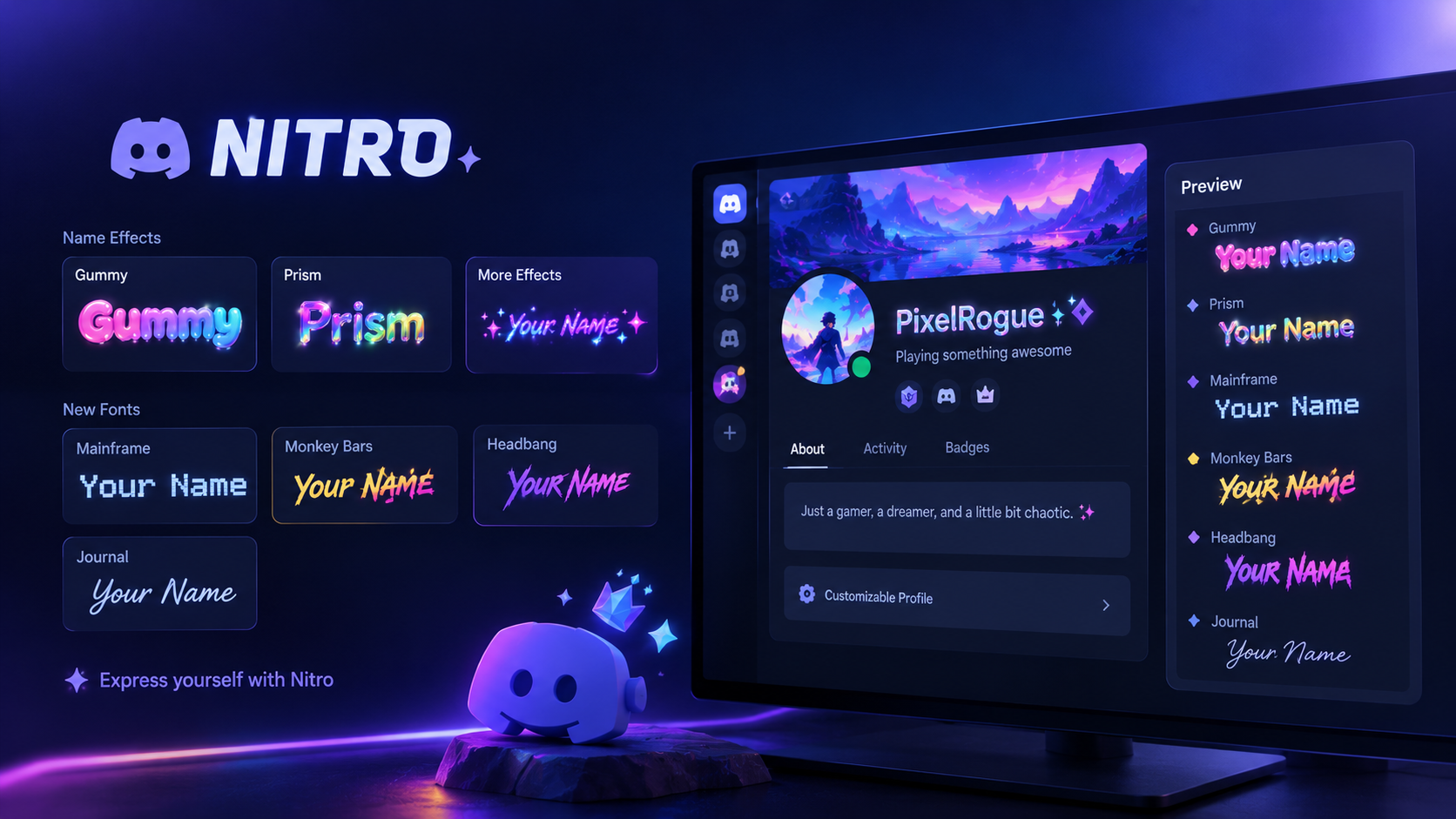
Discord Nitro Name Effects expanded with two new visual effects, Gummy and Prism, alongside four new display name fonts: Mainframe, Monkey Bars, Headbang, and Journal. The additions were announced in Discord's September 25, 2026 update, giving users more ways to change the appearance of their existing display names without needing a completely different username.
The update is part of Discord's wider approach to profile customization. Instead of relying only on avatars, profile banners, and decorations, members can now experiment with the typography, colors, and visual treatment of their names.
For gamers, creators, and community regulars, these options offer a small but noticeable way to stand out. Here's what each addition does, how to find the settings, and how to choose a style that looks good without making your profile difficult to read.
Official announcement: Discord Update: September 25, 2026.
────────────────────────────────────────
────────────────────────────────────────
────────────────────────────────────────
What Are Discord Display Name Styles?
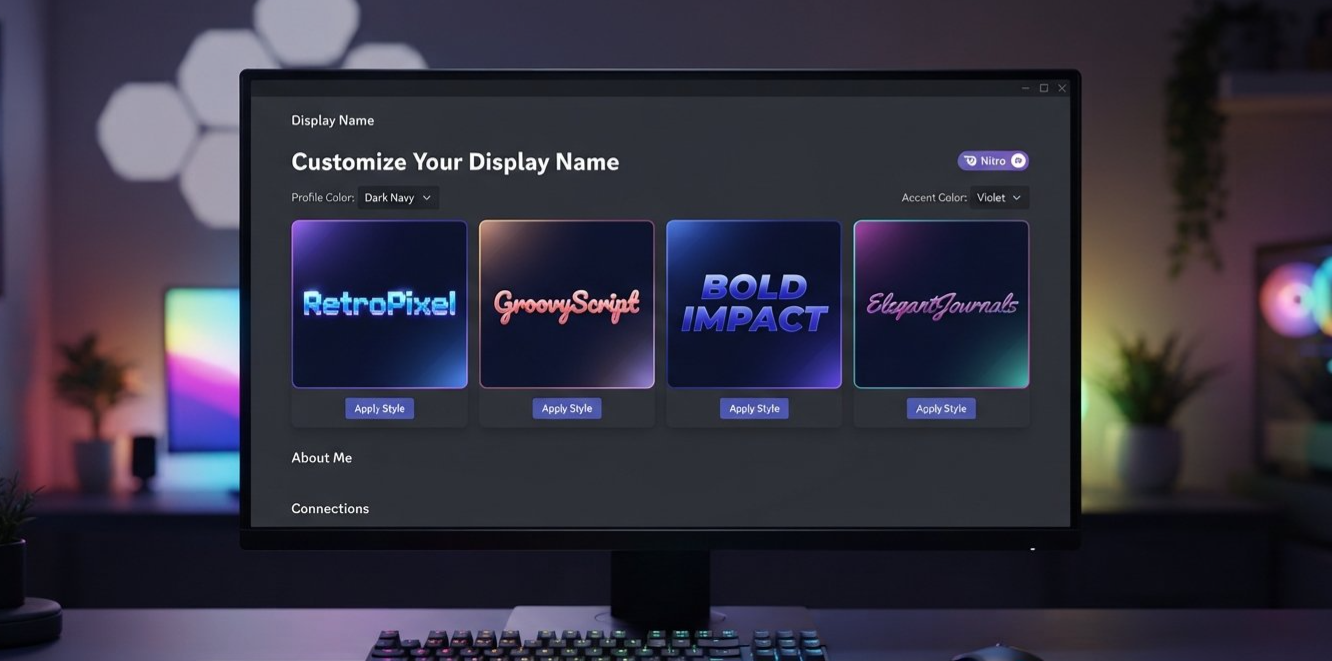
Display Name Styles are customization options that let eligible Discord Nitro subscribers change how their display names look through fonts, colors, and effects.
Your display name remains your display name. The feature changes its presentation rather than requiring you to invent a new username or change your account identity.
For example, someone using the display name PixelRogue could choose a blocky, retro-inspired font, apply a colorful effect, or select a cleaner style that fits a more understated profile.
Discord's official Display Name Styles FAQ explains the available customization controls and where the styles appear.
The system has three main components:
| Customization | What it changes |
|---|---|
| Font | The visual shape and personality of your display name |
| Effect | The way the name is visually treated, such as Gummy or Prism |
| Color | The color palette used by supported styles |
The September update introduced four fonts and two effects. They join the existing collection of display name styles rather than replacing the older options.
One important detail: Discord allows non-Nitro users to preview Display Name Styles, but saving a chosen style requires Nitro.
────────────────────────────────────────
Meet the Gummy Effect
Gummy is the playful option in this update.
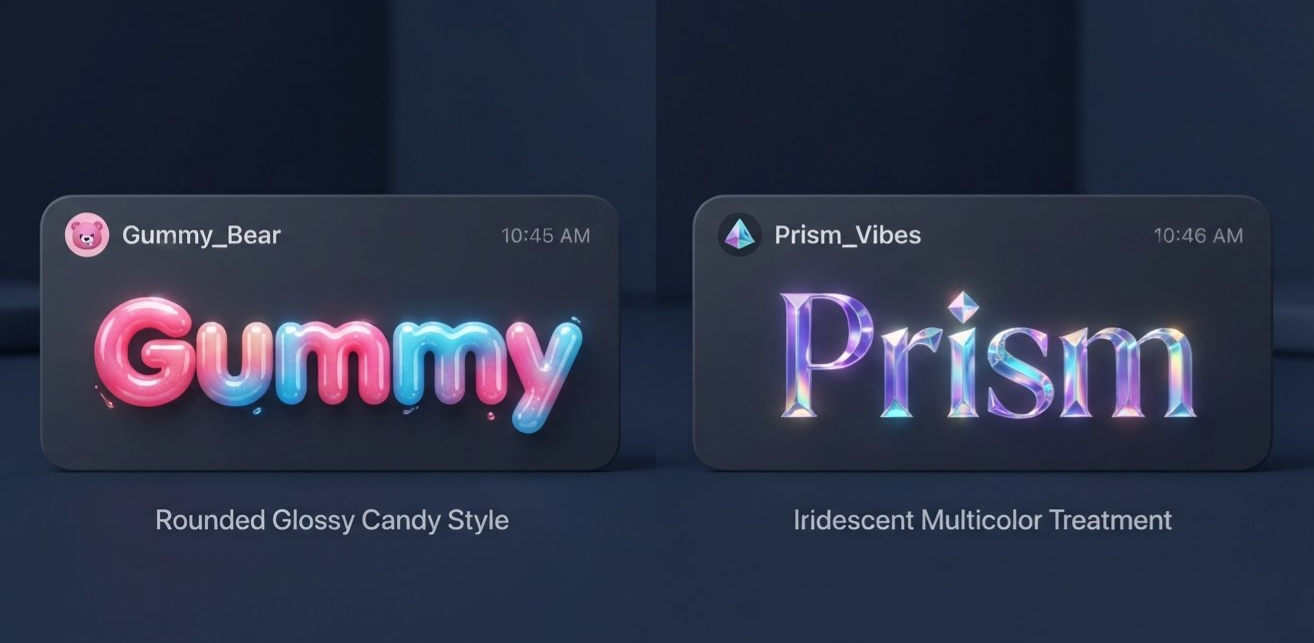
Its look is inspired by soft, glossy lettering, giving a name a colorful, almost candy-like appearance. It works especially well with short display names because the rounded visual treatment can become a noticeable part of the profile's identity.
Imagine a name like Nova rendered with bright, shiny letters. Compared with a plain display name, it feels more expressive and informal.
Gummy is a natural fit for:
Casual gaming profiles
Community members who enjoy colorful customization
Playful usernames and short display names
Profiles with bright avatars or animated decorations
The trick is to avoid making every element compete for attention. If your avatar, profile banner, decorations, and display name are all highly colorful, the overall profile can become visually busy.
A Gummy effect paired with a relatively simple avatar can create a better balance.
────────────────────────────────────────
Meet the Prism Effect
Prism takes a different approach. Instead of leaning into the rounded, candy-inspired appearance of Gummy, it offers a more iridescent, multicolored look.
Discord's Display Name Styles FAQ notes that the Prism effect supports a five-color selection. That gives users more room to experiment with combinations that match their profile artwork.
A display name such as PixelRogue can use a mix of cool blues, purples, and brighter accent colors to create a more futuristic gaming aesthetic.
Prism is particularly appealing for:
Neon-inspired gaming profiles
Sci-fi and cyberpunk aesthetics
Colorful creator profiles
Members who want their display name to complement an elaborate banner
It can also be more visually prominent than a simple solid-color style, so readability matters. Choose a combination that remains clear against Discord's dark and light interfaces.
Gummy vs. Prism: Which should you choose?
| Feature | Gummy | Prism |
|---|---|---|
| Overall feel | Playful and glossy | Colorful and iridescent |
| Best aesthetic | Casual, cute, expressive | Neon, futuristic, vibrant |
| Color approach | Candy-inspired appearance | Multicolor treatment |
| Good pairing | Simple avatar, playful decorations | Neon banner, futuristic avatar |
Neither effect is objectively better. The best choice depends on the rest of your profile and the kind of visual identity you want to create.
────────────────────────────────────────
────────────────────────────────────────
The Four New Fonts Explained
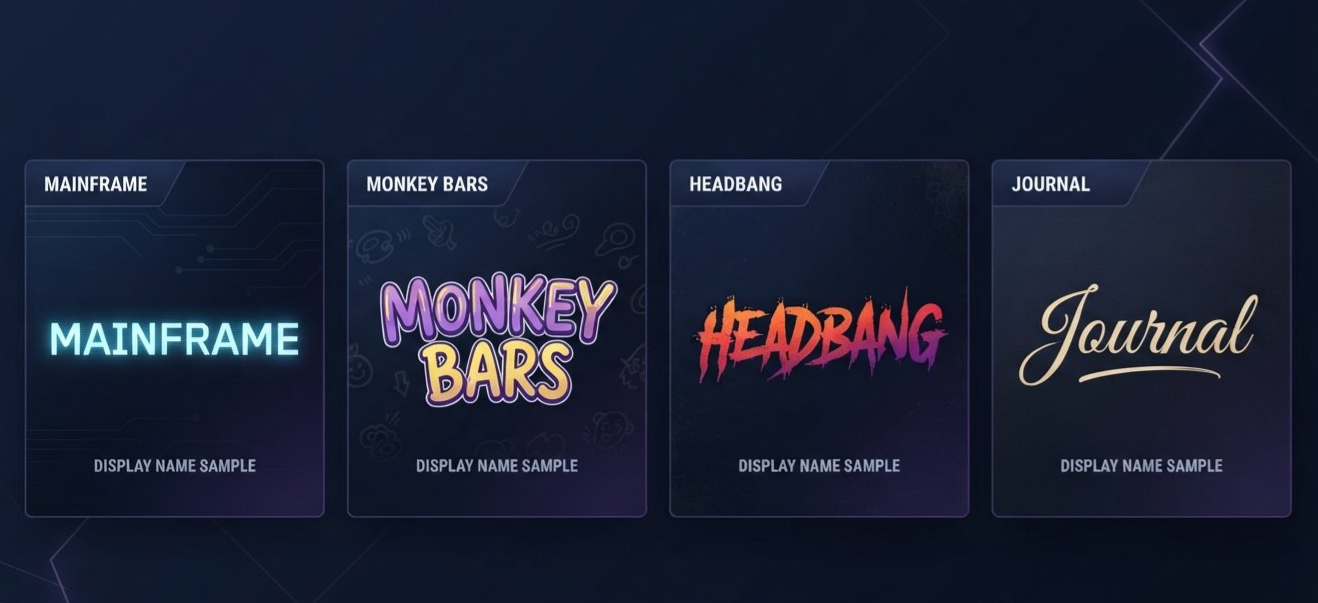
The September 25 update introduced four new font options: Mainframe, Monkey Bars, Headbang, and Journal.
Each offers a different personality, so choosing one is less about finding the most dramatic option and more about matching your display name to your preferred style.
1. Mainframe: A Retro Digital Look
Mainframe is the option to try if you like a digital, technical, or retro-computing aesthetic.
Its character fits gaming profiles built around classic arcade games, futuristic worlds, coding, or sci-fi themes. It can also work nicely with a simple avatar because the typography itself provides the visual interest.
Consider Mainframe if your profile uses:
Retro gaming artwork
Pixel-inspired avatars
Minimalist technology graphics
Futuristic or space-themed banners
A shorter display name can help the style remain easy to recognize.
2. Monkey Bars: A Playful Personality
Monkey Bars brings a more informal, expressive feel to your display name.
It is a good match for users who want a profile that feels energetic rather than sleek or technical. Casual gaming communities, meme channels, and friend groups are natural places for this sort of style.
Try it if your profile already uses bright colors or playful artwork. For a more professional creator identity, compare it with a simpler font before deciding.
3. Headbang: Bold and Expressive
Headbang is suited to a more energetic profile aesthetic.
It can complement gaming profiles centered on action games, competitive play, heavy music, or high-energy creator content. Compared with a restrained digital font, it offers a more expressive direction.
If your avatar is already dramatic or your banner has strong contrast, Headbang can tie those elements together.
For everyday use, however, make sure your display name remains recognizable at smaller sizes.
4. Journal: A More Personal Look
Journal provides a more handwritten, personal direction.
It can suit cozy gaming profiles, creative communities, art-focused servers, and users who prefer a softer aesthetic to a neon or arcade-inspired design.
Journal is also a useful reminder that profile customization does not have to mean brighter colors or more animation. Sometimes a distinctive font is enough to make a profile feel personal.
Comparing the four fonts
| Font | Style direction | Best fit |
|---|---|---|
| Mainframe | Digital and retro-inspired | Tech, sci-fi, arcade gaming |
| Monkey Bars | Playful and informal | Casual gaming and social servers |
| Headbang | Bold and energetic | Competitive gaming and expressive profiles |
| Journal | Personal and handwritten | Creative, cozy, and art-focused communities |
These descriptions are style suggestions, not additional technical features. The actual appearance will depend on Discord's rendering and your selected colors.
────────────────────────────────────────
────────────────────────────────────────
How to Customize Your Display Name
Discord provides Display Name Style controls on desktop, browser, and mobile. The exact placement can vary slightly as the interface changes, but the official instructions are straightforward.
On desktop or browser
Open Discord and select your profile at the bottom-left.
Choose Edit Profile.
Find Display Name Style.
Select the button to open the style controls.
Choose your preferred font, effect, and color.
Preview the result, then apply your changes.
You can also access profile editing through User Settings.
On mobile
Open Discord and select the You tab.
Tap Edit Profile.
Find the Display Name Style controls.
Choose a font, effect, or color.
Preview the style and tap Apply to save it.
Discord also provides a Surprise Me option that can generate combinations of fonts, colors, and effects if you want inspiration rather than manually testing every option.
For the most up-to-date instructions and screenshots, see the official Display Name Styles FAQ.
────────────────────────────────────────
Where Your New Name Style Appears
Display Name Styles are designed to carry across several parts of Discord, but the appearance is not identical everywhere.
Discord's documentation identifies the profile panel and user profile as places where the selected display name style appears. It can also appear in direct messages and group chats, although some parts of the styling may be displayed differently depending on the interface.
There are two limitations worth knowing.
Mobile animation: Discord currently displays fonts, colors, and effects on mobile without the animated treatment. A style that looks animated on desktop may therefore appear static on a phone.
Server member lists: Discord's documentation says display-name fonts appear in servers, but the color and effect settings do not appear there in the same way. Server role colors or enhanced role styles can take precedence.
If you want your profile to look consistent, preview it in the places where you spend the most time. A style that looks impressive on your profile card may be less noticeable in a busy channel.
────────────────────────────────────────
Tips for Choosing a Style That Looks Good
With more options available, it is tempting to combine the most colorful effect, the most dramatic font, and a busy profile banner. That can work for some profiles, but it can also make a name difficult to read.
A few practical rules help.
Match the font to your profile
A digital font can complement a retro gaming avatar, while Journal may suit a softer or more creative profile. The goal is to create a coherent look rather than apply every new option at once.
Prioritize readability
Your display name may appear in small spaces, including chat lists and member lists. Shorter names and clear letter shapes tend to be easier to recognize.
Use color deliberately
Prism supports five colors, according to Discord's FAQ. That creates room for experimentation, but a restrained palette can look more polished than using every color at maximum contrast.
Preview before saving
Use Discord's light and dark mode previews where available. Check how the name looks against different backgrounds rather than judging it from a single screenshot.
Keep your identity recognizable
Changing your font or effect does not mean you need to change your display name. Keeping the same name while updating its presentation makes it easier for friends and community members to recognize you.
────────────────────────────────────────
Why This Update Matters for Gaming Communities
Discord's new name styles may seem like a small cosmetic addition, but personalization plays a role in how people express themselves online.
Gaming communities are full of recognizable identities: clan members, streamers, moderators, competitive players, artists, and regulars who become familiar faces in a server.
A display name style offers another way to reinforce that identity. A competitive player might prefer a bold font, a creator might match their name to their channel's color palette, and a casual member might choose something playful simply because it feels right.
For community managers, these features also create a natural topic for community engagement.
A server could run a profile-customization showcase, invite members to share their favorite combinations, or create a weekly thread where people post their new styles. These activities are optional and do not require members to purchase Nitro to participate in the conversation.
The most successful use of customization is still personal. The feature gives people more options; the community gives those choices meaning.
────────────────────────────────────────
Frequently Asked Questions
Are Gummy and Prism available to everyone?
They are part of Discord's Nitro Display Name Styles feature. Users without Nitro can preview styles, but saving a selected style requires Nitro.
What are the four new fonts?
The four fonts announced in the September 25, 2026 update are Mainframe, Monkey Bars, Headbang, and Journal.
Can I use a new font without changing my username?
Yes. Display Name Styles change the appearance of your display name. You do not need to replace it with a different name to use the customization controls.
Does Prism support multiple colors?
Yes. Discord's official FAQ says the Prism effect supports five selected colors.
Do name effects animate on mobile?
Discord's current documentation says the animated treatment does not appear on mobile. Fonts, colors, and effects are displayed statically there.
Where do I find Display Name Styles?
On desktop, open your profile and select Edit Profile, then find Display Name Style. On mobile, open the You tab, tap Edit Profile, and select the style controls.
Can I turn off Display Name Styles?
Yes. Discord provides an accessibility setting to disable the display of Display Name Styles. Consult the official FAQ for the current desktop and mobile navigation.
────────────────────────────────────────
Final Verdict
Discord Nitro's new Gummy and Prism effects, alongside Mainframe, Monkey Bars, Headbang, and Journal, expand a feature that lets users give their display names a more personal identity.
Gummy offers a playful, glossy direction. Prism leans into multicolor styling. The four fonts add further variety, from digital-inspired lettering to bold and handwritten looks.
The biggest advantage is choice. You can create a profile that feels energetic, understated, futuristic, or creative without changing the name your friends already know.
If you have Nitro, open the Display Name Style menu and experiment with the new options. If you do not, you can still preview the styles and decide which look suits you before choosing whether the subscription is worthwhile.
────────────────────────────────────────
SEO & CMS CHECKLIST
Primary keyword included in title: Yes
Primary keyword included in slug: Yes
Primary keyword included in meta description: Yes
Primary keyword included in opening paragraphs: Yes
Meta title: Targeted to the recommended SEO length
Meta description: Written for the CMS target range
Cover image prompt: Included
In-article images: 3
Image prompts: Included at exact placement
Alt text and captions: Included
Table of contents: Included
Comparison tables: Included
FAQ section: Included
Official Discord sources: Included
New effects and font names: Verified against Discord documentation
Nitro eligibility and mobile limitations: Explained
────────────────────────────────────────

Comments
Sign in to join the conversation
Sign inNo comments yet
Be the first to share your thoughts!