
Link Previews Get an Overhaul: Understanding Discord's New Component Embeds
Sharing a link in Discord has always been about more than posting a URL. A website link can expand into a preview card containing a title, description, image, or other useful details, giving people a reason to open it before leaving the conversation.
But traditional link previews have a limitation: website owners have relatively little control over the exact layout Discord displays. Metadata can describe a page, but it does not offer the same flexibility as a structured interface.
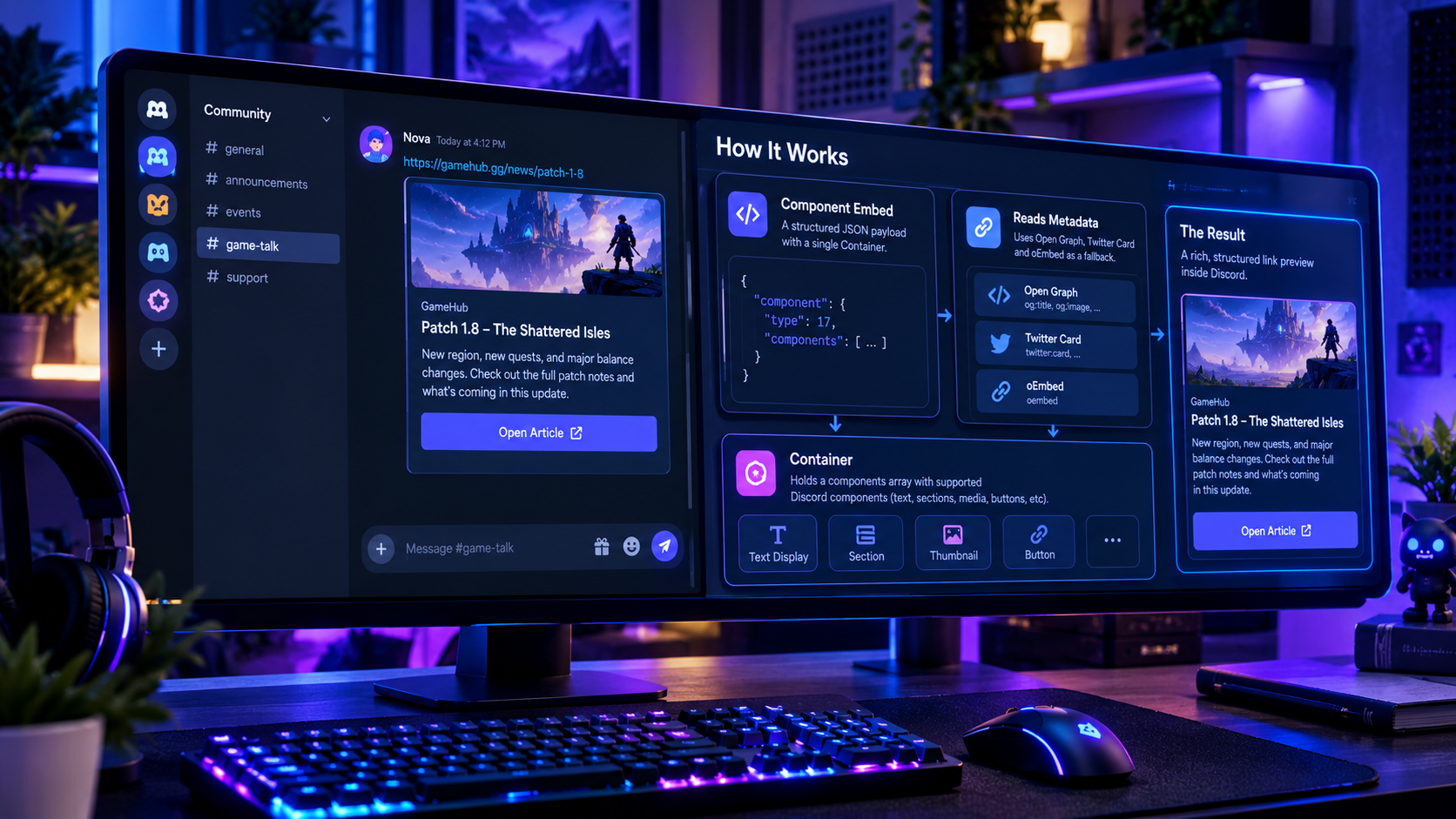
Discord's new component embed system takes that idea further. Instead of relying only on a conventional preview card, a website can provide a JSON payload describing a custom layout built from supported Discord components. That layout is organized inside a single top-level Container, allowing the preview to include structured text, images, sections, separators, and supported link buttons.
For developers, this creates a new way to shape how articles, product pages, release notes, and other website content appear when shared. For Discord users, it could mean link previews that are more informative, better organized, and more useful inside the conversation.
The important detail is that component embeds are not simply a new visual style automatically applied to every link. Websites need to provide the appropriate payload, and Discord must be able to fetch and validate it. Traditional metadata remains relevant, particularly when a custom component embed cannot be displayed.
1. What Are Discord Component Embeds?
A link preview, sometimes called an embed or an unfurl, is the card that appears when a supported URL is shared in a Discord message.
A conventional preview might contain:
The webpage's title
A short description
A thumbnail or preview image
The website's name or URL
These details help users understand what they are about to open without immediately leaving Discord.
Discord component embeds introduce another option. Website owners can define a richer preview using a structured JSON payload and a supported subset of Discord's message components. Instead of treating the preview as a fixed card with a handful of metadata fields, the site can specify how its content should be arranged.
For example, a gaming news website could present a patch-notes headline, a short summary, a thumbnail, and a link button. A product page might display a product image alongside a description and a button linking to the full listing. A documentation page could use a heading, explanatory text, and a navigation link.
The exact appearance depends on the payload and the components supported by Discord's component-embed system.
2. How the New Components Embed Type Works
The technical structure is the most important part of this update.
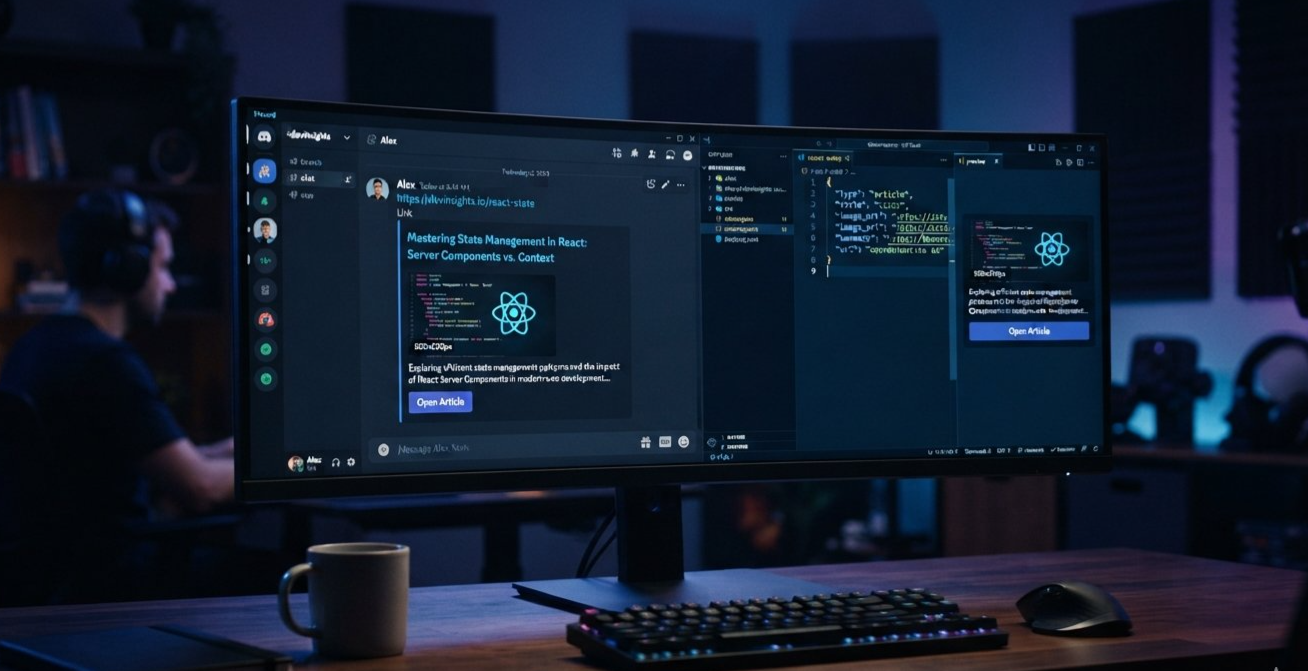
Discord's component-embed documentation describes a custom preview payload built around a single Container component. The Container is the top-level layout element, and its own components array holds the elements that make up the preview.
The resulting preview is not an arbitrary HTML page rendered inside Discord. It is a structured collection of supported components that Discord interprets and displays.
The basic structure
A simplified example looks like this:
{
  "component": {
    "type": 17,
    "components": [
      {
        "type": 10,
        "content": "# New Update Available\nRead the latest patch notes."
      }
    ]
  }
}
In this example:
componentcontains the custom preview definition.type: 17identifies the Container component.componentscontains the Container's child elements.type: 10identifies a Text Display component.contentcontains the text and supported Discord Markdown.
This is a minimal illustration of the website-provided payload. The full API message representation and the website's JSON payload are related, but they should not be confused with each other.
In the message's embed data, the new embed type identifies the component-based preview, with a components array representing the component structure. The website-facing payload described in the documentation uses a singular component object containing the Container.
That distinction matters when developers inspect message objects, build tooling, or parse preview data. A conventional rich embed and a component-based embed are not necessarily represented in the same way.
How a website provides the payload
The official documentation describes two ways to expose the JSON to Discord.
Option one: An inline script
A page can include a script element inside its HTML document's head:
<script
  id="discord:component-embed"
  type="application/json"
>
{
  "component": {
    "type": 17,
    "components": [
      {
        "type": 10,
        "content": "# New Update Available"
      }
    ]
  }
}
</script>
Option two: A linked JSON file
A webpage can also link to a separate JSON resource:
<link
  rel="discord:component-embed"
  type="application/json"
  href="https://example.com/discord-preview.json"
/>
These examples demonstrate the basic discovery mechanisms. A production implementation must use a valid payload and satisfy Discord's documented fetching and validation requirements.
3. Why the Container Is the Center of the Layout
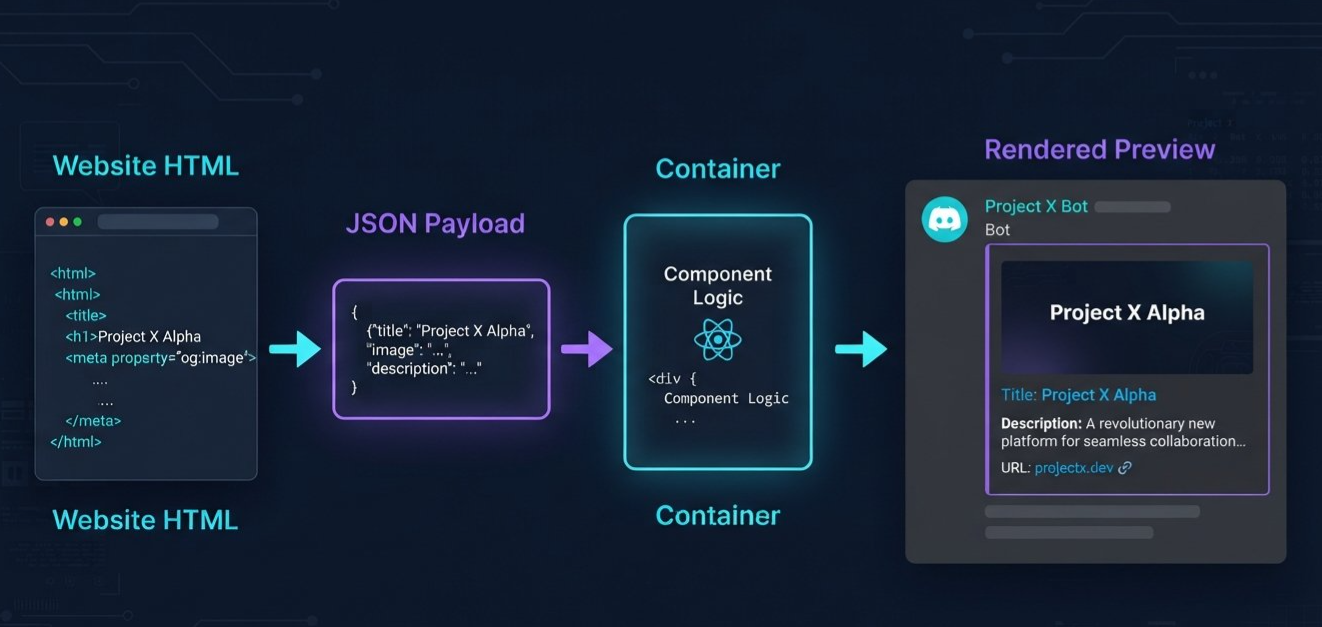
The Container is not just another decorative element. It defines the outer structure that groups the preview's contents.
Discord's component-embed documentation requires a single parent Container at the top level. Other components cannot sit beside it at that level, and a Container cannot contain another Container.
Within that structure, supported components can be arranged to create a richer presentation.
Text Display
Text Display components provide the main textual content. They support Discord Markdown, making them useful for headlines, summaries, labels, and explanatory text.
For example, a gaming article preview might show a heading followed by two sentences summarizing the update.
Sections and thumbnails
A Section can combine text with an accessory, such as a Thumbnail or a supported link button. This allows a preview to place a short description beside an image or action.
That is useful when the visual should complement the text rather than dominate the entire card.
Media Gallery
A Media Gallery can display multiple images or supported media items. This could be useful for a release announcement with several screenshots, provided the payload follows Discord's media requirements and limits.
Separators and action rows
Separators can create visual breathing room between content blocks. Action Rows can group supported link buttons, helping users navigate to related pages.
Buttons inside component embeds have specific restrictions. They must use the link style and point to URLs rather than behaving like arbitrary interactive application controls.
A simple example layout
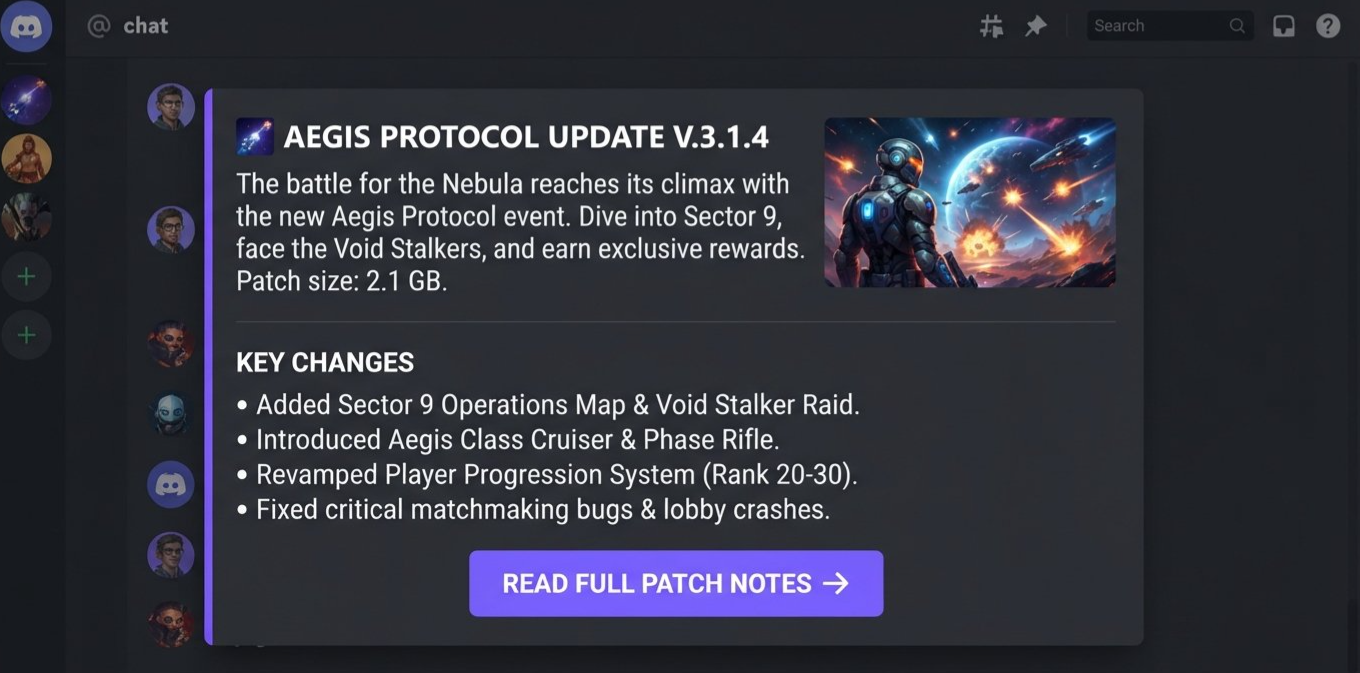
Imagine a developer sharing a new game update. The preview could be structured as follows:
A Container groups the entire preview.
A Section presents the update title and a short summary.
A Thumbnail displays the game's key artwork.
A Text Display lists two important changes.
A Separator divides the summary from the final action.
A link button opens the complete patch notes.
The website can choose a structure that suits the page, within the supported component set and payload limits.
4. Where Open Graph, Twitter Cards, and oEmbed Fit In
One of the easiest details to misunderstand is the relationship between component embeds and traditional webpage metadata.
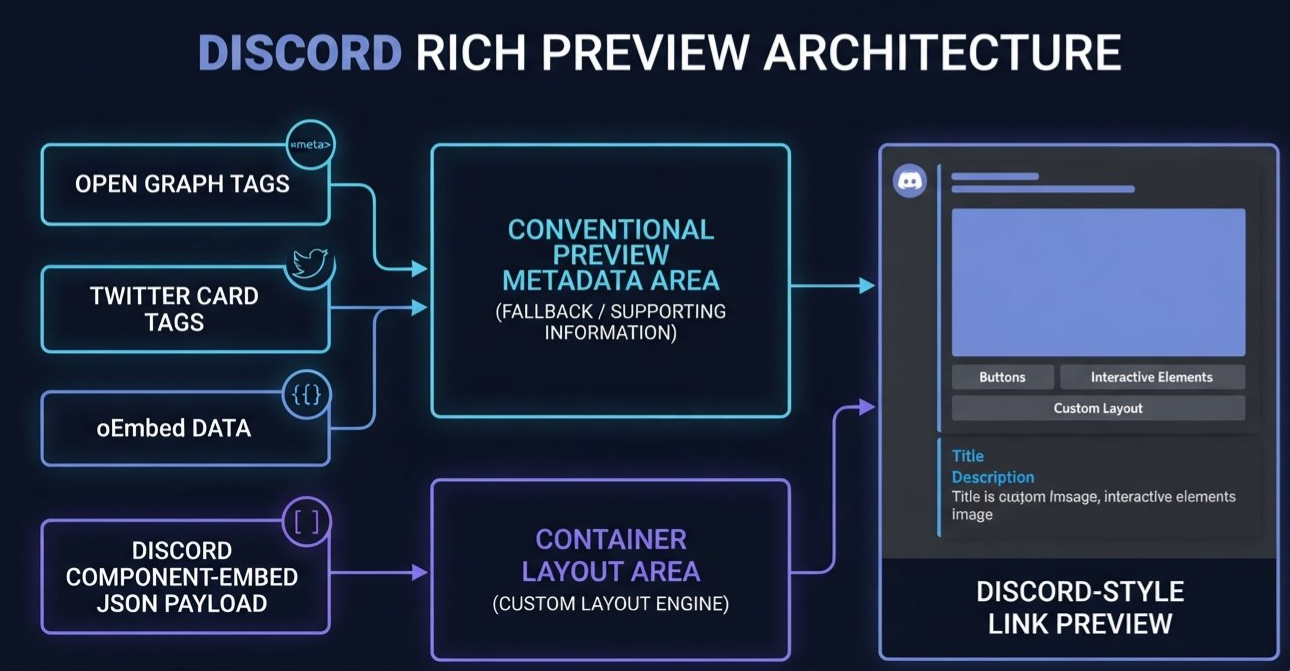
Open Graph, Twitter Card, and oEmbed are different mechanisms used across the web to describe content and help services generate previews. Discord's conventional link-preview system can use webpage information such as a title, description, and image to build a card.
Component embeds add a separate, structured way for a website to specify the layout of a custom preview.
Open Graph metadata
Open Graph tags are widely used to describe a webpage for social sharing. Common examples include:
<meta property="og:title" content="New Game Update" />
<meta property="og:description" content="Explore the latest changes." />
<meta property="og:image" content="https://example.com/update.jpg" />
<meta property="og:url" content="https://example.com/update" />
These tags describe the page and its primary preview assets.
Discord's component-embed documentation specifically recommends providing Open Graph tags as a fallback when a custom component embed cannot be displayed. That means sites should not assume the custom layout will always render successfully.
Twitter Card metadata
Twitter Card tags are another metadata format historically used to describe how links should appear when shared on X and other services that interpret those tags.
A site might include a twitter:card value and related metadata alongside its Open Graph tags. These tags can contribute to conventional link-preview behavior, depending on how a service interprets the page.
They are not, however, the JSON structure that defines a Discord component embed.
oEmbed
oEmbed is a separate standard that lets a service discover structured information about a URL, often for media or richer third-party content.
It can be part of the wider link-preview ecosystem, particularly for supported providers and content types. But a developer should not assume that an oEmbed response automatically becomes a Discord component-embed payload.
How the pieces fit together
| Mechanism | Main purpose |
|---|---|
| Open Graph | Describes a webpage's title, description, image, and related sharing metadata |
| Twitter Cards | Supplies metadata for supported social preview formats |
| oEmbed | Provides structured information about supported embedded content |
| Discord component-embed JSON | Defines a custom preview layout using Discord's supported components |
The important distinction is that metadata describes the page, while the component-embed payload describes the custom layout.
5. What Developers Can Build With Component Embeds
The most interesting possibilities depend on the type of website being shared.
Gaming and patch-note websites
Gaming publishers could create previews that include a patch title, a short summary, an image, and a link to the complete notes. A Media Gallery could display several supported screenshots where appropriate.
That could make patch announcements more informative in gaming communities without requiring every preview to be created and maintained by a Discord bot.
News and editorial sites
A publication could present the headline, a concise introduction, a thumbnail, and a link to the full story. The publisher would have more control over the order and grouping of those elements than a conventional metadata-only card generally allows.
Product and event pages
Product websites could show an item image, a short description, and a link to the full product page. Event websites could display the event title, key details, and a link to registration information.
The layout still needs to respect Discord's supported component set. A component embed is not an unrestricted webpage, and a link button is not a replacement for a full interactive checkout or event-registration flow.
Documentation and developer resources
Documentation websites could make technical links more useful by presenting a title, a concise explanation, and a navigation button. This could help people distinguish between a tutorial, an API reference, and a changelog when several links are posted in a developer server.
Why this matters for websites without bots
A key benefit is that the website can provide the component-embed payload directly through its HTML or linked JSON resource. This opens a path for custom previews without requiring a dedicated Discord bot to construct every card.
It does not mean bots and apps are no longer useful. They can still serve many other functions, and custom previews remain subject to Discord's requirements. But for the specific task of defining a link preview, the website itself can provide the layout.
6. Important Technical Requirements and Limitations
Custom previews offer flexibility, but they also introduce requirements that developers need to take seriously.
The payload has a size limit
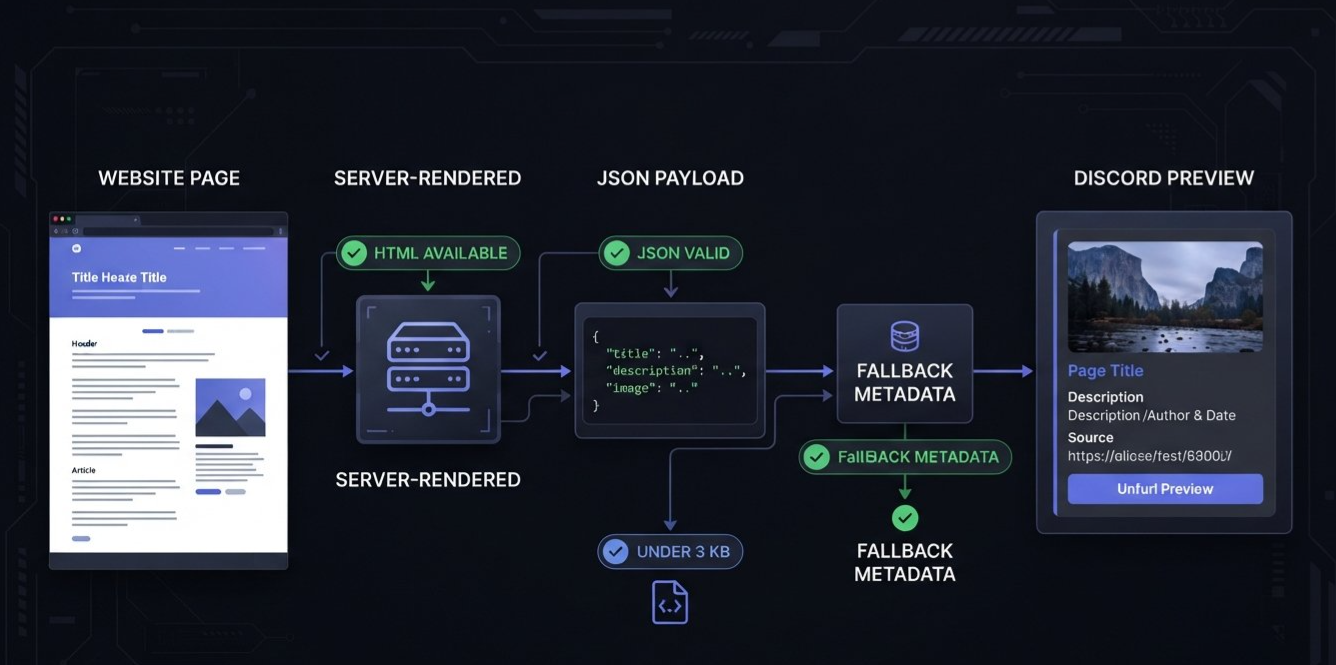
Discord's component-embed documentation specifies a maximum payload size of 3,000 bytes for the inline or linked JSON representation. Escape sequences count toward that limit at their full length.
A complex preview therefore needs to be designed carefully. Developers should avoid unnecessary text and oversized JSON structures.
The page must expose the payload in server-rendered HTML
Discord's crawler does not execute webpage JavaScript to discover a component-embed tag injected after the page has loaded. The required tag needs to be present in the HTML Discord fetches.
A single-page application that only adds the tag client-side may not expose the payload correctly. Server-rendered markup or the documented linked-JSON approach is a more appropriate option.
Discord must be able to fetch the page
The page must meet the documented content-type and accessibility requirements. Discord also specifies a 10-second limit for the fetch, including assets in the payload.
A site that blocks Discord's crawler, requires an interactive login, or takes too long to serve the required resources may fail to produce the intended preview.
Only supported components are allowed
The component-embed system supports a defined subset of components. The documentation describes a maximum of 40 components, including the parent Container.
Unsupported components, invalid properties, or structural mistakes can prevent the preview from rendering. Developers should validate their JSON against the current documentation rather than assuming every component available in Discord messages is valid inside a link preview.
Keep standard metadata as a fallback
Open Graph tags should accompany the custom payload so Discord can still create a standard preview when the component embed cannot be shown.
Developers can use Discord's Embed Debugger to help diagnose preview issues.
7. What This Means for Discord Users
Most users will not need to understand JSON, Containers, or metadata tags to benefit from better link previews.
If a website adopts component embeds, a link shared in a Discord conversation may display a more deliberate layout. Instead of a basic card with a title and image, it could contain a grouped summary, several supported media elements, or a clear navigation button.
However, not every website will adopt the feature immediately, and not every shared link will display a custom component embed. The experience depends on whether the website provides a valid payload and whether Discord can retrieve and render it.
For community moderators, this could make official announcements and reference links easier to scan. For gaming communities, it could improve how patch notes, trailers, and release announcements appear. For developer communities, it could make documentation links and release information easier to distinguish.
The change is primarily about presentation and content structure. It does not mean that Discord will run arbitrary website code inside a chat message, nor does it turn every preview into an interactive web application.
The practical result is more flexibility for websites that choose to implement the system, while familiar link-preview behavior remains important for everything else.
8. Frequently Asked Questions
What is a Discord component embed?
A component embed is a custom link preview built from a structured JSON payload and a supported set of Discord components. It gives a website more control over how its preview is arranged in chat.
What is the role of the Container?
The Container is the required top-level component in a component-embed payload. Its components array holds the child components used to construct the preview.
Does every link automatically use component embeds?
No. The website needs to expose a valid component-embed payload, and Discord must be able to fetch and validate it. Traditional link previews remain relevant for websites that do not implement the feature or when a custom preview cannot be displayed.
How are Open Graph tags related to component embeds?
Open Graph tags describe the webpage and its sharing metadata. Discord's component-embed documentation recommends them as a fallback when the custom component embed cannot be displayed. They do not replace the JSON payload that defines the custom layout.
Do Twitter Card and oEmbed tags define the component layout?
No. Twitter Card metadata and oEmbed serve other roles in the wider link-preview ecosystem. The custom Discord layout is defined by the component-embed JSON payload.
Can a component embed include images and buttons?
Yes, within the supported component set and its restrictions. Supported options include Text Display, Section, Thumbnail, Media Gallery, Separator, Action Row, and link-style buttons.
Does a website need a Discord bot to create a component embed?
Not necessarily. The documented system allows a website to provide the payload through an inline script or linked JSON resource. A bot is not required simply to define that website's custom link-preview layout.
What is the payload size limit?
The component-embed documentation specifies a maximum of 3,000 bytes for the inline or linked JSON payload. Developers should also respect the documented component-count limit and validation rules.
How can developers troubleshoot a preview?
Start by checking the payload structure, ensuring the discovery tag appears in the server-rendered HTML, confirming that Discord can fetch the page and its assets, and preserving Open Graph fallback tags. Discord's Embed Debugger can help diagnose problems.
9. Final Verdict: Link Previews Become More Flexible
Discord component embeds give website developers a new way to shape how shared links appear in chat. The required Container provides the structure, and its child components can combine text, images, sections, separators, and supported link buttons into a more deliberate presentation.
The distinction between the custom payload and conventional metadata is crucial. Open Graph tags continue to provide useful page information and a fallback, while Twitter Card and oEmbed remain part of the broader ecosystem of link-preview formats. The component-embed JSON itself is what defines the custom Discord layout.
For developers, the opportunity is straightforward: make shared links more informative without depending on a bot to build every preview. For users, the potential payoff is clearer context and more useful previews directly inside conversations.
The feature will not change every link overnight. Websites still need to implement it, and the payload must meet Discord's technical requirements. But it gives publishers, developers, and community-focused sites another tool for making shared content feel more native to the conversation.
Sources
Discord Developer Documentation: Component Embeds
Official documentation covering payload structure, supported components, metadata fallback, and implementation requirements.Discord Developer Documentation: Components Overview
Background on Discord's component system and how components are used in messages.Discord Support: About Discord Link Previews and the Discordbot
Explains how Discord fetches webpage information to generate conventional link previews.Discord Embed Debugger
Tool for troubleshooting link-preview rendering.
Comments
Sign in to join the conversation
Sign inNo comments yet
Be the first to share your thoughts!