
 You just unboxed your Switch 2. You're logged in, you've picked your first game, and then nothing.
A grey error screen with the code 2123-1502 stops your download cold.
If you searched for this exact code, you're not alone. It's one of the most reported issues among people setting up new consoles this weekend, and it's been a recurring headache on the original Switch for years too.
What Is Error Code 2123-1502?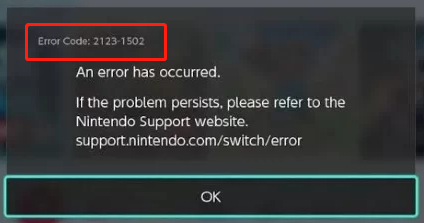
According to Nintendo's own support documentation, this code appears when connecting to the internet, downloading software or updates, or launching downloadable software. In plain terms: it's a network-side failure that interrupts the connection between your console and Nintendo's servers mid-download.
It's not new. Switch owners have reported this exact code since at least 2021, tied to a Switch system update that seemed to trigger a wave of connection issues. What's changed is the scale with millions of Switch 2 units now being set up for the first time, a much bigger audience is running into it during that critical first eShop download.
Why Does It Keep Happening?
The most common root cause traces back to your network configuration rather than anything wrong with your console. One frequently cited culprit is an MTU (Maximum Transmission Unit) setting that's incompatible with your specific network, which causes data packets to get dropped partway through a download.
Beyond MTU mismatches, a few other things can trigger it:
- A weak or unstable Wi-Fi signal
- DNS servers that are slow to respond or temporarily down
- Corrupted cache data on the console itself
- General congestion on Nintendo's servers during high-traffic launch periods
The Fixes That Actually Work
Here's the frustrating part: Nintendo's official guidance is refreshingly simple, but not always satisfying. The company's support page essentially says to close the error message and select Continue to retry the download, repeating the attempt a few more times if the error reappears.
That "just keep trying" approach has become something of a running joke among Switch owners — multiple gaming outlets have independently confirmed that repeatedly hitting retry is often the fastest fix, even if it's not the most elegant one.
If retrying alone doesn't cut it, work through these steps in order:
1. Restart the console and your router.
Power off the Switch 2 completely, then unplug your router for about 30 seconds before plugging it back in. This clears out temporary network glitches that commonly trigger the error.
2. Clear the system cache.
A corrupted cache is a known cause of this error. You can clear it through the console's System Settings menu.
3. Manually set your MTU to default.
In your network settings, check that your MTU value is set to 1400 — the recommended default. An incorrect value here is one of the most consistent fixes reported by users.
4. Try an alternate DNS.
If your current DNS server is struggling, manually entering an alternate one (such as a public DNS) can resolve the connection.
5. Move closer to your router or switch networks.
Testing your connection at a different location or simply moving within about 10 feet of your router can rule out signal strength as the issue.
Why It Matters for Switch 2 Launch Weekend
This isn't just an annoyance, it's shaping a lot of people's first impression of the console. For families setting up a Switch 2 for the first time, hitting a cryptic error code before they've even played a game is a rough start, and it's fueling a fresh wave of frustrated posts across Reddit and support forums.
It also highlights something bigger: legacy Switch infrastructure issues didn't disappear with the hardware upgrade. The eShop backend, account systems, and network stack carried over largely intact, and so did their quirks.
What Happens Next?
Nintendo hasn't issued a dedicated patch specifically targeting 2123-1502, historically, the company has treated it as a general connectivity error rather than a bug requiring a fix. Don't expect an official server-side resolution announcement; the most realistic outlook is that server load eases as launch-weekend traffic settles down over the coming days, which should reduce how often the error appears.
In the meantime, if you're mid-download and hit this wall, the MTU and DNS fixes above are your best bet at actually solving it rather than just waiting it out.
🎮 The Bottom Line
Error 2123-1502 isn't a sign your new Switch 2 is broken, it's a network hiccup with a long history and a handful of reliable fixes. Check your MTU, clear your cache, and don't be afraid to just hit retry a few extra times.
Did this error hit you during your Switch 2 setup, and which fix actually worked for you? Let us know in the comments.