

Pixel Drop Setup Guide: How to Enable "Pause Point" and Gboard Scam Detection
Google just pushed one of its most practical Pixel updates in months.
Not a flashy camera feature. Not a new wallpaper pack.
Real-time scam warnings that appear while you're typing, and a distraction-blocking pause that now works on phones going back four generations.
Here's exactly what changed, and how to turn both features on.
What Happened

Google began rolling out the September 2026 Pixel Drop on September 15, 2026.
Every Pixel from the Pixel 6 series through the latest Pixel 10 lineup is eligible.
Note: Rollout timing still depends on your carrier and region, so if a feature isn't showing yet, check back over the next few days rather than assuming your device was skipped.
The two headline features:
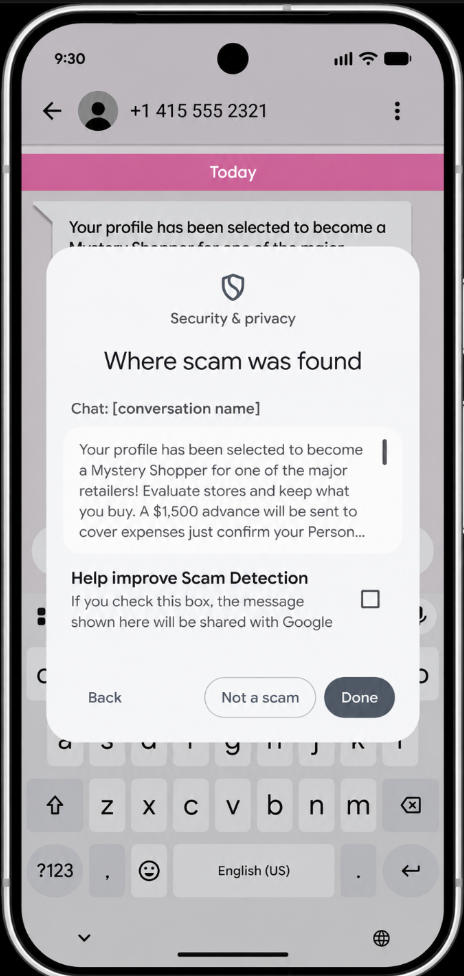
- Gboard Scam Detection, which flags a "Likely scam" warning directly above your keyboard while you're typing a reply to a suspicious message
- Pause Point, a Digital Wellbeing feature that inserts a short pause before you open an app you've marked as distracting
Both features were previously limited to newer or flagship hardware.
Now they're available on the Pixel 6 and every model since.
According to 9to5Google's full breakdown of the update, Scam Detection warnings now appear "wherever you chat," triggered the moment you start typing a response to a message the system flags as suspicious.
How to Enable Gboard Scam Detection
This feature runs entirely on-device, so no message content gets sent to Google's servers for analysis.
That distinction matters for a feature built around private conversations.
Steps to turn it on:
- Open Settings on your Pixel
- Go to System → Languages & input → On-device Scam Detection
- Enable the toggle for Gboard warnings
- Make sure your Gboard app is fully updated through the Play Store
Important: This feature is currently US-only. If you're outside the US, Gboard-level warnings won't appear yet, though notification-based Scam Detection is expanding separately to nine additional countries, including the UK, Canada, and India.
Once enabled, a warning appears above the keyboard the moment you start replying to a flagged message.
Tapping it shows more detail on why the message was flagged.
According to a breakdown of the feature's practical limits, the warning is meant as a prompt to pause and verify independently, not a guaranteed filter that catches every scam attempt.
How to Enable Pause Point

Pause Point launched exclusively on the Pixel 11 series.
This update brings it to the Pixel 6 and every device released since.
Steps to turn it on:
- Open Settings → Digital Wellbeing & parental controls
- Select Pause Point (may also appear under "Ways to disconnect")
- Choose which apps count as "distracting" for you specifically
- Set your preferred pause behavior
Once active, opening a marked app triggers a short delay instead of blocking it outright.
During that pause, you'll see one of several prompts:
- A guided breathing moment
- A reminder of meaningful photos
- A suggested alternative app
- A session time limit
- A requirement to set an intention before continuing
Feature Availability by Region and Device
Not every part of this update is available everywhere yet.
| Feature | Devices | Region |
|---|---|---|
| Gboard Scam Detection | Pixel 6 and newer | US only |
| Notification Scam Detection | Pixel 6 and newer | US + 9 new countries (UK, Canada, India, and others) |
| Pause Point | Pixel 6 and newer (previously Pixel 11 only) | All regions |
| Pixel VIP widget redesign | Pixel 6 and newer | All regions and languages |
Note: Notification-based Scam Detection now supports six additional languages, including Arabic, French, German, Portuguese, Japanese, and Spanish, alongside its regional expansion.
Why This Update Matters
Scams that rely on quick replies and emotional urgency are exactly what Gboard-level detection is designed to interrupt.
Catching a warning while you're actively typing a response, rather than after you've already sent it, changes the moment where a user has a real chance to stop and think.
That timing is deliberate.
Most scam-prevention tools warn you before you open a message or after damage is done. This one interrupts the exact moment someone is about to respond, when urgency and pressure are highest.
Pause Point solves a completely different problem, but the design logic is similar: insert friction at the exact moment a habit would otherwise run on autopilot.
Neither feature blocks anything outright.
Both are built around giving you one extra beat to reconsider.
What Happens Next?
A few things worth watching as this rollout continues:
- Whether Gboard Scam Detection expands beyond the US, following the same pattern as the notification-based version
- Whether the remaining nine-country expansion for notification warnings reaches full rollout without delays
- Whether Google adds more customization to Pause Point's prompts based on early user feedback
- Whether older Pixel models beyond the 6 series eventually gain support, based on how this rollout performs
The Bottom Line
This isn't a headline-grabbing redesign.
It's Google pushing two of its most genuinely useful safety and wellbeing tools down to phones that are years old, rather than reserving them for the newest flagship.
If you own a Pixel 6 or newer, both features are worth turning on today, particularly Scam Detection if you're in the US, where real-time typing warnings can catch exactly the kind of pressure-driven scam messages that slip past slower, after-the-fact filters.

FAQ
Which Pixel devices support the September 2026 Pixel Drop?
Every Pixel from the Pixel 6 series through the current Pixel 10 lineup is eligible, though rollout timing varies by carrier and region.
Is Gboard Scam Detection available outside the US?
Not yet. It's currently limited to US users. Notification-based Scam Detection, a separate feature, is expanding to nine additional countries including the UK, Canada, and India.
Does Gboard Scam Detection send my messages to Google?
No. The feature processes entirely on-device, so message content isn't sent to Google's servers for analysis.
Was Pause Point available before this update?
It launched exclusively on the Pixel 11 series. This update brings it to the Pixel 6 and every Pixel model released since.
Does Pause Point block distracting apps completely?
No. It inserts a short pause before the app opens, along with a prompt like guided breathing or a session time limit, rather than blocking access outright.