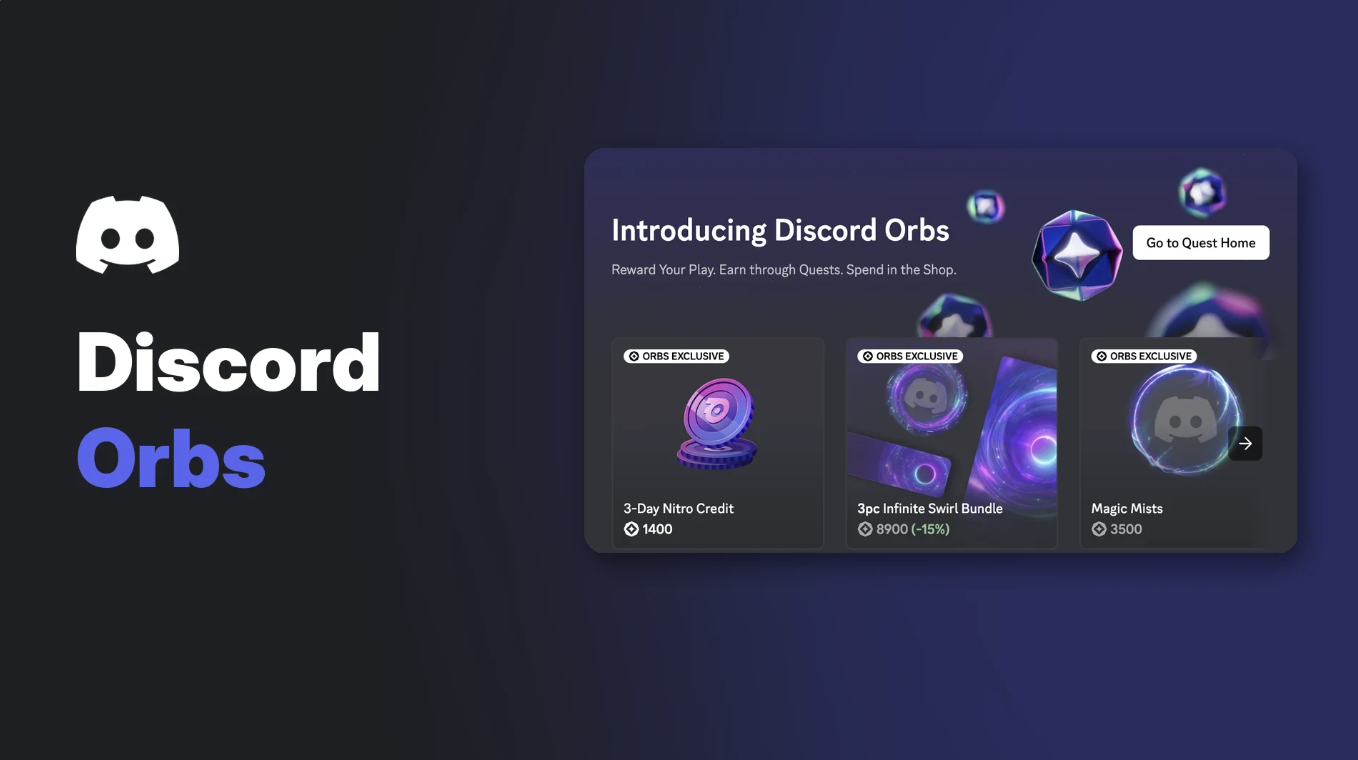

Discord Orbs are a virtual reward you earn on Discord, mostly by completing Quests. You then spend them in the Orbs Shop on things like Nitro credits, avatar decorations and profile effects, with no payment method needed.
The system is simple on the surface, but the details are spread across several help centre pages. Nitro changes how many Orbs you get, teenagers have a daily Quest cap, and some items can never be bought with Orbs.
This wiki pulls those rules together from Discord's own documentation. Where Discord has not published something, such as a full Orbs price list, this guide says so.
At a glance - What they are: a reward balance tied to your account, earned mainly from Quests. - Where to spend: Shop > Orbs Shop, on Nitro credits, Orbs exclusives and selected Shop items. - Nitro bonus: 1.2x Orbs on eligible Quests, plus a 250 Orb monthly drop for eligible paid subscribers. - Expiry: earned Orbs do not expire, according to Discord. - Refunds: anything claimed with Orbs is final. - Transfers: Orbs cannot be gifted, bought, sold, traded or cashed out.
🔮 What Are Discord Orbs?
Orbs are Discord's in-app reward balance. Discord describes them as rewards you earn by completing Quests, with some extra Orbs handed out through select promotions.
They only work inside Discord. You cannot turn them into real money, move them to another platform or send them to a friend. They stay on the account that earned them, even if you own a second account.
Using Orbs means agreeing to the Discord Orbs Terms, which sit inside Discord's Paid Services Terms.
Your Orbs balance sits in the top right of the Shop and Quest Home. Image: Discord.
🎯 How to Earn Discord Orbs
Quests are the main source. A Quest is a sponsored task, usually from a game publisher, that pays a reward when you finish it. Some Quests pay Orbs, others pay avatar decorations, Nitro credits or in-game items.
| Way to earn | What you do | Notes from Discord |
|---|---|---|
| Video Quest | Watch a video or trailer in the desktop app or browser | The video pauses if you switch windows, but progress is saved |
| Play Quest | Play a game for a set time, stream it to a friend, or finish an in-game task | Playing and streaming need the desktop app; in-game tasks can take up to 36 hours to register |
| Cloud Play Quest | Play a game streamed inside Discord, no install | Experimental; can be accepted on browser but only completed in the desktop app |
| Monthly Orbs Drop | Keep an eligible paid Nitro subscription | 250 Orbs a month, still rolling out |
| Orb Challenges | Complete a listed action on Discord | Experiment on desktop and browser, not widely available |
| Promotions and account links | Join select promotions; some users get Orbs for linking Riot Games or Battle.net accounts | Eligibility varies by promotion |
We cover the cloud version in more depth in our Discord Cloud Play Quests wiki, so this guide sticks to how those Quests feed your Orbs balance.
Steps on desktop or browser
- Find a Quest that offers Orbs. Use the Quest bar in the bottom left of the app, or open Discover > Quests to see Quest Home.
- Press Accept Quest for a Play Quest or Start Video Quest for a Video Quest.
- Complete the task shown on the Quest card.
- Press Claim Reward. Orbs are added to your account straight away.
Claiming an Orbs reward after a Video Quest on desktop. Image: Discord.
Steps on mobile
- Tap your avatar, then Settings > Quests, or tap your Orbs Balance on your profile.
- Accept a Quest that offers Orbs.
- Complete it and tap Claim Reward.
Discord notes that Quests on mobile are still in beta and limited to specific Quests, so you will see fewer options on a phone.
How much does a Quest pay?
Discord does not publish a fixed rate. Its Quests FAQ says Orbs amounts vary by Quest type and can be changed over time. Each Quest card shows its own reward before you accept it.
As a current example, Khel Now reported in November 2026 that a Grand Theft Auto VI launch trailer Video Quest was paying 240 Orbs. Like every Quest, it is time limited, and Discord has not published its own page for it.
💜 Nitro Bonuses for Discord Orbs
Nitro adds two separate Orbs perks. They have different eligibility rules, which is worth checking before you rely on either.
The 1.2x tag on a Quest card marks the Nitro Orbs multiplier. Image: Discord.
| Perk | What you get | Who qualifies | Who does not |
|---|---|---|---|
| Orbs Multiplier | 1.2x Orbs on Quests with Orb rewards that started on or after 8 May 2026 | Nitro subscribers, including trial and gifted Nitro | Nitro through Nitro credits, Nitro Basic |
| Monthly Orbs Drop | 250 Orbs added to your balance each month | Paid Nitro bought on desktop, browser or mobile web, in good standing, and in Discord's rollout group | Gifted Nitro, Nitro credits, Nitro Basic or Classic, partner trials, suspended subscriptions |
A few details from Discord's Monthly Orbs Drop FAQ:
- Your first drop can take up to a week after you subscribe.
- The Orbs arrive automatically, with a "You've got Orbs!" notice.
- If a payment fails, you miss the next drop.
- If you cancel, you keep the Orbs you already received.
You can see your next drop date and your total monthly Orbs under Nitro Home > Earn monthly Nitro Rewards on desktop or web. Discord says this view is not in the mobile app yet.
🛒 What Can You Buy With Discord Orbs?
Orbs are spent in the Shop. On desktop, open your Direct Messages list, select Shop, then the Orbs Shop tab. On mobile, tap your avatar, the Shop icon, then the Shop menu and Orbs Exclusives.
| Category | Examples Discord lists |
|---|---|
| Orbs exclusives | Nitro credits, the Orbs profile badge, special avatar decorations and profile effects |
| Orbs redeemable items | Selected popular items from the main Shop |
| Not available for Orbs | Gifts, partner-branded Shop items, recurring Nitro or Boost subscriptions |
If an item shows no Orbs price, it cannot be claimed with Orbs. When you have enough Orbs, the Shop shows the Orbs price first. To pay with money instead, exit the confirmation and choose Buy.
Discord does not publish a full Orbs price list. In its own help centre screenshot, a 3-Day Nitro Credit is shown at 1,400 Orbs, but treat that as an example since prices can change.
Nitro credits
Nitro credits give you Nitro for a limited time and do not renew. They stack, and Discord says they do not expire. They can only be claimed on desktop or browser, though the perks then work on mobile too.
Credits leave out a few Nitro perks: the two free Server Boosts, the Boost discount, the Nitro profile badge and Share Nitro. If boosting matters to you, see our Discord Boost guide for how boosts work.
🏅 The Discord Orbs Profile Badge
The Orbs badge is a profile badge you buy in the Orbs Shop. Once claimed, it shows on your profile next to your other badges.
The Orbs badge on a Discord profile. Image: Discord.
It is separate from the Quests badge. That one is added automatically when you complete any Quest after 24 April 2024. Discord has not published the Orbs badge price outside the Shop itself.
⏳ Expiry, Limits and Availability
Expiry. Discord says earned Orbs do not expire and stay until you spend them. It also says it may adjust the system in future to keep it balanced.
Daily Quest cap. Users aged 13 to 17 can complete three Quests per day. After the third, you cannot accept new Quests for 24 hours, counted from when you finished it. You can still claim rewards for Quests already completed.
The Why? button shows how long is left on the daily cap. Image: Discord.
One completion per Quest. Each available Quest can be completed once per account.
Regions. Discord says Quests are not available in certain regions, and its premium services are restricted in some regions too. It does not publish a full list, so availability can differ by country.
Platforms. Discord says Quest rewards cannot currently be earned on Linux, and Quests are not supported on Meta VR headsets.
Age. Discord's Orbs FAQ does not set a separate age limit beyond the teen Quest cap and Discord's normal account rules.
💸 Refunds and Account Problems
Purchases made with Orbs are final. Both the Orbs FAQ and Discord's Refund Policy say claimed items cannot be refunded.
If you think someone spent your Orbs without permission, Discord's Refund Policy points you to a billing ticket at dis.gd/billing. For compromised accounts, contact Discord Support.
Orbs cannot be bought or gifted. Discord asks users to report anyone selling or trading Orbs, as that breaks the Orbs Terms and can lead to account penalties.
⚠️ Why Auto-Completing Quests Can Cost You Your Orbs
Scripts and plugins that fake Quest progress are widely shared. Discord's long-standing policy is that automating a normal user account outside its bot API is forbidden and can lead to account termination.
The Orbs FAQ adds that if you lose access to your account for breaking the Terms of Service or Community Guidelines, you may lose the Orbs on it. That is the real risk: one ban can wipe out everything you saved.
Our Discord Quest Ban blog covers the reports and the enforcement side in detail. If you want to keep your Quest preferences tidy instead, our Discord privacy settings guide explains the Data & Privacy toggles that control personalised Quest promotions.
❓ Frequently Asked Questions
Do Discord Orbs expire?
No. Discord says earned Orbs stay in your account until you spend them, including Orbs from the monthly Nitro drop.
Can I buy Discord Orbs with money?
No. Orbs can only be earned. They cannot be bought, gifted or transferred.
Can I get a refund on something I bought with Orbs?
No. Discord treats every Orbs purchase as final.
Why do I have more Orbs than I expected?
Discord says some users receive Orbs for linking Riot Games or Battle.net accounts. A monthly Nitro drop can also add 250 at once.
Do Nitro Basic members get the Orbs bonus?
No. Nitro Basic is excluded from both the 1.2x multiplier and the monthly drop.
Why is my Quest progress not updating?
Discord suggests restarting the app and installing any updates. Also check you are on the desktop app for Play Quests and not on Linux.
Summary
Discord Orbs are a free, account-bound reward balance earned mainly through Video, Play and Cloud Play Quests. Nitro subscribers can get 1.2x Orbs on eligible Quests and, if eligible, a 250 Orb monthly drop.
You spend Orbs in the Orbs Shop on Nitro credits, the Orbs badge, exclusive cosmetics and selected Shop items. Orbs do not expire, cannot be refunded or transferred, and can be lost with a banned account, so earn them the normal way.
Sources
- Discord Orbs FAQ, Discord Support
- Monthly Orbs Drop for Nitro Members FAQ, Discord Support
- Discord Quests FAQ, Discord Support
- Discord Cloud Play Quests, Discord Support
- Shop FAQ, Discord Support
- Nitro Credits FAQ, Discord Support
- Discord Profile Badges: What Each Badge Means, Discord Support
- Refund Policy, Discord Support
- Automated User Accounts (Self-Bots), Discord Support
- GTA 6 Discord Quest guide, Khel Now
Comments
Sign in to join the conversation
Sign inNo comments yet
Be the first to share your thoughts!