
Discord's latest patch notes are one of the longest lists it has published in a while. The Discord November 2026 update arrived on 9 November, and it mixes handy new tools with fixes to things that have annoyed people for years.
The headline items are about keeping track of messages: bookmarks, reminders, Favorites and scheduled messages. Under the hood, the app starts faster, streams use less CPU and phones get storage back.
Here are the changes that matter most, who gets them, and a few small fixes you might otherwise miss.
At a glance - Published: 9 November 2026, by Discord Engineering - Save messages: bookmarks and reminders from the right-click menu - Favorites: pin your most-used channels and DMs in one place - Scheduled messages: write now, send later with the + button - Speed: desktop startup up to 2.35 seconds faster for slower starts - Linux: push-to-talk finally works on Wayland - Rollout: Discord says some fixes may still be rolling out
🔖 Bookmarks, Reminders and Favorites
The biggest theme in the Discord November 2026 update is finding things again.
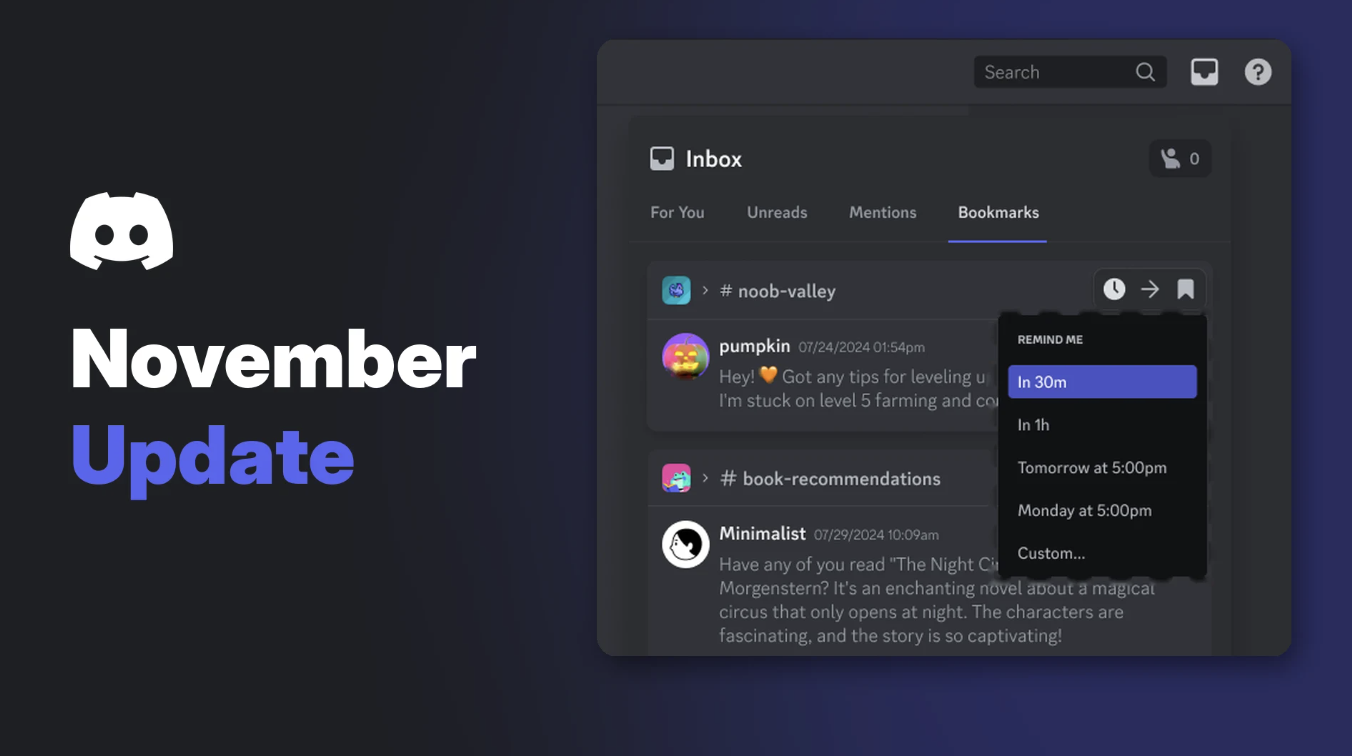
Bookmarks and reminders live in the message menu. Right-click a message on desktop, or long-press it on mobile, to bookmark it or set a reminder. Your saved messages appear in the Inbox on desktop and under Notifications on mobile.
Setting a reminder from the Bookmarks tab in Discord's Inbox. Image: Discord.
Discord's help centre says bookmarks are a Nitro feature, with a limit of 200 saved messages. We've written a full guide to Discord bookmarks and reminders with every step for desktop and mobile.
Favorites works the same way for channels. Right-click a channel or DM and choose Add to Favorites, and it appears in a Favorites section at the top of your server list. According to Discord's help centre, Favorites is currently a Nitro experiment on desktop and browser, and mobile can only view them.
The Favorites icon sits above your server list. Image: Discord.
✉️ Scheduled Messages
Discord's patch notes also list scheduled messages: use the + button in the chat bar to send a message later.
That's handy for server announcements across time zones, or a reminder that should land when your friends are awake. Discord hasn't published a help centre article on scheduled messages yet, so details like time limits and who gets it aren't confirmed.
If you post updates for a community, our guide to writing clean Discord announcements pairs well with this.
⚡ A Faster, Lighter Discord
Discord shared some real numbers this time.
| Change | What Discord reported |
|---|---|
| Desktop startup | Since April, typical (p50) startup is 530 ms faster and slow (p95) startup is 2.35 seconds faster on Windows, macOS and Linux |
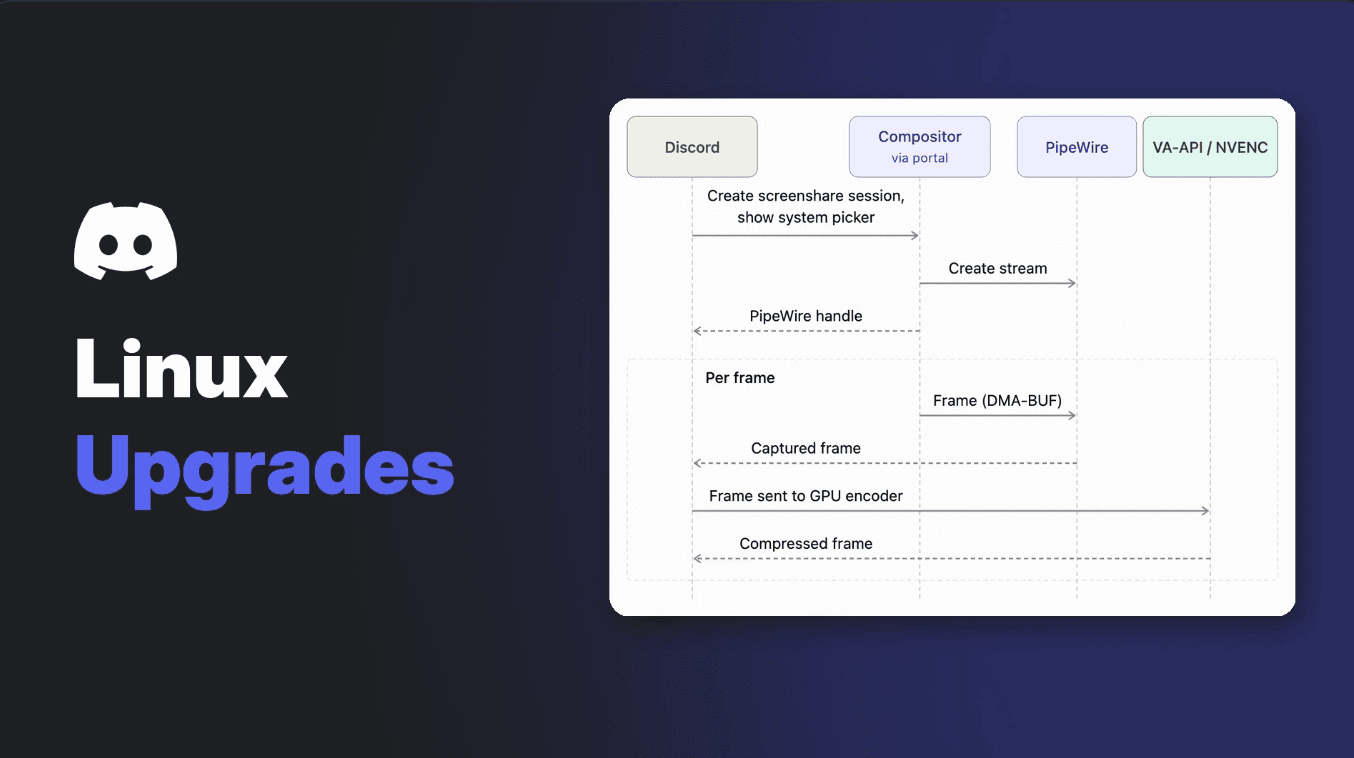
| Streaming | Fewer frame copies cut CPU use by 4.5% and memory by 0.5% (relative) |
| Mobile storage | Fixed files that weren't being cleaned up, returning "several GB" to the worst-affected users |
| Typing indicator | Rebuilt in CSS, trimming desktop CPU use by 1% (relative) |
| Animated GIFs | Making a still from a 300-frame GIF dropped from about 800 ms to about 15 ms in testing |
These are separate from the Rust rebuild Discord showed off last week. That new desktop app is still on its way, while these improvements apply to the current app.
🐧 Linux, GIFs and Privacy Fixes
A few smaller changes stand out:
- Linux Wayland: global shortcuts now work, so push-to-talk no longer needs workarounds.
- Favorited GIFs: since 2018, Discord re-processed them, making them about 1.6 times bigger on average and slightly worse looking. They're now served the way the GIF provider sends them.
- Image privacy: Discord now strips EXIF metadata, including location data, from more image formats.
- Android Photo Picker: Discord moved to Android's newer picker, so only the images you choose are shared.
- Letterboxd: you can now add it as an account connection.
🛠️ Better Tools for Server Owners on Mobile
Server admins get more done from their phones. The mobile app gains role icon uploads, AutoMod, Server Templates and Server Insights, matching desktop.
That's good news if you moderate on the go. If you're still setting up your filters, our AutoMod setup guide walks through the rules.
Other admin fixes include member lists that stopped rendering after the 100th member, and blocked AutoMod messages no longer counting against slowmode on iOS.
🐞 Small Fixes in the Discord November 2026 Update
- Invisible status: on desktop, you could appear Online or Idle if the mobile app was open in the background. Fixed.
- Hindi sign-ups: web users with Hindi selected were wrongly told they were too young to sign up. Fixed.
- Updates and voice: restarting Discord to finish an update now puts you back in your voice call.
- Group DMs on mobile: you can now leave quietly without notifying everyone, like on desktop.
- Longtime Nitro badges: Nitro Basic and Classic subscribers no longer show as new sign-ups.
Frequently Asked Questions
When did the Discord November 2026 update come out?
Discord published the patch notes on 9 November 2026. It says all fixes are merged but some may still be rolling out.
Are bookmarks free on Discord?
No. Discord's help centre says bookmarks are available for Nitro users, with up to 200 saved messages.
How do I schedule a message on Discord?
The patch notes say to use the + button in the chat bar. Discord hasn't published a full help article yet, so it may not be on your account.
Does push-to-talk work on Linux now?
Yes, on Wayland. Discord says global shortcuts now work, so push-to-talk no longer needs workarounds.
Is this the new Rust version of Discord?
No. The Discord November 2026 update improves the current app. The rebuilt Rust desktop app is a separate project that hasn't fully launched.
🎮 The Bottom Line
The Discord November 2026 update won't change how Discord looks, but it fixes a lot of how it feels. Bookmarks, reminders and Favorites make busy servers easier to follow, and faster startup helps everyone.
If you're on Linux or you're running low on phone storage, update today. Which change are you trying first?
Comments
Sign in to join the conversation
Sign inNo comments yet
Be the first to share your thoughts!