
You fire up a game, jump in a voice channel, and your frame rate dips. Is Discord the culprit? Sometimes, yes. That's why Discord Game Mode is one of the most interesting experiments Discord is running right now.
Game Mode is a new desktop setting that automatically dials Discord down while you play. It's still an early test, so you may not have it yet.
The good news: you don't have to wait. Below, we explain what Game Mode does and what it doesn't, then walk through 8 settings Discord itself recommends to make it lighter today.
At a glance - What: a desktop toggle that reduces Discord's CPU and GPU use while a game is running - How: it automatically reduces animations and turns off effects when it detects a game - Status: an early experiment, confirmed by Discord in late September 2026 - Doesn't mention: RAM (memory) use - Today's fix: turn off GIF autoplay, animated emoji and hardware acceleration, and tame the overlay
🎮 What Is Discord Game Mode?
Game Mode first appeared in the desktop app's settings as a toggle called Enable Game Mode, with the description "Reduce Discord's CPU and GPU usage while a game is running." It was spotted on 26 September 2026 by the feature-tracking account Discord Previews.
Two days later, Discord confirmed it on X, calling it "an early experiment that will begin rolling out next week." According to PC Gamer, Discord said Game Mode will "automatically reduce animations and disable effects when it detects a game being played."
So it's basically an automatic version of turning down Discord's eye candy whenever you launch a game.
🧠 What Game Mode Won't Fix
Game Mode talks about CPU and GPU, not memory. PC Gamer pointed out that the announcement says nothing about RAM, which it argues is the bigger concern.
A few other things to know:
- Discord is built on Chromium, which runs several processes at once. Discord says seeing lots of Discord processes in Task Manager "is normal."
- PC Gamer reports Discord added a feature in late 2025 that restarts the app if it uses more than 4GB of memory.
- Discord also said it's "aiming to add more resource-saving features over time."
In other words, Game Mode is a good start, not a complete fix.
⚙️ 8 Ways to Make Discord Lighter Right Now
These come straight from Discord's own lag troubleshooting advice, plus its overlay and accessibility settings.
1. Turn off GIF autoplay
User Settings > Accessibility > turn off Automatically play GIFs when Discord is focused. Busy chats full of GIFs stop animating unless you hover.
2. Turn off animated emoji
User Settings > Accessibility > turn off Play animated emoji.
3. Turn on Reduced Motion
User Settings > Accessibility > turn on Enable Reduced Motion. Discord says this limits "the amount and intensity of animations," including GIF avatars, which stop playing in chat until you click a profile.
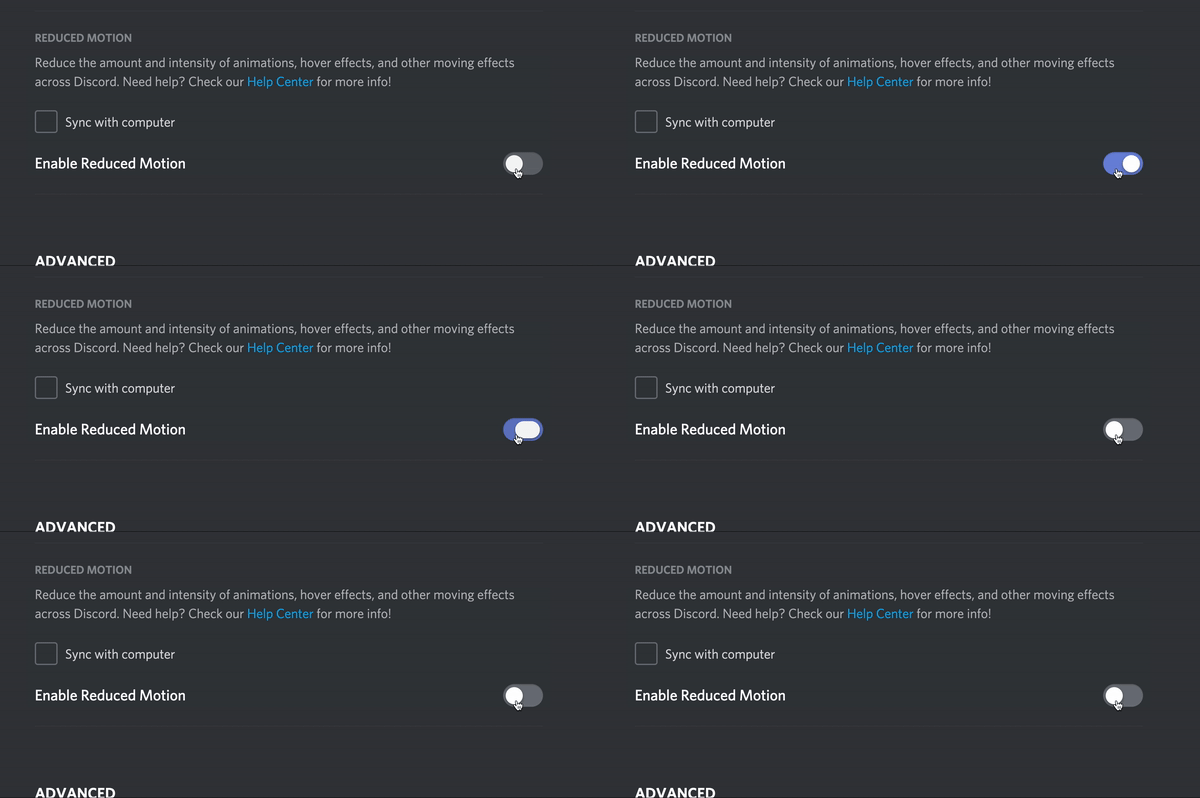
The Enable Reduced Motion toggle. Image: Discord.
It's an accessibility feature first, but it cuts back the same kind of animations Game Mode targets.
4. Turn off Display Name Styles
Fancy animated names add up in big servers. User Settings > Accessibility > turn off Display Name Styles to stop seeing them.
Most of these toggles live in the Accessibility tab. Image: Discord.
5. Try turning off Hardware Acceleration
User Settings > Advanced > turn off Hardware Acceleration. Discord lists this as a lag fix. It moves some work off your GPU, which can help in GPU-heavy games, but it can make Discord itself feel slower. Test it both ways.
6. Disable the overlay for problem games
Discord says: "If you experience lag, game crashes, or other issues while the Game Overlay is enabled, we recommend disabling the Game Overlay for that specific game." The overlay adds extra processes of its own, so turn it off where you don't need it.
7. Lower your stream quality when you Go Live
Streaming to friends while you play is heavy work. Select the three dots on your stream > Stream Quality, and pick a lower frame rate and resolution. Our Discord streaming guide covers more stream settings.
8. Keep Discord and your drivers updated
Discord's first lag tip is the simplest: update the Discord app, your operating system and your graphics drivers. If problems continue, try reinstalling Discord.
📋 Quick Settings Checklist
| Setting | Where | Change it to |
|---|---|---|
| Automatically play GIFs | Accessibility | Off |
| Play animated emoji | Accessibility | Off |
| Reduced Motion | Accessibility | On |
| Display Name Styles | Accessibility | Off |
| Hardware Acceleration | Advanced | Try off |
| Game Overlay | Overlay | Off for games that stutter |
| Stream Quality | Stream menu | Lower frame rate and resolution |
| App and drivers | Your PC | Up to date |
🔮 When Will Everyone Get Game Mode?
Discord hasn't announced a wide release date. It described Game Mode as an early experiment, so it may reach a small group first and change before it rolls out to everyone. If it appears for you, you'll find Enable Game Mode in your desktop settings.
Setting up a gaming community while you wait? Our guide to setting up a gaming Discord server covers channels, roles and voice setups.
Frequently Asked Questions
What is Discord Game Mode?
An experimental desktop setting that reduces Discord's CPU and GPU use while a game is running, by automatically reducing animations and effects.
How do I turn on Discord Game Mode?
If you're in the experiment, turn on Enable Game Mode in your desktop settings. It isn't available to everyone yet.
Does Discord Game Mode reduce RAM usage?
Discord hasn't said so. The announcement only mentions CPU and GPU.
Does Discord lower my FPS?
It can, especially with lots of animations, the overlay or Go Live running. The settings above help reduce its load.
Should I turn off Hardware Acceleration in Discord?
Discord lists it as a lag fix. Try it, and switch it back on if Discord itself feels slower.
🎮 The Bottom Line
Discord Game Mode is a welcome sign that Discord knows its app can get heavy while you play. Until it reaches everyone, a few minutes in your Accessibility, Advanced and Overlay settings can give you most of the same benefit today.
Have you noticed Discord slowing down your games, or does your PC barely notice it?
Sources
- PC Gamer: Discord's new resource-light Game Mode doesn't mention anything about reducing memory usage, 29 September 2026
- Dexerto: Discord testing new Game Mode feature to help your PC run better, 28 September 2026
- BigGo Finance: Discord to begin testing Game Mode, 29 September 2026
- Discord Help Center: What are the OS/system requirements for Discord?, updated 23 October 2026
- Discord Help Center: Reduced Motion Setting, updated 16 October 2026
- Discord Help Center: Game Overlay 101, updated 23 October 2026
- Discord Help Center: Why does Discord have multiple processes?, updated 19 October 2026

Comments
Sign in to join the conversation
Sign inNo comments yet
Be the first to share your thoughts!