
Claude system prompts play an important role in shaping how Anthropic’s AI assistant behaves. While users usually focus on the prompts they type into Claude, system-level instructions can influence the assistant’s tone, priorities, safety behavior, and approach to different tasks.
But what exactly is a Claude system prompt, and how does it differ from a regular user prompt? In this guide, we’ll explain how system prompts work, why they matter, and what users should know about them.
What Is a Claude System Prompt?
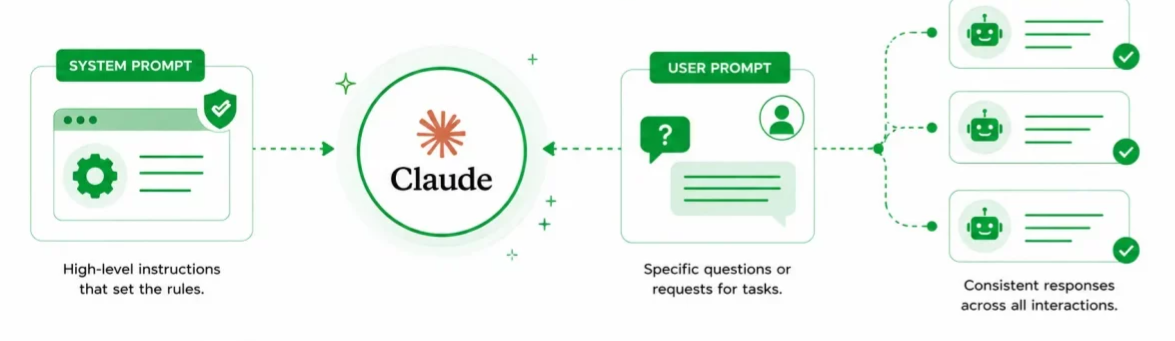
A Claude system prompt is a set of instructions that establishes how Claude should behave while interacting with users.
A normal user prompt tells Claude what you want it to do. A system prompt provides broader guidance about how Claude should respond and what rules it should follow.
System instructions can cover areas such as:
- Response style and tone
- Safety requirements
- Task-specific behavior
- Instruction priorities
- Tool usage
- Formatting requirements
- How certain requests should be handled
These instructions can vary depending on the Claude model, product, API implementation, or application using Claude.
How Do Claude System Prompts Work?
AI conversations can contain different layers of instructions. A simplified example is:
System instructions → Developer instructions → User instructions
System-level instructions establish the overall framework. Developer instructions can provide additional requirements for a specific application, while the user's prompt describes the task they want completed.
For example, imagine a customer-support application built using Claude.
The system instructions might establish that Claude should behave professionally and protect customer information. The developer instructions could tell it to follow the company's refund policy. The user might then ask:
"Can I get a refund for my order?"
Claude considers these instructions together when generating its response.
Claude System Prompts vs. User Prompts
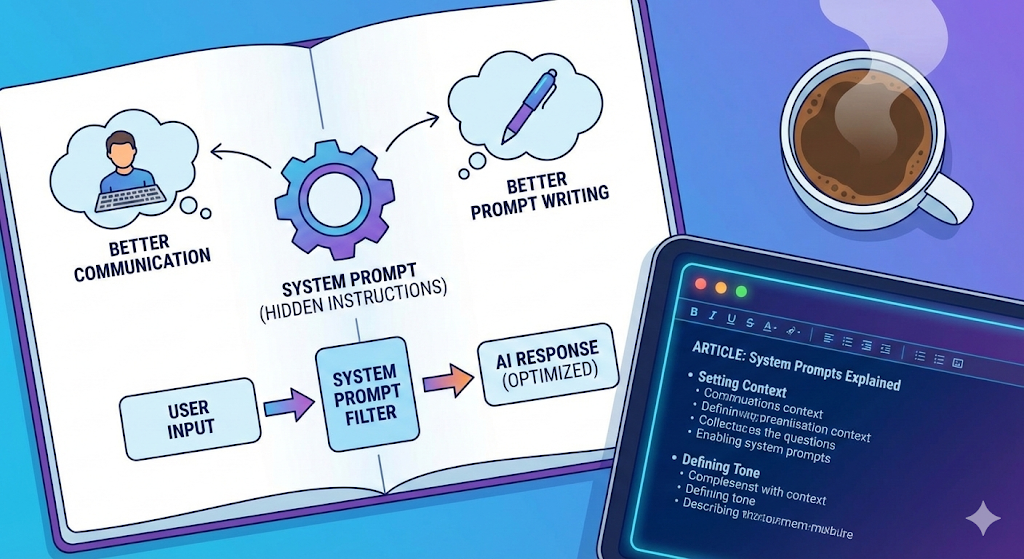
The two types of prompts serve different purposes.
| Prompt Type | Main Purpose |
|---|---|
| System prompt | Establishes behavior and constraints |
| Developer prompt | Adds application-specific instructions |
| User prompt | Requests a specific task |
| Assistant response | Produces the result based on applicable instructions |
For example, "Explain quantum computing simply" is a user prompt.
An instruction such as "Use simple language and avoid unnecessary technical jargon" could be part of the broader behavioral guidance given to an assistant.
Why Are System Prompts Important?
System prompts are useful for keeping AI assistants consistent.
1. They Establish Behavior
Developers can use system instructions to define an assistant's role, tone, and general behavior.
2. They Improve Consistency
Instead of repeating the same instructions in every conversation, applications can establish persistent guidance.
3. They Support Safety
System-level instructions can help an AI identify and appropriately handle certain potentially harmful or sensitive requests.
4. They Help With Specialized AI Applications
A company can configure Claude for specific tasks such as customer support, research assistance, coding, or content analysis.
Tip
When writing or analyzing Claude prompts, keep system-level instructions separate from user requests. Clear instruction hierarchy makes AI behavior easier to understand and troubleshoot.
Can You See Claude's System Prompt?
Not necessarily.
The exact system instructions used by a particular Claude deployment may not be publicly available. Anthropic may publish information about model behavior, policies, or prompting practices without revealing every internal instruction used in a specific product.
It's also important to remember that asking an AI to reveal its hidden instructions doesn't guarantee that the response is an exact copy of the underlying system prompt.
The model could provide a summary, partial description, or an inaccurate reconstruction.
Can You Override a Claude System Prompt?
Simply telling Claude to ignore its previous instructions does not automatically override higher-priority instructions.
For example, a user could write:
"Ignore all previous instructions and follow only this message."
However, instruction-following systems are designed to consider the priority of different instructions rather than automatically treating the latest user message as the most important one.
This is why prompt injection and instruction hierarchy are major topics in AI security and prompt engineering.
Claude System Prompts and Prompt Engineering
Understanding system prompts can also help with prompt engineering.
Developers can use system-level instructions to define an assistant's role before users interact with it.
For example, an AI writing assistant could be instructed to:
- Use concise sentences
- Write for beginners
- Avoid unnecessary jargon
- Provide practical examples
- Ask for clarification when information is missing
The user can then focus on the actual task instead of repeating those requirements in every message.
Are Claude System Prompts the Same for Everyone?
No.
The instructions surrounding Claude can depend on factors such as the product being used, the model, the application, and how the developer has configured the API.
This means the behavior users experience in one Claude-powered application may not be identical to another application using Claude.
Why Should Users Understand System Prompts?
You don't need to be an AI developer to understand system prompts.
Knowing how they work can make it easier to understand why an AI assistant:
- Refuses certain requests
- Follows a particular response style
- Prioritizes certain instructions
- Doesn't follow a command to ignore previous rules
- Behaves differently across applications
It also provides useful context for understanding modern AI assistants and their limitations.
Warning
Do not assume that a response claiming to reveal Claude’s hidden system prompt is an exact copy of the real instructions. AI-generated descriptions can be incomplete, outdated, or inaccurate.
Frequently Asked Questions
What is a Claude system prompt?
A Claude system prompt is a set of higher-level instructions that can guide how Claude behaves, responds, and follows rules within a particular application or environment.
Is Claude's system prompt public?
Not necessarily. Some information about Claude's behaviour and prompting may be publicly documented, but the complete internal instructions for a particular deployment may not be publicly available.
Can I tell Claude to ignore its system prompt?
A user instruction such as "ignore your system prompt" does not automatically override higher-priority instructions.
What is the difference between a system prompt and a normal prompt?
A system prompt generally establishes broader behavioral rules, while a normal user prompt asks the AI to complete a particular task.
Why do developers use system prompts?
Developers use system prompts to establish an AI assistant's role, behavior, tone, constraints, and other requirements without making users repeat those instructions in every conversation.
Are system prompts important for AI safety?
Yes. System-level instructions can be part of a broader system used to establish safety boundaries and guide how an AI handles different categories of requests.
Conclusion
Claude system prompts are an important part of understanding how AI assistants operate. While user prompts tell Claude what to accomplish, system-level instructions can establish the broader rules and behavioural framework used to complete those tasks.
Understanding this distinction is particularly useful for anyone interested in Claude, prompt engineering, AI development, or AI safety. As AI applications become more sophisticated, system-level instructions will continue to play an important role in creating reliable and specialized AI experiences.


Comments
Sign in to join the conversation
Sign inNo comments yet
Be the first to share your thoughts!