
Discord's New Live Translation Meta: How JotMe and Extensions Bridge Global Servers
Imagine joining a Discord voice channel for the first time. Your teammates are Japanese, German and Spanish speakers. Everyone is excited to play, but the moment the match begins, communication falls apart. You understand the game, recognize the callouts and know what needs to happen next. You simply cannot understand what your teammates are saying.
For international gaming communities, that language barrier has always been a frustrating limitation.
Discord live translation is becoming a practical workaround, thanks to third-party AI tools that can turn spoken conversations into translated captions and, in some cases, synthesized speech. Apps such as JotMe are bringing these capabilities to Discord voice channels without requiring every community to build its own translation bot.
The possibilities extend beyond gaming. International VR groups, creator communities, language-learning servers and remote teams can all benefit from conversations that are no longer limited to a shared language.
There is an important distinction, though: this is not a newly announced, universal native Discord feature. The emerging approach relies on external desktop applications and translation tools working alongside Discord.
That distinction matters because compatibility, latency, privacy and translation quality all affect whether these tools are genuinely useful.
────────────────────────────────────────

────────────────────────────────────────
Discord's Voice Chat Has a Translation Gap
Discord has spent years making voice communication central to online communities. Friends can join a channel, start a game and talk without interrupting the experience to type messages.
But voice introduces a problem that text chat does not have.
Written messages can be copied into a translator. A multilingual text channel can use translation bots to make conversations easier to follow. Spoken communication is more complicated because the system must recognize speech, interpret the meaning, translate it and deliver the result quickly enough to remain useful.
A translation that arrives ten seconds after someone calls out an enemy position is not much help in a competitive match.
The challenge becomes even greater when people interrupt each other, use slang, speak over background noise or rely on abbreviations familiar only to their gaming group.
Discord's native voice features do not amount to a universal, built-in system that translates every participant's speech into every other participant's language. Instead, third-party applications are filling that gap.
JotMe, for example, advertises live translation for Discord voice channels and calls, with translated captions and AI-generated speech options. Its product page lists support for more than 200 languages, although the practical experience can vary with the language pair, audio quality and conversation. JotMe's official Discord translation guide
This is a significant change in how international servers can operate. The conversation can remain in voice, rather than forcing everyone to switch back to text whenever someone does not understand a teammate.
────────────────────────────────────────
How JotMe Works With Discord
JotMe's Discord translation setup uses a desktop application that runs alongside Discord.
According to its documentation, the app can listen to the computer's audio and microphone input, translate the conversation and display the results. It does not need to join the voice channel as a conventional Discord bot.
That makes the setup different from a typical translation bot that reads text messages and posts translated versions into a channel.
The general workflow is straightforward:
Download and open the desktop app.
Grant the required microphone and system-audio permissions.
Select the language being spoken and the language you want to understand.
Start the live translation session.
Read the translated captions or use supported translated-speech features.
For multilingual channels, the tool also advertises automatic language detection and context-aware translation.
That context matters. A literal translation of a gaming phrase may be technically understandable but still confusing if the software does not recognize the game's terminology.
JotMe also offers a custom vocabulary feature for specialized terms, which can be useful for communities with recurring character names, technical vocabulary or team-specific expressions.
These are product capabilities advertised by JotMe, not guarantees that every sentence will be translated correctly. Always test the language pairs and setup you plan to use.
Official setup guide: JotMe for Discord
────────────────────────────────────────
────────────────────────────────────────
Live Captions vs AI-Generated Speech
Not all translation tools deliver the same experience.
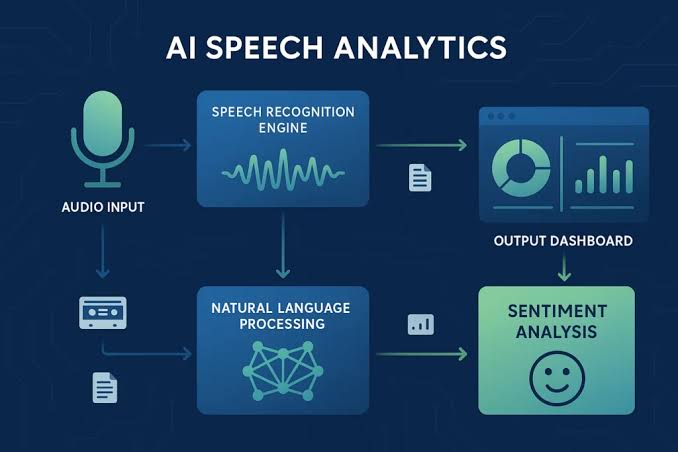
Some convert speech into translated text. Others also generate spoken output in the target language.
The difference can determine whether a tool works for a particular community.
| Feature | Live translated captions | AI-generated translated speech |
|---|---|---|
| How it works | Displays translated text | Produces spoken translated audio |
| Best use | Meetings, slower games and discussions | Hands-free communication and immersive play |
| Main advantage | Easy to check or reread | Keeps attention on the game or activity |
| Main limitation | Requires reading while listening | Can introduce latency or sound unnatural |
| Best environment | Community discussions and planning | Coordinated gameplay and social VR |
JotMe advertises both live captions and voice-to-voice translation options, including a feature that can produce translated speech using a cloned version of the speaker's voice. Availability and behavior depend on the selected mode and current product support. JotMe's feature overview
That last feature is particularly interesting, but it deserves careful consideration. Voice cloning should be used transparently and with appropriate consent. A translated voice should not be presented as proof that someone literally spoke those words in that language.
For a casual international gaming group, captions might be sufficient. A VR group trying to coordinate movement or a competitive team making fast decisions may prefer spoken translation if its latency is low enough.
Neither approach is perfect. The right choice depends on how quickly the conversation moves and how much attention members can spare.
────────────────────────────────────────
Why Global Gaming Communities Need This
Gaming already connects people who might never meet in person.
A player in India can join a Japanese fighting-game community. A European Minecraft builder can collaborate with an American creator. A competitive team can recruit talented players from several countries.
But joining the same server does not automatically mean everyone can participate equally.
Language barriers can keep members from contributing to strategy discussions, joining voice events or building friendships beyond their existing language group.
Live translation can reduce some of that friction.
Competitive gaming
In team-based shooters, MOBAs and tactical games, voice communication is essential. Translated callouts could help international teammates understand plans, warnings and role assignments.
However, competitive players should test latency before relying on translation for time-sensitive decisions. A tool that works during a strategy discussion may be too slow for a split-second engagement.
Cooperative games
Co-op games often give players more time to explain objectives, share discoveries and solve puzzles. This can make them a better starting point for multilingual voice translation.
Community events
International servers can host discussions, tournaments, creator Q&As and community gatherings without requiring every participant to use the same language.
Language learning
Members can listen to a language they are learning while using translated captions to follow the conversation. This can provide helpful context, although AI translations should not be treated as a substitute for learning pronunciation, grammar or cultural nuance.
The broader opportunity is simple: people can begin participating based on their interests rather than being excluded immediately by language.
────────────────────────────────────────
────────────────────────────────────────
The VR Opportunity: Translation Without Breaking Immersion
Virtual reality creates an even more interesting use case.
In a traditional text channel, a player can stop, read a message and reply. In social VR, the appeal is often the feeling of being physically present with other people.
You might be exploring a virtual world, building a shared environment or attending a community event. Switching between a headset experience and a separate translation window can interrupt that feeling of presence.
Live translated speech could help international VR groups communicate more naturally.
Imagine a virtual meetup where someone explains how to build an object, another member asks a question in a different language and the group continues without stopping to translate every sentence manually.
The same principle could help social VR gaming, collaborative design sessions and virtual events.
There are limitations, though.
A desktop translation app does not automatically guarantee that captions will appear inside a VR headset. Compatibility depends on the VR platform, the computer's audio routing, the translation application's output and the way the headset handles windows or overlays.
Before planning an entire event around a translation tool, test it with the specific headset, game and operating system your members use.
Also test microphone routing carefully. If the tool captures the wrong audio device, it may hear your own microphone but miss other participants, or capture the game audio without recognizing the conversation correctly.
VR communities should treat live translation as an accessibility and communication layer that needs testing, not as a feature that will work identically across every headset.
────────────────────────────────────────
Are Browser Extensions Enough?
Browser extensions can make translation easier, but the distinction between translating text and translating voice is crucial.
A browser extension may translate a webpage, a chat message or captions displayed in a browser. That does not necessarily mean it can capture the audio of a Discord desktop call and translate every participant's speech.
JotMe's own product documentation makes this distinction clear: its Chrome extension is designed for Google Meet, while Discord voice translation is supported through its desktop application. JotMe's platform overview
That is why choosing a tool based on the phrase "Discord translator" alone can lead to disappointment.
Before installing anything, check four things:
Does it translate voice, or only written messages?
Does it support the Discord desktop app, browser version or both?
Can it capture other participants' audio as well as your microphone?
Does it provide captions, synthesized speech or both?
A text-translation bot can be useful for international server discussions. A desktop voice translator serves a different purpose.
Neither replaces the other completely.
For many communities, the best setup will combine translated text channels with optional live voice translation during events and gaming sessions.
────────────────────────────────────────

────────────────────────────────────────
The Latency Problem Nobody Should Ignore
Translation accuracy gets most of the attention, but speed can be just as important.
A translation system typically has to recognize speech, determine the meaning, generate the translation and deliver text or audio to the listener.
Every stage can add delay.
In a casual conversation, a short pause may be acceptable. In a fast-paced multiplayer match, that same delay could make a callout arrive too late.
There are also situations where translation becomes harder:
Several people speak at once.
A microphone picks up game audio.
Teammates use slang or abbreviations.
A speaker changes languages mid-sentence.
Background noise masks important words.
A game uses fictional names or specialized terminology.
Context-aware models and custom dictionaries can help, but they cannot eliminate every error.
For this reason, communities should begin with low-risk use cases, such as social voice channels, cooperative games or planned events. Once members understand the system's limitations, they can decide whether it is reliable enough for competitive play.
A sensible rule is to keep critical callouts short and confirm important instructions when the translation is ambiguous.
────────────────────────────────────────
Privacy, Consent and Discord's Encryption
There is one issue that should be part of every serious discussion about live translation: privacy.
Discord announced in May 2026 that end-to-end encryption had become standard for its voice and video calls, with Stage channels identified as an exception. The protection applies to communication between supported Discord clients, but it does not prevent software running on a participant's own device from accessing audio that the device can play or record. Discord's official encryption announcement
That distinction is important when using a third-party translation app.
If an application captures system audio, it may process conversation audio outside Discord's own client. The precise handling depends on the app's design and privacy terms. Do not assume that Discord's encryption automatically extends to every external tool you run alongside it.
Before enabling live translation:
Read the provider's current privacy policy and data-retention terms.
Check whether audio is processed locally or sent to external servers.
Understand whether transcripts or translations are saved.
Review any voice-cloning features before enabling them.
Tell other participants when a tool will capture or process their conversation, and obtain consent where appropriate.
Avoid using unapproved translation tools for sensitive discussions.
This is especially important in private communities, work-related servers and VR groups where participants may not expect their voices to be processed by a separate service.
Convenience should not come at the expense of informed consent.
────────────────────────────────────────
What This Means for Discord Server Owners
Community owners do not need to make translation mandatory for everyone.
A more practical approach is to offer it as an optional accessibility layer.
For example, an international gaming server could:
Maintain dedicated language-specific text channels.
Publish important announcements in multiple languages.
Test live translation during selected voice events.
Create a guide explaining how members can configure their own translation tools.
Ask participants which languages and features they need.
Establish clear consent and privacy expectations before using audio-processing software.
This approach avoids turning one tool into a requirement for joining the community.
It also recognizes that members have different devices, budgets, accessibility needs and privacy preferences.
A desktop translation application might work well for one player but be unsuitable for someone using a console or a mobile device. An optional system gives members room to choose the setup that works for them.
────────────────────────────────────────
How to Test Live Translation Before a Big Event
A short test can reveal problems that are difficult to predict from a product page.
Step 1: Choose Two Languages
Pick a language pair commonly used by your community. Confirm that the tool supports both directions you need.
Step 2: Test the Audio
Have one person speak through Discord while another listens. Confirm that the application captures the remote participant's voice, not just your own microphone.
Step 3: Try Normal Conversation
Use natural speech, common slang and complete sentences. Do not evaluate translation quality only with carefully spoken demonstration phrases.
Step 4: Test Gaming Callouts
Try a cooperative game and observe whether translated instructions arrive quickly enough to be useful.
Step 5: Test VR or Headset Routing
If your members use VR, check that the game, headset microphone and translation output can operate together without feedback or missing audio.
Step 6: Review Privacy Settings
Before a larger session, explain what the tool captures and how the provider handles the data.
Step 7: Collect Feedback
Ask participants whether captions were readable, translations were understandable and delays affected the experience.
A tool that performs well in a quiet one-on-one conversation may behave differently in a busy voice channel.
────────────────────────────────────────
The Future of Global Discord Communities
Live translation will not remove every language barrier.
Humor, cultural references, accents and context remain difficult. Some translations will be inaccurate, and generated speech may sound unnatural or arrive too late for competitive play.
Still, the direction is promising.
The combination of speech recognition, multilingual language models and generated speech is making it increasingly practical for people to communicate without sharing a first language.
For Discord communities, that creates opportunities to recruit internationally, host more accessible events and help members build friendships across language boundaries.
For VR communities, it could make shared virtual spaces feel more welcoming to people who would otherwise stay silent.
And for gaming squads, it could turn a frustrating language mismatch into a manageable technical problem.
The key is to treat these tools as support for human communication, not a replacement for it.
────────────────────────────────────────
FAQ
Does Discord have built-in live voice translation?
Discord does not currently provide a universal native feature that translates every participant's spoken language into another language across all voice channels. Third-party applications such as JotMe offer voice translation alongside Discord.
Can JotMe translate Discord voice chats in real time?
JotMe advertises live translation for Discord voice channels and calls, including translated captions and supported AI-generated speech options. Actual performance depends on the language pair, audio quality, setup and selected mode.
Do I need a Discord translation bot?
Not necessarily. JotMe says its desktop app can work alongside Discord without joining the voice channel as a bot. Text-translation bots and voice-translation applications perform different jobs.
Does the JotMe Chrome extension work with Discord voice chat?
JotMe's published product information identifies its Chrome extension as a Google Meet option and its desktop app as the option for Discord voice translation. Check current platform support before installing.
Can live translation work in VR?
Potentially, depending on the VR platform, computer audio routing, headset and translation software. Test the complete setup before relying on it for a live event.
Is AI-generated translated speech always accurate?
No. Background noise, overlapping speakers, slang, specialized terminology and latency can all affect results. Confirm critical information when accuracy matters.
Is using a live translation app private on Discord?
Privacy depends on the specific application and its audio-processing practices. Discord's end-to-end encryption does not automatically guarantee that external software running on your device handles captured audio in the same way. Review the provider's privacy policy and obtain appropriate consent.
Can translation tools help international gaming communities grow?
They can reduce communication barriers and make some activities more accessible to international members. However, successful communities still need good moderation, clear onboarding, engaging events and a welcoming culture.
────────────────────────────────────────
Final Take
The next stage of Discord community growth may be less about adding more text channels and more about making voice communication accessible to more people.
Tools such as JotMe are demonstrating how third-party AI translation can bring live captions and generated speech into Discord workflows. For international gaming squads, social VR groups and multilingual communities, that opens up new ways to communicate without requiring everyone to speak the same language.
But the technology is not magic. Latency, translation errors, device compatibility and privacy remain real considerations. Server owners should test tools carefully and make their use transparent.
The opportunity is still substantial.
When language becomes less of a barrier, a Discord server can draw on a wider pool of players, creators and community members. The result is not just easier communication. It is the possibility of building communities that are genuinely global.
────────────────────────────────────────
SOURCE NOTES
JotMe: Discord Translation
https://www.jotme.io/discord/translationJotMe: Live Translation Documentation
https://docs.jotme.io/product/desktop/live-translationJotMe: Using Live Translation With Online Meetings
https://docs.jotme.io/product/desktop/live-translation/zoom-teams-meetDiscord: End-to-End Encryption for Voice and Video Calls
https://discord.com/blog/every-voice-and-video-call-on-discord-is-now-end-to-end-encrypted
────────────────────────────────────────

Comments
Sign in to join the conversation
Sign inNo comments yet
Be the first to share your thoughts!