
Custom Server Badges vs. Official Profile Badges: What You Can Create and What Only Discord Controls
Anyone can draw a badge. Only Discord can give you one.
Community artists make icons and graphics for server roles and events every day. But the badges that sit on a Discord profile come from Discord’s own programs.
This guide explains the difference between custom server badges and official profile badges, so server owners, designers and members know what each one is and what it is not.
🔥 Main Story: Discord Controls Official Profile Badges
Discord’s Profile Badges 101 article, last updated July 31, 2026, lists every profile badge and how each is earned. It also states that profile badges are non transferable and cannot be moved to another account.
Each badge ties to something Discord runs. That includes a Nitro subscription, Server Boosting, completing a Quest, buying a badge with Orbs, and Discord’s own programs.
The key fact: a server cannot add to that list. A designer can draw anything, but only Discord decides what appears as an official badge.
🎮 How the Two Worlds Differ
Official badges describe your history with Discord. The Server Booster badge, for example, represents a user who supports servers through Boosting and evolves the longer the streak lasts.
Custom server graphics describe your place in one community. They live inside a server, such as a role icon next to a moderator’s name or a poster for an upcoming event.
🧭 Navigation: Main Story → How the Two Worlds Differ → Why It Matters → Key Details → Deeper Breakdown → Comparison → Creator Note → What Happens Next
🎨 Who controls what: 🏛️ Discord → Official profile badges → 🛠️ Server admins → Role icons and tags → 🖌️ Community artists → Graphics and event art
🧠 Why It Matters
Badges build trust. When you see an official badge, you know Discord issued it through a real program.
Custom graphics can blur that line if they copy the look of official badges. Keeping the two clearly separate protects members and keeps your server honest.
⚠️ Important: A role icon or server graphic is not an official badge, even if it looks similar. Discord can also retire badges entirely, as it did with the Active Developer badge.
⚡ Key Details
| Detail | Information |
|---|---|
| Official badges | Controlled by Discord |
| Transferable | No, per Discord |
| Examples | Nitro, Server Booster, Quests, Orbs, Bug Hunter, Staff |
| Custom role icons | Server owners can upload images |
| Role icon requirement | Level 2 Server Boosting, per Discord’s FAQ |
| Server tag | 4 characters plus an icon, 3 Boosts to unlock |
| Event graphics | Ordinary images, not a Discord badge feature |
🔍 Deeper Breakdown
What Official Profile Badges Are
Discord’s article groups badges into common, rare, mythic and legacy. The common ones include the Nitro badge, the Server Booster badge, the Quests badge, the Orbs badge and the Legacy Username badge.
The Bug Hunter badge belongs to people active in the Discord Testers community. The Staff badge is for people who work at Discord.
Several legacy badges can no longer be obtained, including HypeSquad Events and Partnered Server Owner. Discord’s Active Developer badge notice shows the company can retire a badge and remove it from profiles.
What Communities Can Create
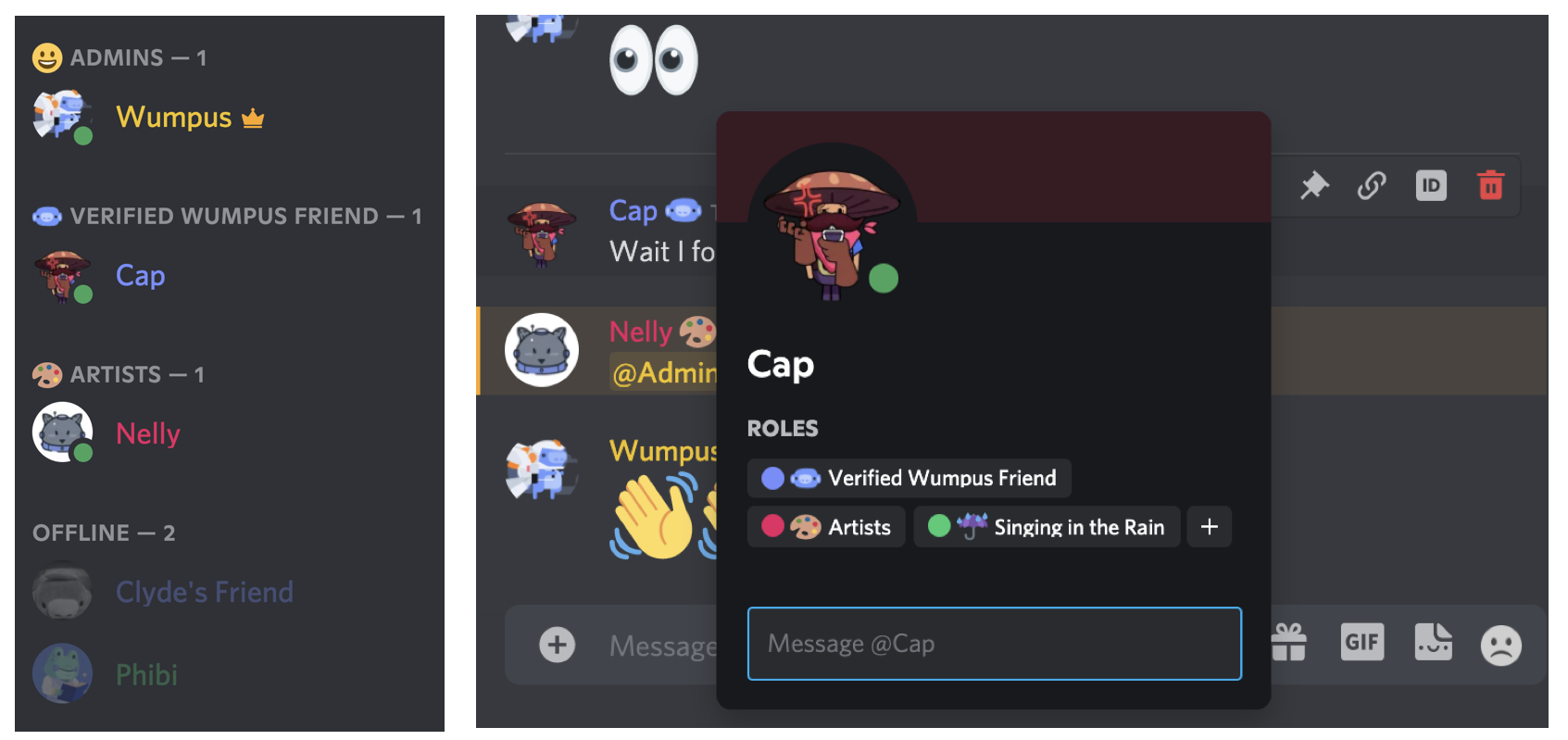
Role icons are the clearest creative opening. Per Discord’s Custom Role Icons FAQ, they are a Level 2 Server Boosting perk, and each role can use an emoji or an uploaded image.
The same FAQ says icons must be static. Discord only shows one icon in the members list and chat, but you can see all of a user’s role icons by opening their profile.
If your server loses Level 2, uploaded icons stay saved but stop displaying until the level returns. That is worth knowing before you commission a full set.
Server Tags Are Different
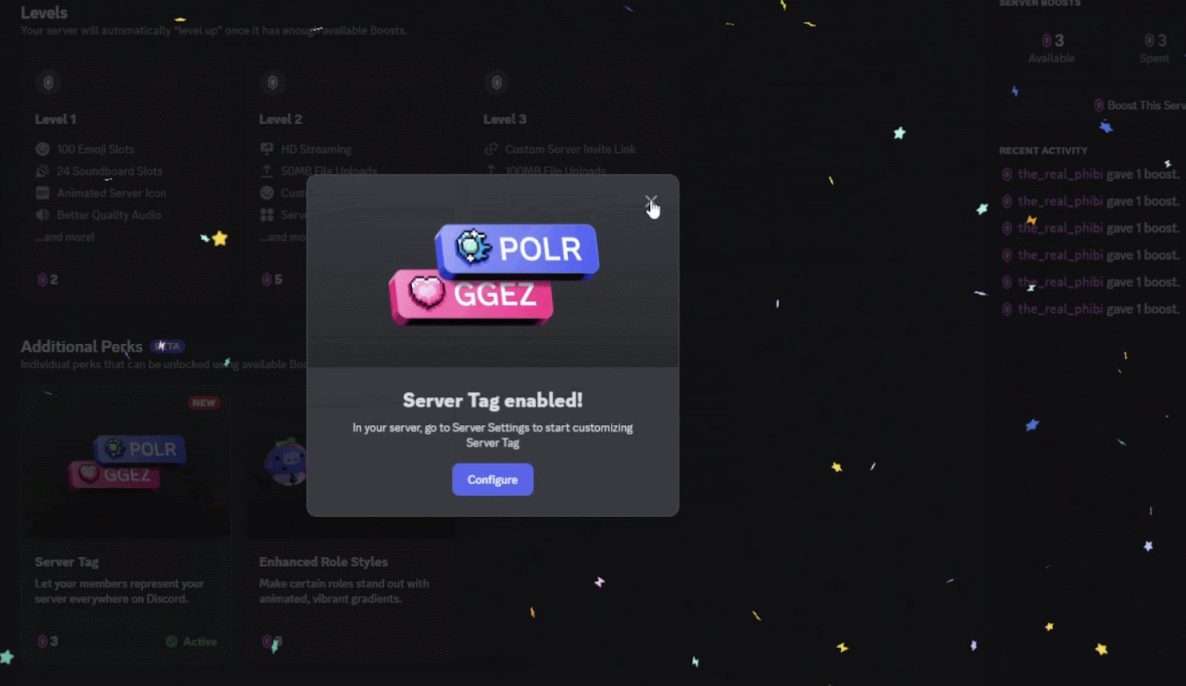
A Server Tag is a 4 character label paired with an icon that members can show on their profiles. Server owners or admins can unlock it with 3 Boosts.
The icon is chosen from badges Discord offers, including optional badge packs that cost more Boosts. Only one badge can be applied to a tag at a time, so a designer cannot upload custom art there.
Members can display one tag at a time, and the tag color is set by the server, not the member.
Event Graphics
Event posters, announcement banners and countdown images are normal images. A designer can make them as bold as they like, and you can post them wherever your server allows.
Discord does not treat these as badges, so they never join the official row on someone’s profile.
💡 Note: If you hire a designer, ask for static PNG files. One design vendor’s role icon packs use transparent 64 by 64 PNGs, but check your own server’s requirements.
What We Know
- Confirmed: profile badges are controlled by Discord and are non transferable, role icons need Level 2 Boosting, and server tag badges come from Discord’s options.
- Reported: one third party guide says the Staff badge helps tell real employees from imposters.
- Not confirmed: whether Discord will ever let servers upload custom art for tag badges.
What Could Happen Next
This section is speculation. Discord could add more badge packs for server tags, since it already sells several.
It could also introduce new official badges tied to programs. Nothing like that has been announced beyond what the help articles describe.
📊 Quick Comparison
| Feature | Official badge | Role icon | Server tag badge | Event graphic |
|---|---|---|---|---|
| Who controls it | Discord | Server admins | Server admins, Discord’s options | Anyone |
| Custom art | No | Yes, static image | No | Yes |
| Requirement | Discord program or purchase | Level 2 Boosting | 3 Boosts | None |
| Where it shows | Profile | Member list, chat, profile | Next to your name | Where you post it |
💡 Creator Note
For designers, server owners and community managers, the opportunity is real, but it works best with honest labels. Here are a few ideas.
- Offer a role icon pack for staff, boosters and event winners.
- Keep your icon designs clearly different from official badges.
- Check your server’s Boost level before ordering artwork.
- Read our full guide to current Discord badges before you name anything a badge.
🚨 What Happens Next
- Watch Discord’s help articles for new badge programs.
- Watch for new badge packs for server tags.
- Watch your server’s Boost count so your perks stay active.
- Review your custom graphics for anything that mimics official badges.
Design the graphic → Check the requirement → Upload or post → Keep it clearly custom
Final Takeaway
The line is simple once you see it. Discord owns the badge system, and servers own their own look.
That split is a good thing. It keeps official badges meaningful while giving communities room to be creative with role icons, event art and tags.
The best custom graphic is the one that is clearly yours and never pretends to be Discord’s.
🔗 Sources
- Profile Badges 101, Discord Help Center: Discord’s official list of profile badges and how each is earned.
- Server Tags, Discord Help Center: How server tags, icons, badge packs and Boost costs work.
- Custom Role Icons FAQ: Discord’s guide to uploading role icons and the Level 2 requirement.
- Active Developer Badge, Discord Developer Help Center: Discord’s notice that the badge was removed.
Comments
Sign in to join the conversation
Sign inNo comments yet
Be the first to share your thoughts!